Unlock a world of possibilities! Login now and discover the exclusive benefits awaiting you.

- Qlik Community
- :
- All Forums
- :
- QlikView App Dev
- :
- Re: Automate reload QVW password
- Subscribe to RSS Feed
- Mark Topic as New
- Mark Topic as Read
- Float this Topic for Current User
- Bookmark
- Subscribe
- Mute
- Printer Friendly Page

- Mark as New
- Bookmark
- Subscribe
- Mute
- Subscribe to RSS Feed
- Permalink
- Report Inappropriate Content
Automate reload QVW password
I have the follwoing script to reload QVW
"C:\Program Files\QlikView\qv.exe" /r C:\ProgramData\QlikTech\Documents\Vente- Test.qvw


EXIT
I have added to the QVW file a section access .
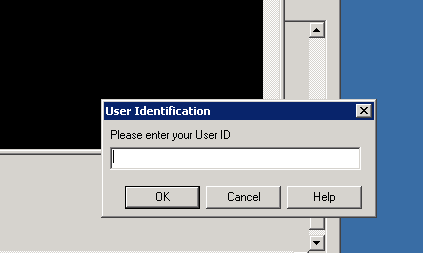
Now I got the following interface
How could I save the pasword in the batch file ?
- Tags:
- new_to_qlikview
Accepted Solutions

 Peter_Cammaert
- Mark as New
- Bookmark
- Subscribe
- Mute
- Subscribe to RSS Feed
- Permalink
- Report Inappropriate Content
If you added Section Access to this QVW, you should know that besides USERID/PASSWORD authentication SA also allows you to use Windows AD user accounts to grant access to this document. SingleSign-On propagates the current AD credentials to SectionAccess, so if the reload is happening as a Windows ADMIN user that is listed in the SA table, you will not be asked a password.
Note that you can mix NTNAME section access with USERID/PASSWORD section access in the same SA table.

 swuehl
- Mark as New
- Bookmark
- Subscribe
- Mute
- Subscribe to RSS Feed
- Permalink
- Report Inappropriate Content
I believe the recommended solution should be either to use an appropriate NTNAME user account or the SERIAL number of the installation you are running the batch, i.e. adding these to the section access table.
- Mark as New
- Bookmark
- Subscribe
- Mute
- Subscribe to RSS Feed
- Permalink
- Report Inappropriate Content
I didn't undestand .Could you explain me more ?
- Mark as New
- Bookmark
- Subscribe
- Mute
- Subscribe to RSS Feed
- Permalink
- Report Inappropriate Content
Peter_Cammaert
- Mark as New
- Bookmark
- Subscribe
- Mute
- Subscribe to RSS Feed
- Permalink
- Report Inappropriate Content
If you added Section Access to this QVW, you should know that besides USERID/PASSWORD authentication SA also allows you to use Windows AD user accounts to grant access to this document. SingleSign-On propagates the current AD credentials to SectionAccess, so if the reload is happening as a Windows ADMIN user that is listed in the SA table, you will not be asked a password.
Note that you can mix NTNAME section access with USERID/PASSWORD section access in the same SA table.