Unlock a world of possibilities! Login now and discover the exclusive benefits awaiting you.

- Qlik Community
- :
- All Forums
- :
- QlikView App Dev
- :
- Average calculation
- Subscribe to RSS Feed
- Mark Topic as New
- Mark Topic as Read
- Float this Topic for Current User
- Bookmark
- Subscribe
- Mute
- Printer Friendly Page

 asknyldz
- Mark as New
- Bookmark
- Subscribe
- Mute
- Subscribe to RSS Feed
- Permalink
- Report Inappropriate Content
Average calculation
Hi there,
How can i calculate below table average by Segment.
It is must be,
| Commercial | 1.50 |
| Middle Market | 2.00 |
| Risk Management | 1.50 |
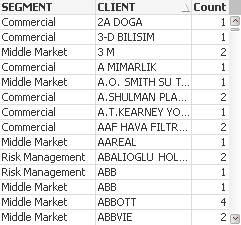
This is my Expressions and table
count(distinct if(AMOUNT>0 AND TYPE='ACTUAL', SPECIALTY))
Accepted Solutions

 devarasu07
- Mark as New
- Bookmark
- Subscribe
- Mute
- Subscribe to RSS Feed
- Permalink
- Report Inappropriate Content
Hi,
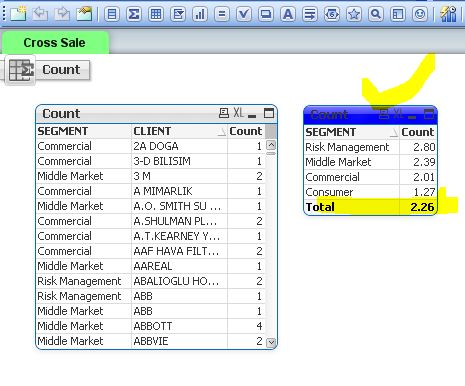
just add your client dimension
=Avg(Aggr(Count({<AMOUNT = {">0"}, TYPE = {'ACTUAL'}>}distinct SPECIALTY), SEGMENT,CLIENT))
for the total just enable total check box on your straight table --> dimension limit tab section.
devarasu07
- Mark as New
- Bookmark
- Subscribe
- Mute
- Subscribe to RSS Feed
- Permalink
- Report Inappropriate Content
Hi,
Can u try like below,
=Avg(aggr(count(distinct if(AMOUNT>0 AND TYPE='ACTUAL', SPECIALTY)),SEGMENT))
or try other way simplified using set analysis method
=Avg(Aggr (count({$<AMOUNT={">0"}, TYPE={'ACTUAL'}>} distinct SPECIALTY),SEGMENT))
if still have a issue, share the mock data. thanks
also check this Hic article,

 jonathandienst
- Mark as New
- Bookmark
- Subscribe
- Mute
- Subscribe to RSS Feed
- Permalink
- Report Inappropriate Content
Looks correct, but probably more efficient to use
=Avg(Aggr(Count({<AMOUNT = {">0"}, TYPE = {'ACTUAL'}>}distinct SPECIALTY), SEGMENT))

 big_dreams
- Mark as New
- Bookmark
- Subscribe
- Mute
- Subscribe to RSS Feed
- Permalink
- Report Inappropriate Content
can you provide sample data???
Regards,
devarasu07
- Mark as New
- Bookmark
- Subscribe
- Mute
- Subscribe to RSS Feed
- Permalink
- Report Inappropriate Content
Hi,
can your share your mock data in excel format? that would be easy for us to check and help you 
devarasu07
- Mark as New
- Bookmark
- Subscribe
- Mute
- Subscribe to RSS Feed
- Permalink
- Report Inappropriate Content
Hi,
just add your client dimension
=Avg(Aggr(Count({<AMOUNT = {">0"}, TYPE = {'ACTUAL'}>}distinct SPECIALTY), SEGMENT,CLIENT))
for the total just enable total check box on your straight table --> dimension limit tab section.
asknyldz
- Mark as New
- Bookmark
- Subscribe
- Mute
- Subscribe to RSS Feed
- Permalink
- Report Inappropriate Content
Thanks Devarasu
