Unlock a world of possibilities! Login now and discover the exclusive benefits awaiting you.

- Qlik Community
- :
- All Forums
- :
- QlikView App Dev
- :
- Re: Bar Chart Dimension Issue
- Subscribe to RSS Feed
- Mark Topic as New
- Mark Topic as Read
- Float this Topic for Current User
- Bookmark
- Subscribe
- Mute
- Printer Friendly Page

- Mark as New
- Bookmark
- Subscribe
- Mute
- Subscribe to RSS Feed
- Permalink
- Report Inappropriate Content
Bar Chart Dimension Issue
Hello,
I am a beginner on QlikView, and i would to create a chart which shows the result of the 12 last "MaJ" from the "Maj" Selected (1 year period from the Maj selected) :
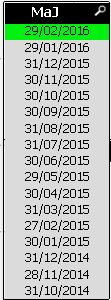
However my chart shows just the result of the MaJ selected:
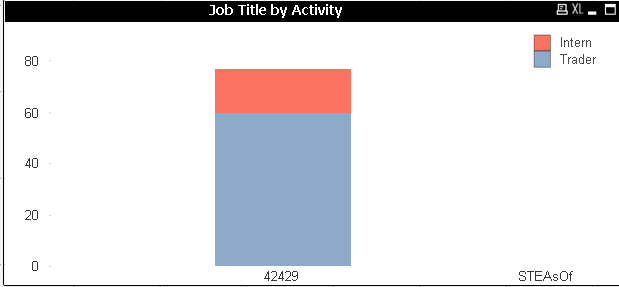
(Here "STEASoF" = "MaJ")
The dimension:
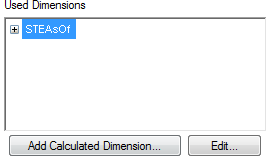
And the Expression looks like:

Do you have an idea ?
Thanks for advance for your help,
Cocalero.
- « Previous Replies
- Next Replies »
Accepted Solutions

 swuehl
- Mark as New
- Bookmark
- Subscribe
- Mute
- Subscribe to RSS Feed
- Permalink
- Report Inappropriate Content
swuehl wrote:
Well, you can create another field in your script that just enumerates the field values in chronological order.
Then use the set modifier on that field (and clear selections on the other calendar field).
But I think your issue in above sample is that your upper limit is still formatted as date, use the num() function also on the upper limit.
=SUM({$<Job_Titles = {'Trader'}, STEAsOf = {">=$(=Num(AddMonths(Max(STEAsOf),-12)))<=$(=Num(Max(STEAsOf)))"}>} STE)
Just in case my previous answer got lost...

 Chanty4u
- Mark as New
- Bookmark
- Subscribe
- Mute
- Subscribe to RSS Feed
- Permalink
- Report Inappropriate Content
can u explain more?
what is expected output?
swuehl
- Mark as New
- Bookmark
- Subscribe
- Mute
- Subscribe to RSS Feed
- Permalink
- Report Inappropriate Content
Maybe like
Sum({$<Job = {'Trader'}, STEAsOf = {">=$(=Num(AddMonths(MaJ,-12)))"}, MaJ= >} STE)
 sunny_talwar
- Mark as New
- Bookmark
- Subscribe
- Mute
- Subscribe to RSS Feed
- Permalink
- Report Inappropriate Content
What format does you STEASoF comes in? Date or number?
If it is number, then try this:
Sum({<Job = {'Trader'}, STEASoF = {"$(='>=' & (Max(STEASoF) - 12) & '<=' & Max(STEASoF))"}>} STE)
If it is date format, then try this:
Sum({<Job = {'Trader'}, STEASoF = {"$(='>=' & Date(Max(STEASoF) - 12), 'DateFieldFormatHere') & '<=' & Date(Max(STEASoF), 'DateFieldFormatHere'))"}>} STE)
- Mark as New
- Bookmark
- Subscribe
- Mute
- Subscribe to RSS Feed
- Permalink
- Report Inappropriate Content
Hello,
Thanks for your help but it doesn't work 😕
I tried this Expression:

My STEAsOF looks like that:
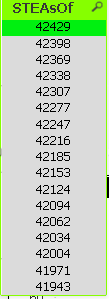
I would like to have the results of the 12 last STEAsOf from my STEAsOf Selected on my Chart:
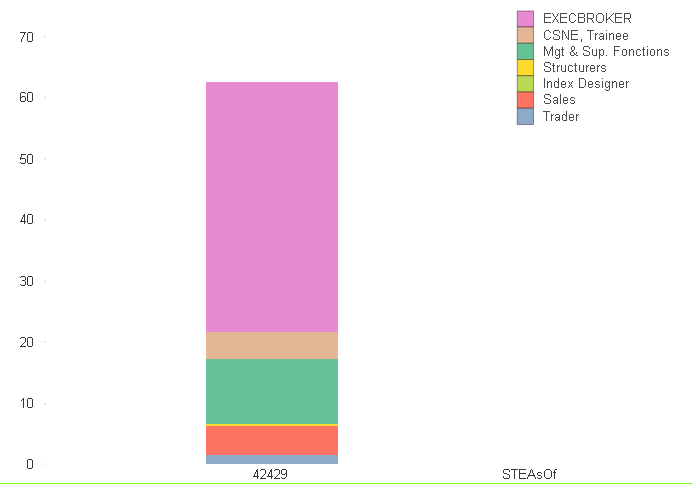
Cocalero.
swuehl
- Mark as New
- Bookmark
- Subscribe
- Mute
- Subscribe to RSS Feed
- Permalink
- Report Inappropriate Content
Could you post a small sample QVW?
- Mark as New
- Bookmark
- Subscribe
- Mute
- Subscribe to RSS Feed
- Permalink
- Report Inappropriate Content
I am so sorry but i can't 😕
But i can post some Screenshots
sunny_talwar
- Mark as New
- Bookmark
- Subscribe
- Mute
- Subscribe to RSS Feed
- Permalink
- Report Inappropriate Content
few sample rows of data? not even real data, may be some made up dummy data
swuehl
- Mark as New
- Bookmark
- Subscribe
- Mute
- Subscribe to RSS Feed
- Permalink
- Report Inappropriate Content
Why not?
Anyway, have you tried my suggested expression?
Your STEAsOf values are essentially Month end dates, so you should use AddMonths() function or AddYears() to return a date 12 months back.
And you might also need to clear other user selections in calendar fields to prevent an incompatible set. Just as I did with MaJ field.
- Mark as New
- Bookmark
- Subscribe
- Mute
- Subscribe to RSS Feed
- Permalink
- Report Inappropriate Content
Here a QlikView test where there is a chart staked, with 3 different AsOF.
I would like to show 2 AsOf into the dimension: the AsOf Selected and the previous one.
Thanks for advance,
Cocalero.
- « Previous Replies
- Next Replies »