Unlock a world of possibilities! Login now and discover the exclusive benefits awaiting you.

- Qlik Community
- :
- All Forums
- :
- QlikView App Dev
- :
- Based on selection Above all months data
- Subscribe to RSS Feed
- Mark Topic as New
- Mark Topic as Read
- Float this Topic for Current User
- Bookmark
- Subscribe
- Mute
- Printer Friendly Page

 qlikview979
- Mark as New
- Bookmark
- Subscribe
- Mute
- Subscribe to RSS Feed
- Permalink
- Report Inappropriate Content
Based on selection Above all months data
Hi Experts,
Here i want the Sum(sales) based on month selection with above all months
For example:-
My variable like
Variable3=MonthName(max(Date))
expression:-
=sum({<Month={'$(Variable3)'}>}Sales)
Here if i select may month its showing may month data its fine.
my requirement is:- if i select APRIL i want data from April,Mar,Feb,Jan
for that i have written expression like this
=sum({<Month={'<=$(Variable3)'}>}Sales(here i am getting result is Zero)
is there any mistake in expression ,please let me know.
qlikview979
- Mark as New
- Bookmark
- Subscribe
- Mute
- Subscribe to RSS Feed
- Permalink
- Report Inappropriate Content
Hi
if i select may its showing only may data ,but i want may,April,mar,Feb,Jan
Regards
mahesh
 ziadm
ziadm
- Mark as New
- Bookmark
- Subscribe
- Mute
- Subscribe to RSS Feed
- Permalink
- Report Inappropriate Content
sum( {1<MonthName=>} aggr( rangesum( above( sum( {1<MonthName=>} Sales),0,6) ), MonthName))
qlikview979
- Mark as New
- Bookmark
- Subscribe
- Mute
- Subscribe to RSS Feed
- Permalink
- Report Inappropriate Content
Hi,
Can any one help me.
marcus_sommerloveisfailjagancbovinieme12
sum({<Month={">=$(=YearStart(Max(Month))) <=$(=Max(Month))"}>}Sales) ( if i am select 2017 May its showing May and above all months)
The main thing if i select 2017 may ,i want to show 2017 may and above data in one column and 2016 may and above data in one column .
Output:-
Ex:-(if i select May 2017)
Year, Monthname 2016 2017
Jan2016 100 0
Feb2016 200 0
2016 Mar2016 300 0
April2016 400 0
May2016 500 0
Jan2017 0 600
Feb2017 0 700
2017 Mar2017 0 800
April2017 0 900
May2017 0 1000
if i select June i want to show both years from June to January.
I want dynamically changing expressions
Regards,
Mahesh

 marcus_sommer
- Mark as New
- Bookmark
- Subscribe
- Mute
- Subscribe to RSS Feed
- Permalink
- Report Inappropriate Content
Your main-problem is that you want to use strings and/or formatted values within a comparing/calculating fieldvalues. Often there are ways to get it to work, too but you will often need more efforts and trouble with it. Therefore the suggestion is to use only pure numeric values for it. It's quite easy to create them additionally within the master-calendar, for example with a unique period-counter like:
...
autonumber(YearMonth) as PeriodCounter
// requirement is a sorted load but this is quite common within a master-calendar
...
and then you could use:
sum({< PeriodCounter = {">=$(=max(PeriodCounter))"}>} AnyValue)
and you will also no have problems with a year-switch which would occur by using a month-field.
- Marcus

 jagan
jagan
- Mark as New
- Bookmark
- Subscribe
- Mute
- Subscribe to RSS Feed
- Permalink
- Report Inappropriate Content
Hi Mahesh,
Try like this
Script:
T1:
LOAD Date,
Year(Date) as Year,
Month(Date) AS MonthNo,
MonthName(Date) as Month,
Sales
FROM
(ooxml, embedded labels, table is Sheet3);
Expression:
=sum({<MonthNo={'<=$(=Month(Max(Date)))'}, Date={'<=$(=Max(Date))'}>}Sales)
Hope this helps you.
Regards,
Jagan.
qlikview979
- Mark as New
- Bookmark
- Subscribe
- Mute
- Subscribe to RSS Feed
- Permalink
- Report Inappropriate Content
Hi Brother,
PFA
Its showing Zero, i am uploading my QV and source please look at that .
qlikview979
- Mark as New
- Bookmark
- Subscribe
- Mute
- Subscribe to RSS Feed
- Permalink
- Report Inappropriate Content
Its Urgent,Can any one help me on that.
Regards
Mahesh

- Mark as New
- Bookmark
- Subscribe
- Mute
- Subscribe to RSS Feed
- Permalink
- Report Inappropriate Content
Like this?
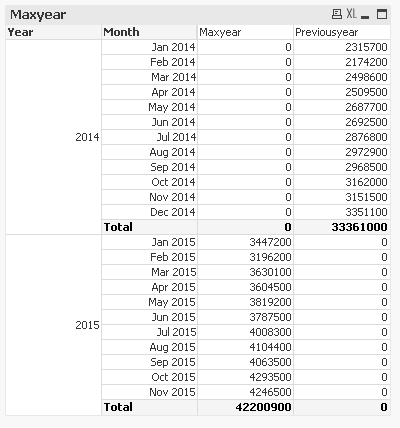
Note: I would high recommend you to mark as Helpful if you feel the answer for your Rek
qlikview979
- Mark as New
- Bookmark
- Subscribe
- Mute
- Subscribe to RSS Feed
- Permalink
- Report Inappropriate Content
Hi Anil,
please check what you attached ,in that file if i select Sep 2015 its showing only Sep data .
Note:- i want from sep to jan for both months( expression should be work dynamically).
Regards
- Mark as New
- Bookmark
- Subscribe
- Mute
- Subscribe to RSS Feed
- Permalink
- Report Inappropriate Content
This should be for Current Max Year, If you select Sep 2016 the values should fetch from Sep 2016 -- Jan 2016 ??
May be this for first expression?
Sum({<Year = {'$(=Max(Year))'}, Month = {">=$(=YearStart(Max(Month))) <=$(=Max(Month))"}>}Sales)
