Unlock a world of possibilities! Login now and discover the exclusive benefits awaiting you.

- Qlik Community
- :
- All Forums
- :
- QlikView App Dev
- :
- Re: Calculating the average
- Subscribe to RSS Feed
- Mark Topic as New
- Mark Topic as Read
- Float this Topic for Current User
- Bookmark
- Subscribe
- Mute
- Printer Friendly Page

- Mark as New
- Bookmark
- Subscribe
- Mute
- Subscribe to RSS Feed
- Permalink
- Report Inappropriate Content
Calculating the average
Dears,
I need a help about the average calculating methodology.
I have a spreadsheet where on the
column D, named "percentage", there are some percentages values, like 80% or 30%, some blank cells, and some "---" text values.So, I would like to create and expression to calculate the average of this column, and for this the expression should eliminate the blank cells and the "---" texts values.
How can I do it?
Can you give me an example?
Thanks

 swuehl
- Mark as New
- Bookmark
- Subscribe
- Mute
- Subscribe to RSS Feed
- Permalink
- Report Inappropriate Content
Hi,
so you have something like this?
LOAD * INLINE [
ColA, ColD
A, 60%
B, 30%
C, sdfsdf
D,
E, ----
F, 120%
];
Maybe a
=avg(ColD)
will just do.
See also attached.
Regards,
Stefan
- Mark as New
- Bookmark
- Subscribe
- Mute
- Subscribe to RSS Feed
- Permalink
- Report Inappropriate Content
Nop,
Because with the avg(COLID) for example, the blank and --- values will be computated. I just want to calclulate the cells that have the % values.
Thanks for your attention!
swuehl
- Mark as New
- Bookmark
- Subscribe
- Mute
- Subscribe to RSS Feed
- Permalink
- Report Inappropriate Content
Well in my attached example, those values will not be taken into account (I assume for the count of records).
I think the average is correct, 210 % / 3 is 70%.
So I assume your data is different from my sample.
Could you post a sample with your data?
Regards,
Stefan
- Mark as New
- Bookmark
- Subscribe
- Mute
- Subscribe to RSS Feed
- Permalink
- Report Inappropriate Content
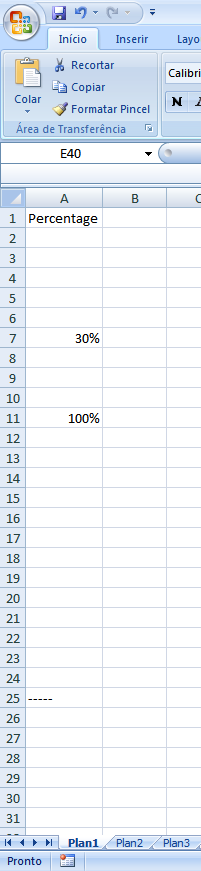
Attached is my excample.
Thanks!
swuehl
- Mark as New
- Bookmark
- Subscribe
- Mute
- Subscribe to RSS Feed
- Permalink
- Report Inappropriate Content
Hm, would be easier if you could post the excel file itself.
I tried to do something similar, still a plain avg(Percentage) seems to do the job.
BTW, I am currently using QV10 SR2.
Regards,
Stefan
- Mark as New
- Bookmark
- Subscribe
- Mute
- Subscribe to RSS Feed
- Permalink
- Report Inappropriate Content
Maybe this is the problem, coz I'm using Wlik version 8.5
swuehl
- Mark as New
- Bookmark
- Subscribe
- Mute
- Subscribe to RSS Feed
- Permalink
- Report Inappropriate Content
I don't have 8.5 available here for testing.
Maybe try
=avg(if(isnum(Percentage),Percentage))