Unlock a world of possibilities! Login now and discover the exclusive benefits awaiting you.

- Qlik Community
- :
- All Forums
- :
- QlikView App Dev
- :
- Re: Checkbox functionality with a table box and da...
- Subscribe to RSS Feed
- Mark Topic as New
- Mark Topic as Read
- Float this Topic for Current User
- Bookmark
- Subscribe
- Mute
- Printer Friendly Page

- Mark as New
- Bookmark
- Subscribe
- Mute
- Subscribe to RSS Feed
- Permalink
- Report Inappropriate Content
Checkbox functionality with a table box and date comparision
Hi All,
I need your help with my requirement here.
1. I've a Start Date and End Date fields which are defaulted to the current date. User can change these dates as below.
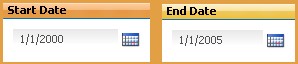
2. I've a table box with information , for example, Student Information

3. I've a checkbox  to include/exclude DOB in the search with the dates given above. Checkbox is a listbox with one value.
My requirement is: if the checkbox is checked, then table box should include Date of Birth as a filter, otherwise it should display all the students information i.e. table box should display as below

When I uncheck the checkbox, the table box should display all the data as below

Appreciate help !!
Accepted Solutions

 swuehl
- Mark as New
- Bookmark
- Subscribe
- Mute
- Subscribe to RSS Feed
- Permalink
- Report Inappropriate Content
I think you can add this logic to your search string in the select in field action:
=if( GetSelectedCount( YourFieldInListBox ) = 1 , '>=' & vStartDate & '<=' vEndDate )
swuehl
- Mark as New
- Bookmark
- Subscribe
- Mute
- Subscribe to RSS Feed
- Permalink
- Report Inappropriate Content
A table box won't allow you to set expressions or calculated dimensions to filter your data, so if you need to stick with the table box (instead of using a table chart), you can try to use a trigger on the selection of your field you are using in the check box style list box (set the trigger in Settings - Document Properties - Triggers - Field Event Trigger), then create a Select - Select in Field action on your field DOB with a search expression like
='>=' & vStartDate & '<=' vEndDate
- Mark as New
- Bookmark
- Subscribe
- Mute
- Subscribe to RSS Feed
- Permalink
- Report Inappropriate Content
Thanks Swuehi.. it worked. However, when I uncheck the checkbox, I've set those variables to blank i.e. I've to remove the date filters.
set the trigger in Settings - Document Properties - Triggers - Field Event Trigger - doesn't have any options to recognize whether use is checking or unchecking.
Thanks in advance !!
swuehl
- Mark as New
- Bookmark
- Subscribe
- Mute
- Subscribe to RSS Feed
- Permalink
- Report Inappropriate Content
I think you can add this logic to your search string in the select in field action:
=if( GetSelectedCount( YourFieldInListBox ) = 1 , '>=' & vStartDate & '<=' vEndDate )
- Mark as New
- Bookmark
- Subscribe
- Mute
- Subscribe to RSS Feed
- Permalink
- Report Inappropriate Content
This worked.. Thanks so much Swuehl