Unlock a world of possibilities! Login now and discover the exclusive benefits awaiting you.

- Qlik Community
- :
- All Forums
- :
- QlikView App Dev
- :
- Re: Class function and Others
- Subscribe to RSS Feed
- Mark Topic as New
- Mark Topic as Read
- Float this Topic for Current User
- Bookmark
- Subscribe
- Mute
- Printer Friendly Page

 ali_hijazi
- Mark as New
- Bookmark
- Subscribe
- Mute
- Subscribe to RSS Feed
- Permalink
- Report Inappropriate Content
Class function and Others
Hello
got a bar char in which I'm classifying number of version by number of patches using the following as dimension
aggr(class(count(Patch_id),5),version_id)
and Count(Version_id) as expression
Now everything is fine and I'm getting the following result:
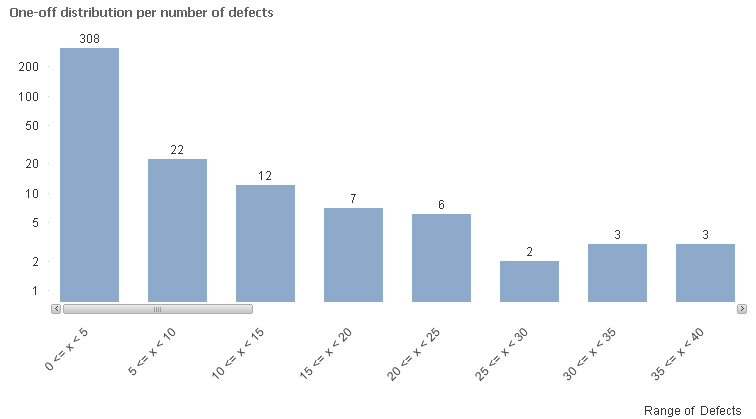
what I want is show labels until 25<=X<30 then the rest group them under >= 30
is this doable ?
Please advise
Accepted Solutions

 swuehl
- Mark as New
- Bookmark
- Subscribe
- Mute
- Subscribe to RSS Feed
- Permalink
- Report Inappropriate Content
Seems to work for me.

 MK_QSL
- Mark as New
- Bookmark
- Subscribe
- Mute
- Subscribe to RSS Feed
- Permalink
- Report Inappropriate Content
You need to use If in this case. Class will not give you result like this.
swuehl
- Mark as New
- Bookmark
- Subscribe
- Mute
- Subscribe to RSS Feed
- Permalink
- Report Inappropriate Content
Try something like
aggr( if(class(count(Patch_id),5)<30,class(count(Patch_id),5),dual('>=30',35) ), version_id)
MK_QSL
- Mark as New
- Bookmark
- Subscribe
- Mute
- Subscribe to RSS Feed
- Permalink
- Report Inappropriate Content
=Aggr(IF(COUNT(Patch_id)>=0 and COUNT(Patch_id)<5, Dual('0<=x<5',1),
IF(COUNT(Patch_id)>=5 and COUNT(Patch_id)<10, Dual('5<=x<10',2),
IF(COUNT(Patch_id)>=10 and COUNT(Patch_id)<15, Dual('10<=x<15',3),
IF(COUNT(Patch_id)>=15 and COUNT(Patch_id)<20, Dual('15<=x<20',4),
IF(COUNT(Patch_id)>=20 and COUNT(Patch_id)<25, Dual('20<=x<25',5),
IF(COUNT(Patch_id)>=25 and COUNT(Patch_id)<30, Dual('25<=x<30',6),Dual('>=30',7))))))),version_id)
ali_hijazi
- Mark as New
- Bookmark
- Subscribe
- Mute
- Subscribe to RSS Feed
- Permalink
- Report Inappropriate Content
this will only change the label for every thing after 25<=x<3 to >=30 but is repeated as follows:
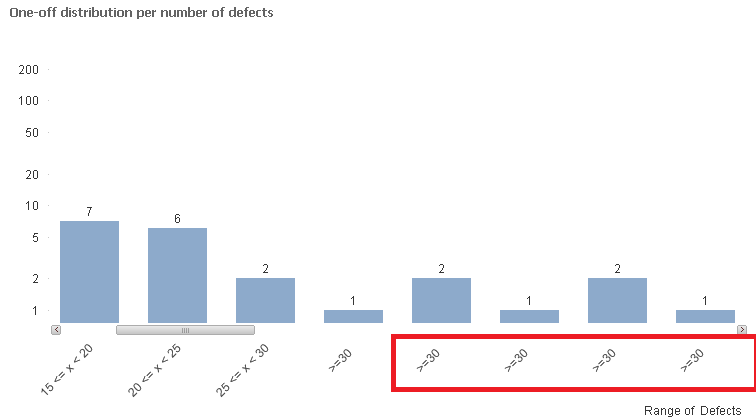
how can I sum the rest under >=30?
swuehl
- Mark as New
- Bookmark
- Subscribe
- Mute
- Subscribe to RSS Feed
- Permalink
- Report Inappropriate Content
Seems to work for me.
ali_hijazi
- Mark as New
- Bookmark
- Subscribe
- Mute
- Subscribe to RSS Feed
- Permalink
- Report Inappropriate Content
ok it is working now
but I didn't understand the Dual('>=30',35)
the 35 why and how I didn't get it
and what if the bracket size is dynamic not always 5 how can this be transformed?
MK_QSL
- Mark as New
- Bookmark
- Subscribe
- Mute
- Subscribe to RSS Feed
- Permalink
- Report Inappropriate Content
Dual('>=30',35)
Dual holds two values...
First as String and 2nd as Numbers.
Here in charts you will see >=30 and 35 is used in sorting the bars so you will get >=30 bar always as a last bar in bar chart.
swuehl
- Mark as New
- Bookmark
- Subscribe
- Mute
- Subscribe to RSS Feed
- Permalink
- Report Inappropriate Content
If you want to have dynamic bucket size and cutoff, just replace the magic numbers with variables and set the variables accordingly:
=aggr( if(class(sum(Fixes),vRange)<vCutOff,class(sum(Fixes),vRange),dual('>='&vCutOff,vCutOff) ), Version)
To have accurate results, take care that vCutOff is a multiple of vRange.
