Unlock a world of possibilities! Login now and discover the exclusive benefits awaiting you.

- Qlik Community
- :
- All Forums
- :
- QlikView App Dev
- :
- Coalition problem
- Subscribe to RSS Feed
- Mark Topic as New
- Mark Topic as Read
- Float this Topic for Current User
- Bookmark
- Subscribe
- Mute
- Printer Friendly Page

 sculptorlv
- Mark as New
- Bookmark
- Subscribe
- Mute
- Subscribe to RSS Feed
- Permalink
- Report Inappropriate Content
Coalition problem
I am trying to join two tables from one database (MS SQL) but different application system (which was created by different partners).
The result is;
SQL SELECT
Tbl_Contact.ID AS ID_Contact,
Tbl_Contact.Name AS Agent_Name,
Tbl_Contact.DepartmentID AS "Contact__Agent_Department_2",
Tbl_Contract2.ContractNumber AS Contract__Number
FROM "TS_Live".dbo."tbl_Contact" AS Tbl_Contact
LEFT JOIN "TS_Live".dbo."tbl_Contract" AS Tbl_Contract2
ON Tbl_Contact.ID = Tbl_Contract2.AgentID
LEFT JOIN "EUR-VENDEN".dbo."EUR VENDEN GROUP$Ship-to Address" AS Tbl_Contract_3
ON Tbl_Contract_3.Code = Tbl_Contract2.ContractNumber;
The third table "EUR VENDEN GROUP$Ship-to Address" is from a different system. And when I run script - I get coalition conflict
'....conflict between "Latin1_General_CI_AS" and "Latvian_CI_AS"....'
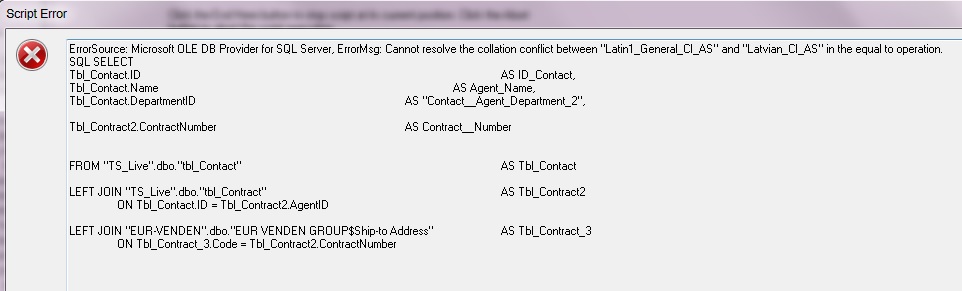
I now very well that Tbl_Contract_3.Code and Tbl_Contract2.ContractNumber values are identical!!
What can I do to join these tables?
Accepted Solutions
sculptorlv
- Mark as New
- Bookmark
- Subscribe
- Mute
- Subscribe to RSS Feed
- Permalink
- Report Inappropriate Content
The working result will be:
SQL SELECT
Tbl_Contact.ID AS ID_Contact,
Tbl_Contact.Name AS Agent_Name,
Tbl_Contact.DepartmentID AS "Contact__Agent_Department_2",
Tbl_Contract2.ContractNumber AS Contract__Number,
Tbl_Contract_3."Customer No_" AS Customer
FROM "TS_Live".dbo."tbl_Contact" AS Tbl_Contact
LEFT JOIN "TS_Live".dbo."tbl_Contract" AS Tbl_Contract2
ON Tbl_Contact.ID = Tbl_Contract2.AgentID
LEFT JOIN "EUR-VENDEN".dbo."EUR VENDEN GROUP$Ship-to Address" AS Tbl_Contract_3
ON Tbl_Contract_3.Code collate Latin1_General_CI_AS = Tbl_Contract2.ContractNumber;

 awhitfield
- Mark as New
- Bookmark
- Subscribe
- Mute
- Subscribe to RSS Feed
- Permalink
- Report Inappropriate Content
HI Ruslans,
this is a SQL Issue rather than Qlikview, you would need to use a collate clause in your select statement, see the attached link
Andy
sculptorlv
- Mark as New
- Bookmark
- Subscribe
- Mute
- Subscribe to RSS Feed
- Permalink
- Report Inappropriate Content
Can I use it in Qlikview script or I must do it in SQL database?
sculptorlv
- Mark as New
- Bookmark
- Subscribe
- Mute
- Subscribe to RSS Feed
- Permalink
- Report Inappropriate Content
The working result will be:
SQL SELECT
Tbl_Contact.ID AS ID_Contact,
Tbl_Contact.Name AS Agent_Name,
Tbl_Contact.DepartmentID AS "Contact__Agent_Department_2",
Tbl_Contract2.ContractNumber AS Contract__Number,
Tbl_Contract_3."Customer No_" AS Customer
FROM "TS_Live".dbo."tbl_Contact" AS Tbl_Contact
LEFT JOIN "TS_Live".dbo."tbl_Contract" AS Tbl_Contract2
ON Tbl_Contact.ID = Tbl_Contract2.AgentID
LEFT JOIN "EUR-VENDEN".dbo."EUR VENDEN GROUP$Ship-to Address" AS Tbl_Contract_3
ON Tbl_Contract_3.Code collate Latin1_General_CI_AS = Tbl_Contract2.ContractNumber;
