Unlock a world of possibilities! Login now and discover the exclusive benefits awaiting you.

- Qlik Community
- :
- All Forums
- :
- QlikView App Dev
- :
- Cumulative Sum
- Subscribe to RSS Feed
- Mark Topic as New
- Mark Topic as Read
- Float this Topic for Current User
- Bookmark
- Subscribe
- Mute
- Printer Friendly Page

- Mark as New
- Bookmark
- Subscribe
- Mute
- Subscribe to RSS Feed
- Permalink
- Report Inappropriate Content
Cumulative Sum
Hello guys.. I have loaded data in QlikView using the following script
AR:
LOAD
RawARPostingYear AS ARPostingYear,
RawARPostingMonth AS ARPostingMonth,
SUM(RawARAmount) AS ARAmount,
RawARCountry AS ARCountry
RESIDENT RawAR
GROUP BY RawARCountry, RawARPostingYear, RawARPostingMonth
ORDER BY RawARCountry ASC, RawARPostingYear ASC, RawARPostingMonth ASC;
DROP TABLE RawAR;
Then I created a pivot table chart type with
Dimension:
ARCountry, ARPostingYear, and ARPostingMonth
Expression:
Col1 : ARAmount/1000
Col2 : IF(ISNULL(ABOVE(COLUMN(1))), COLUMN(1), COLUMN(1)+ABOVE(COLUMN(2)))
In which produces the result that I want
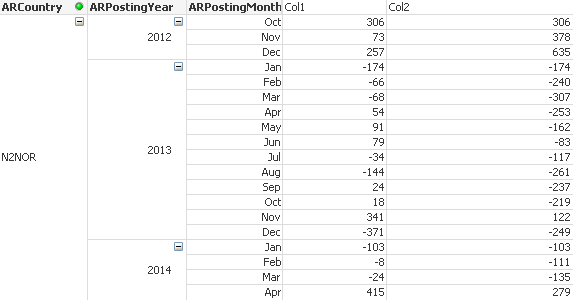
But I you look at until 2012 - Dec the Col2 value is correct but when it enters 2013 - Jan the value seems to reset instead of taking 635+(-174) = 461.
- Can somebody point me out if my expression is incorrect?
- Is there away to do this is load script as well?
Thank you for your kind attention guys. Any suggestions/opinions/advices would be greatly appreciated.
Thank you again. 
Accepted Solutions

.png "Former Employee") hic
hic
- Mark as New
- Bookmark
- Subscribe
- Mute
- Subscribe to RSS Feed
- Permalink
- Report Inappropriate Content
To solve the problem around year shifts, you should use Above(total ... ) instead of Above(...)
Secondly, I think you should replace your formulas with
Col1 : Sum(ARAmount)/1000
Col2 : RangeSum(Sum(ARAmount)/1000, Above( total Sum(ARAmount)/1000))
It should do the same
HIC
hic
- Mark as New
- Bookmark
- Subscribe
- Mute
- Subscribe to RSS Feed
- Permalink
- Report Inappropriate Content
To solve the problem around year shifts, you should use Above(total ... ) instead of Above(...)
Secondly, I think you should replace your formulas with
Col1 : Sum(ARAmount)/1000
Col2 : RangeSum(Sum(ARAmount)/1000, Above( total Sum(ARAmount)/1000))
It should do the same
HIC

 marcus_malinow
- Mark as New
- Bookmark
- Subscribe
- Mute
- Subscribe to RSS Feed
- Permalink
- Report Inappropriate Content
Hi Khairal,
in response to the second part of your question - you can do this in the load script.
Add the following into your load statement:
if(IsNull(peek('ARCountry',-1) or peek('ARCountry',-1) <> RawARCountry,
sum(RawARAmount),
peek('CumulativeARAmount',-1) + sum(RawARAmount)) as CumulativeARAmount
- Mark as New
- Bookmark
- Subscribe
- Mute
- Subscribe to RSS Feed
- Permalink
- Report Inappropriate Content
Henric,
It works! Thank you.. One more thing how to do the same in load script based on the script above?
Thank you very much for your kind attention.
- Mark as New
- Bookmark
- Subscribe
- Mute
- Subscribe to RSS Feed
- Permalink
- Report Inappropriate Content
Hello Marcus,
Thank you very much for the suggestion. It works like a charm!
Thank you again for your kind attention.