Unlock a world of possibilities! Login now and discover the exclusive benefits awaiting you.

- Qlik Community
- :
- All Forums
- :
- QlikView App Dev
- :
- Database Connection Issue
- Subscribe to RSS Feed
- Mark Topic as New
- Mark Topic as Read
- Float this Topic for Current User
- Bookmark
- Subscribe
- Mute
- Printer Friendly Page

- Mark as New
- Bookmark
- Subscribe
- Mute
- Subscribe to RSS Feed
- Permalink
- Report Inappropriate Content
Database Connection Issue
Hi All!
This time, im consulting about database connections.
Lets suppose that i have an application that use some odbc or oledb connection to a database and i run the refresh of this application on a bat file.
Sometimes, some refresh freeze on the load in the connection time. So, sometimes, the procces remains paused because the connection was not successfull.
The problem its that, i cannot permit that those procces keeps stopped because other procces must run.
So, the question is, theres any way to check if some procces have some connection problem and stop it?
Thanks for all!
Germán
- « Previous Replies
-
- 1
- 2
- Next Replies »

 rbecher
- Mark as New
- Bookmark
- Subscribe
- Mute
- Subscribe to RSS Feed
- Permalink
- Report Inappropriate Content
I presume this will not occur with the OLE DB Provider (instead of ODBC)..
- Ralf
- Mark as New
- Bookmark
- Subscribe
- Mute
- Subscribe to RSS Feed
- Permalink
- Report Inappropriate Content
Thanks Ralf... i'll try it!
rbecher
- Mark as New
- Bookmark
- Subscribe
- Mute
- Subscribe to RSS Feed
- Permalink
- Report Inappropriate Content
I have downloaded it here:
http://www.microsoft.com/download/en/details.aspx?displaylang=en&id=14839
- Ralf
- Mark as New
- Bookmark
- Subscribe
- Mute
- Subscribe to RSS Feed
- Permalink
- Report Inappropriate Content
Yes... thanks for this... i tryed many connectors... in fact...

- Mark as New
- Bookmark
- Subscribe
- Mute
- Subscribe to RSS Feed
- Permalink
- Report Inappropriate Content
Hey Ralph, so I'm attempting to connect to the FoxPro tables, and I'm able to create the connection based off your example. I can then read the table, but it does not pull in any data. And I know for sure that ther is some there as I can open the table and see data. What could I be missing?
Here is my script.
OLEDB CONNECT32 TO [Provider=VFPOLEDB.1;Data Source=C:\Users\Public\Documents\MFHS\Abra\Abra\Data;Mode=Share Deny None;Extended Properties="";User ID="";Mask Password=False;Cache Authentication=False;Encrypt Password=False;Collating Sequence=MACHINE;DSN="";DELETED=True;CODEPAGE=1252;MVCOUNT=16384;ENGINEBEHAVIOR=90;TABLEVALIDATE=3;REFRESH=5;VARCHARMAPPING=False;ANSI=True;REPROCESS=5];
employees:
LOAD a_empno,
a_hours;
SQL SELECT *
FROM HATTRAN;
rbecher
- Mark as New
- Bookmark
- Subscribe
- Mute
- Subscribe to RSS Feed
- Permalink
- Report Inappropriate Content
Unfortunately this is not working anymore with my newest QlikView versions v10 SR4 and v11 SR1 on 64bit. It is just crashing qvconnect.exe
So, I started to use our QlikView JDBC Connector (http://bit.ly/A98Sdi) with the HXTT DBF driver (http://bit.ly/K7uNkT) which runs very smoothly now..
- Ralf
- Mark as New
- Bookmark
- Subscribe
- Mute
- Subscribe to RSS Feed
- Permalink
- Report Inappropriate Content
Yeah, it was just crashing the qvconnect.exe for me too. But then I through in your modified script at it pulled the table, but just not any data.
Alex Peasley
Business Intelligence Architect
Core BTS
608-661-7769
rbecher
- Mark as New
- Bookmark
- Subscribe
- Mute
- Subscribe to RSS Feed
- Permalink
- Report Inappropriate Content
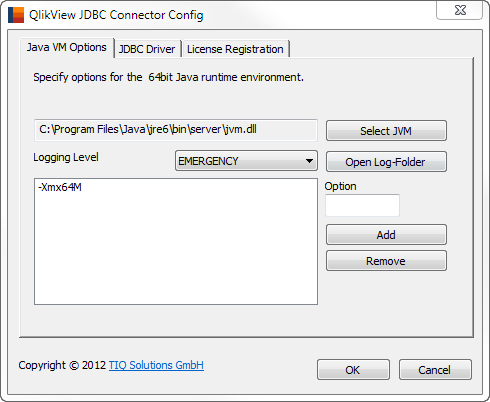
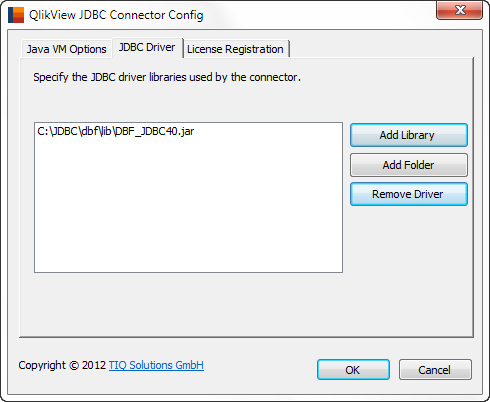
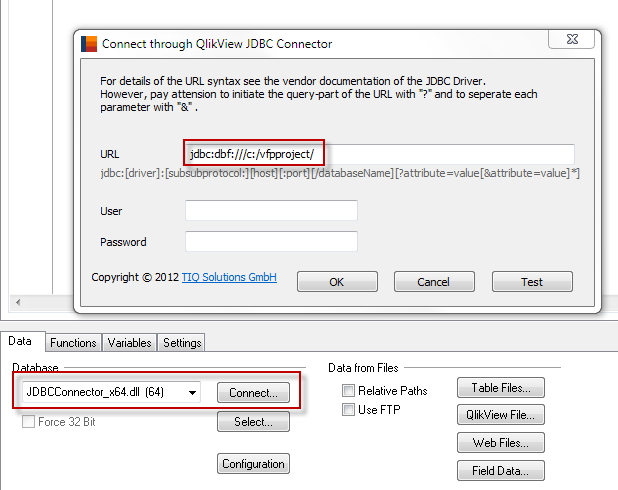
Hi Alex,
this is the JAVA runtime config:
this is the JDBC driver config:
This is the QV script connect:
Just contact me directly if you have any question: ralf.becher@tiq-solutions.de
- Ralf
- « Previous Replies
-
- 1
- 2
- Next Replies »