Unlock a world of possibilities! Login now and discover the exclusive benefits awaiting you.

- Qlik Community
- :
- All Forums
- :
- QlikView App Dev
- :
- Date issue
- Subscribe to RSS Feed
- Mark Topic as New
- Mark Topic as Read
- Float this Topic for Current User
- Bookmark
- Subscribe
- Mute
- Printer Friendly Page

- Mark as New
- Bookmark
- Subscribe
- Mute
- Subscribe to RSS Feed
- Permalink
- Report Inappropriate Content
Date issue
Hi all.
I have two tables and one of them have a date field called "AnswerCreated" and the format for that field is "2014-02-04 19:42:22.130" and when I look at it in QV "41407,71546412".
I would like to use that field as a key to a Calendar but what is the best way to format that field?
See attached qvw.
- « Previous Replies
-
- 1
- 2
- Next Replies »

 Nicole-Smith
- Mark as New
- Bookmark
- Subscribe
- Mute
- Subscribe to RSS Feed
- Permalink
- Report Inappropriate Content
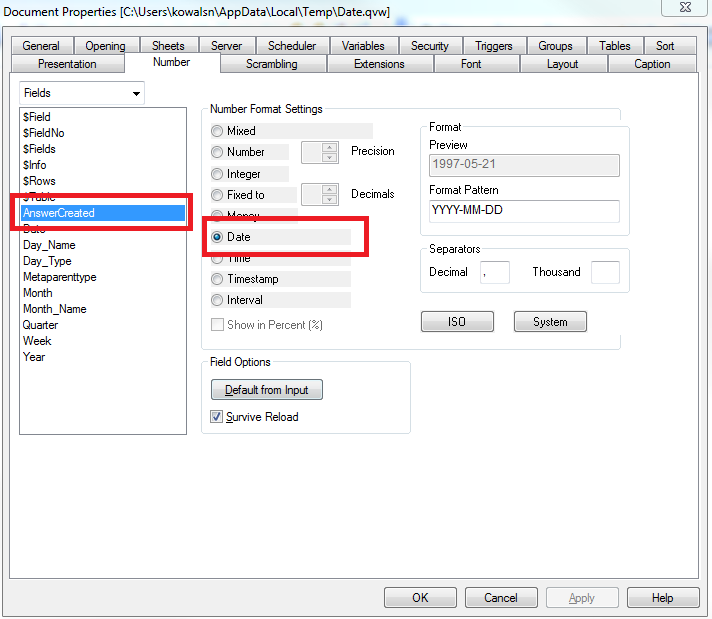
Settings > Document Properties > Number:
 MK_QSL
- Mark as New
- Bookmark
- Subscribe
- Mute
- Subscribe to RSS Feed
- Permalink
- Report Inappropriate Content
Either use below in UI side
=Date(Date#(AnswerCreated,'YYYY-MM-DD hh:mm:ss'))
Or below in script side
Date(Date#(AnswerCreated,'YYYY-MM-DD hh:mm:ss')) as AnswerCreated
- Mark as New
- Bookmark
- Subscribe
- Mute
- Subscribe to RSS Feed
- Permalink
- Report Inappropriate Content
Yes, I would like to do it in the script but that doesn't work. The field AnswerCreated is empty, doesn't you need to take care about the last three numbers?

 sunilkumarqv
- Mark as New
- Bookmark
- Subscribe
- Mute
- Subscribe to RSS Feed
- Permalink
- Report Inappropriate Content
open the script
Please find the attached give feed back hope thio helps you
 manojkulkarni
- Mark as New
- Bookmark
- Subscribe
- Mute
- Subscribe to RSS Feed
- Permalink
- Report Inappropriate Content
use
Date(AnswerCreated,'YYYY-MM-DD') AS Date...
ashwanin
- Mark as New
- Bookmark
- Subscribe
- Mute
- Subscribe to RSS Feed
- Permalink
- Report Inappropriate Content
use
Date(AnswerCreated,'DD-MMM-YYYY') As AnswerCreated
in the script.

 er_mohit
- Mark as New
- Bookmark
- Subscribe
- Mute
- Subscribe to RSS Feed
- Permalink
- Report Inappropriate Content
Try this in text object
=Date(Date# ('2014-02-04 19:42:22.130','YYYY-MM-DD hh:mm:ss.fff'),'YYYY-MM-DD hh:mm:ss' )
sunilkumarqv
- Mark as New
- Bookmark
- Subscribe
- Mute
- Subscribe to RSS Feed
- Permalink
- Report Inappropriate Content
try this into your textobject not required that of script Mohit.
=Timestamp#(Now(),'DD/MM/YYY hh:mm:ss')
 PrashantSangle
- Mark as New
- Bookmark
- Subscribe
- Mute
- Subscribe to RSS Feed
- Permalink
- Report Inappropriate Content
Hi,
try this
timestamp(timestamp#(AnswerCreated,'YYYY-MM-DD hh:mm:ss')) as AnswerCreated
Please appreciate our Qlik community members by giving Kudos for sharing their time for your query. If your query is answered, please mark the topic as resolved 🙂
- « Previous Replies
-
- 1
- 2
- Next Replies »