Unlock a world of possibilities! Login now and discover the exclusive benefits awaiting you.

- Qlik Community
- :
- All Forums
- :
- QlikView App Dev
- :
- Re: Diff between the 2 expressions
- Subscribe to RSS Feed
- Mark Topic as New
- Mark Topic as Read
- Float this Topic for Current User
- Bookmark
- Subscribe
- Mute
- Printer Friendly Page

 surajap123
- Mark as New
- Bookmark
- Subscribe
- Mute
- Subscribe to RSS Feed
- Permalink
- Report Inappropriate Content
Diff between the 2 expressions
Hi All,
I thought both the below statements are same, so i created the 2nd one using set analysis. But i am getting different outputs
(Sum(IF(Status = 'Cancelled', (Amount)))) + (Sum(IF(Status = 'Booked', (Amount))))
sum( {<Status={'Cancelled'},Status={'Booked'}>}Amount)
Could you please tell me why they are giving different results?
- Tags:
- new_to_qlikview
- « Previous Replies
-
- 1
- 2
- Next Replies »

 tresesco
- Mark as New
- Bookmark
- Subscribe
- Mute
- Subscribe to RSS Feed
- Permalink
- Report Inappropriate Content
Suraj,
Set analysis is meant for that. In the expression: sum( {<Status={'Cancelled'},Status={'Booked'}>}Amount)
you specifically say the values to be considered for field Status. Hence, it ignores the selection for that field.

 SunilChauhan
- Mark as New
- Bookmark
- Subscribe
- Mute
- Subscribe to RSS Feed
- Permalink
- Report Inappropriate Content
first one is showing correct result
and second one is overriding the status to Booked.
changed the order of booked and cancelled in second expression.
it will give other result.
i mean to say it taking last one status and showing value on that.
hope this helps

 sudeepkm
- Mark as New
- Bookmark
- Subscribe
- Mute
- Subscribe to RSS Feed
- Permalink
- Report Inappropriate Content
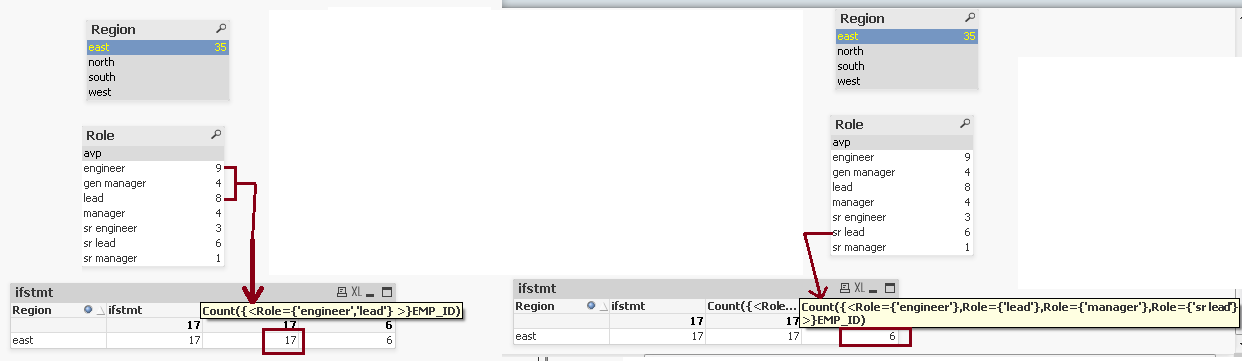
Given below is a screenshot of what I tested in my sample Application.
As you can see when I have the expression {<Field={'value1', 'value2'} >} it considers as either or that means all from both the selection.
when I gave the expression like {<Field={'value1'},Field={'value2'} >} it considers it as two selections of same field but one after another. and finally it considers the second selection. this is same response when we select a value from a list box and then we select another value from the same list box. the first selection is overridden by the second selection.
surajap123
- Mark as New
- Bookmark
- Subscribe
- Mute
- Subscribe to RSS Feed
- Permalink
- Report Inappropriate Content
Thanks a lot to everyone for explaining it so well, especially tresesco and sudeep
 preminqlik
- Mark as New
- Bookmark
- Subscribe
- Mute
- Subscribe to RSS Feed
- Permalink
- Report Inappropriate Content
you can use the following expressions :
Sum(IF(Status = 'Cancelled' or Status = 'Booked', Amount)
or
sum( {<Status={'Cancelled' , 'Booked'}>}Amount)

 Joseph_Musekura
- Mark as New
- Bookmark
- Subscribe
- Mute
- Subscribe to RSS Feed
- Permalink
- Report Inappropriate Content
Hi,
I agree with Sudeep,
sum( {<Status={'Cancelled','Booked'}>}Amount), this will returns both selections
If you add 1
sum( {1<Status={'Cancelled', 'Booked'}>}Amount), it will disregard any selection made
Regards,

- « Previous Replies
-
- 1
- 2
- Next Replies »