Unlock a world of possibilities! Login now and discover the exclusive benefits awaiting you.

- Qlik Community
- :
- All Forums
- :
- QlikView App Dev
- :
- Double As
- Subscribe to RSS Feed
- Mark Topic as New
- Mark Topic as Read
- Float this Topic for Current User
- Bookmark
- Subscribe
- Mute
- Printer Friendly Page

 Chanty4u
- Mark as New
- Bookmark
- Subscribe
- Mute
- Subscribe to RSS Feed
- Permalink
- Report Inappropriate Content
Double As
Hi all,
When i load below script it is givng error as Filed not found <Date>
how to over come dis?
Sample:
LOAD F1 as [s.no],
F2 as [Sales Executive],
F3 as [TopLine Achieved],
F4 as [Gross Margin Achieved] ,
F5 as [Top Line Target] ,
F6 as GMTarget,
F7 as Product,
F8 as BranchHead,
F9 as Branch,
F10 as Dept ,
F11 as Date
// Year(Date) as Year,
// Month(Date) as Month,
// Day(Date) as Day,
// Week(Date) as Week,
// 'Q' & ceil(Num(Month(Date))/3) as Quater,
// applyMap('FiscalQuarterMap', num(month(Date)),null()) AS FiscalQuarter
from[...];
 PrashantSangle
- Mark as New
- Bookmark
- Subscribe
- Mute
- Subscribe to RSS Feed
- Permalink
- Report Inappropriate Content
Hi,
Yes, That could be possible error if those field not commented in his original post.
Regards,
Please appreciate our Qlik community members by giving Kudos for sharing their time for your query. If your query is answered, please mark the topic as resolved 🙂
Chanty4u
- Mark as New
- Bookmark
- Subscribe
- Mute
- Subscribe to RSS Feed
- Permalink
- Report Inappropriate Content
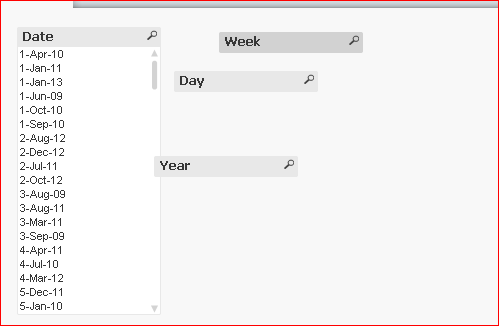
same kush.... its nt givng the values in the field
PrashantSangle
- Mark as New
- Bookmark
- Subscribe
- Mute
- Subscribe to RSS Feed
- Permalink
- Report Inappropriate Content
Hi,
try with date#()
like
month(date#(dateField,'DD-MMM-yy')) as Month
Regards
Please appreciate our Qlik community members by giving Kudos for sharing their time for your query. If your query is answered, please mark the topic as resolved 🙂
 Kushal_Chawda
- Mark as New
- Bookmark
- Subscribe
- Mute
- Subscribe to RSS Feed
- Permalink
- Report Inappropriate Content
Your dates are in string format use Date#
Sample:
LOAD *,
Year(date#(Date,'DD-MMM-YY')) as Year,
Month(date#(Date,'DD-MMM-YY')) as Month,
Day(date#(Date,'DD-MMM-YY')) as Day,
Week(date#(Date,'DD-MMM-YY')) as Week,
'Q' & ceil(Num(Month(date#(Date,'DD-MMM-YY')))/3) as Quater,
applyMap('FiscalQuarterMap', num(month(Date)),null()) AS FiscalQuarter;
LOAD F1 as [s.no],
F2 as [Sales Executive],
F3 as [TopLine Achieved],
F4 as [Gross Margin Achieved] ,
F5 as [Top Line Target] ,
F6 as GMTarget,
F7 as Product,
F8 as BranchHead,
F9 as Branch,
F10 as Dept ,
F11 as Date
from[...];

- Mark as New
- Bookmark
- Subscribe
- Mute
- Subscribe to RSS Feed
- Permalink
- Report Inappropriate Content
Hi Chanty,
This is because your format on your original table is not on Date format. Could you share one example of your data?
Thanks
- Mark as New
- Bookmark
- Subscribe
- Mute
- Subscribe to RSS Feed
- Permalink
- Report Inappropriate Content
Hi Chanty,
Try kushal chawda solution. On Applymap apply the Date# expression too.
Regards!
Chanty4u
- Mark as New
- Bookmark
- Subscribe
- Mute
- Subscribe to RSS Feed
- Permalink
- Report Inappropriate Content
yes its givng correct now...but Quarter value shwng as only "Q"
instead of Q1 and Q2 Q3 Q4...?
Chanty4u
- Mark as New
- Bookmark
- Subscribe
- Mute
- Subscribe to RSS Feed
- Permalink
- Report Inappropriate Content
evrythng is wrkng except fiscal quarter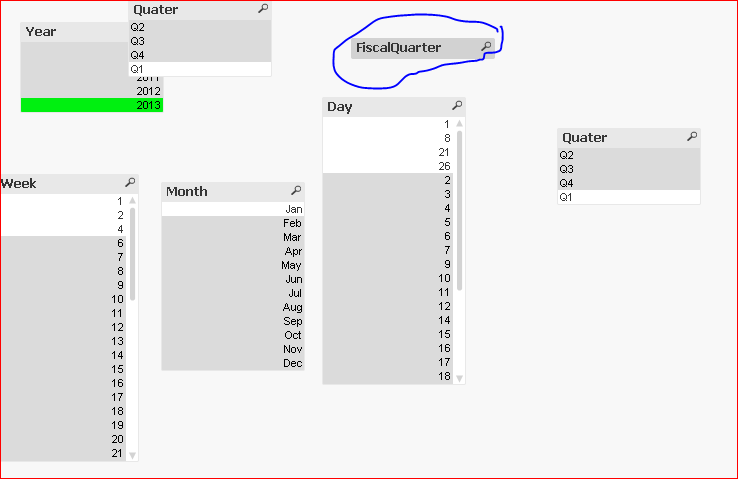
PrashantSangle
- Mark as New
- Bookmark
- Subscribe
- Mute
- Subscribe to RSS Feed
- Permalink
- Report Inappropriate Content
Hi,
try
'Q' & ceil(Month(date#(Date,'DD-MMM-YY'))/3) as Quater
Regards
Please appreciate our Qlik community members by giving Kudos for sharing their time for your query. If your query is answered, please mark the topic as resolved 🙂

 tamilarasu
- Mark as New
- Bookmark
- Subscribe
- Mute
- Subscribe to RSS Feed
- Permalink
- Report Inappropriate Content
Should be this,
applyMap('FiscalQuarterMap', num(month(Date#(Date,'DD-MMM-YYYY'))),null()) AS FiscalQuarter;