Unlock a world of possibilities! Login now and discover the exclusive benefits awaiting you.

- Qlik Community
- :
- All Forums
- :
- QlikView App Dev
- :
- Re: Doubt in Left join
- Subscribe to RSS Feed
- Mark Topic as New
- Mark Topic as Read
- Float this Topic for Current User
- Bookmark
- Subscribe
- Mute
- Printer Friendly Page

- Mark as New
- Bookmark
- Subscribe
- Mute
- Subscribe to RSS Feed
- Permalink
- Report Inappropriate Content
Doubt in Left join
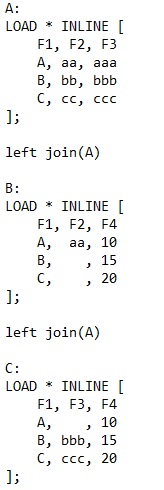
What will be the result after applying Left join in the three tables?
- « Previous Replies
-
- 1
- 2
- Next Replies »
- Mark as New
- Bookmark
- Subscribe
- Mute
- Subscribe to RSS Feed
- Permalink
- Report Inappropriate Content
The final output which i am getting is exactly the same which you gave but when I look at the resultant table I can't see all the values of F4 (including 15 and 20) since the corresponding values of F1 and F3 are matching.
Could you please elaborate on this?

 sunny_talwar
- Mark as New
- Bookmark
- Subscribe
- Mute
- Subscribe to RSS Feed
- Permalink
- Report Inappropriate Content
If I leave the second join and run this script
A:
LOAD * INLINE [
F1, F2, F3
A, aa, aaa
B, bb, bbb
C, cc, ccc
];
Left Join (A)
LOAD * INLINE [
F1, F2, F4
A, aa, 10
B, , 15
C, , 20
];
My output is this
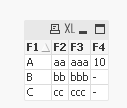
Now imagine that you wanted to do a left join to this table
Left Join (A)
LOAD * INLINE [
F1, F3, F4
A, , 10
B, bbb, 15
C, ccc, 20
];
What is the result do you expect to see? Would you think that you will only join on F1 and F3 or F1, F3, & F4? There is a certain order of execution here and you cannot just expect QlikView to know what you are looking for. There are work arounds but the existing script won't give what you are looking for.
This can be your work around
A:
LOAD * INLINE [
F1, F2, F3
A, aa, aaa
B, bb, bbb
C, cc, ccc
];
Left Join (A)
LOAD * INLINE [
F1, F2, F4
A, aa, 10
B, , 15
C, , 20
];
Left Join (A)
LOAD * INLINE [
F1, F3, F5
A, , 10
B, bbb, 15
C, ccc, 20
];
FinalA:
LOAD F1,
F2,
F3,
Alt(F4, F5) as F4
Resident A;
DROP Table A;
- Mark as New
- Bookmark
- Subscribe
- Mute
- Subscribe to RSS Feed
- Permalink
- Report Inappropriate Content
That explanation helped me understand the whole process.
Thank you.
sunny_talwar
- Mark as New
- Bookmark
- Subscribe
- Mute
- Subscribe to RSS Feed
- Permalink
- Report Inappropriate Content
Awesome, I am glad it helped. Please close the thread by marking correct and helpful responses.
Best,
Sunny
- Mark as New
- Bookmark
- Subscribe
- Mute
- Subscribe to RSS Feed
- Permalink
- Report Inappropriate Content
Sure.
sunny_talwar
- Mark as New
- Bookmark
- Subscribe
- Mute
- Subscribe to RSS Feed
- Permalink
- Report Inappropriate Content
Thank you 
- « Previous Replies
-
- 1
- 2
- Next Replies »