Unlock a world of possibilities! Login now and discover the exclusive benefits awaiting you.

- Qlik Community
- :
- All Forums
- :
- QlikView App Dev
- :
- Re: Doubt
- Subscribe to RSS Feed
- Mark Topic as New
- Mark Topic as Read
- Float this Topic for Current User
- Bookmark
- Subscribe
- Mute
- Printer Friendly Page

 NavinReddy
- Mark as New
- Bookmark
- Subscribe
- Mute
- Subscribe to RSS Feed
- Permalink
- Report Inappropriate Content
Doubt
Hi Experts,
same features its not reflecting on Access point
In Desktop when i enter the next sheet i made the page show only 2015 data
but its not working this function on Access Point
can some one guide me how can i make it enable on Access Point
Thanks In Advance
Niranjan

 Qrishna
- Mark as New
- Bookmark
- Subscribe
- Mute
- Subscribe to RSS Feed
- Permalink
- Report Inappropriate Content
could you please post your application or atleast a demo app which depicts your problem?
NavinReddy
- Mark as New
- Bookmark
- Subscribe
- Mute
- Subscribe to RSS Feed
- Permalink
- Report Inappropriate Content
Hi Chaitanya,
Thanks for your reply
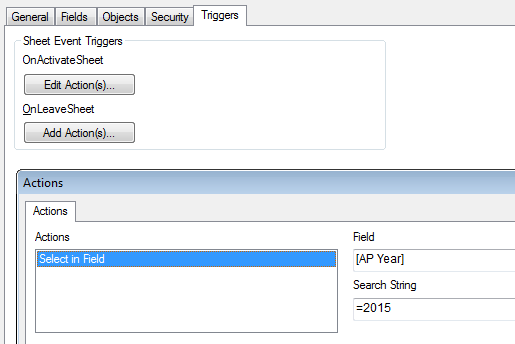
what i did is sheet properties on Trigger i added the field year=2015

on Desktop its working file
the same QVW access point its not working, any idea
Best Regards,
Niranjan
Qrishna
- Mark as New
- Bookmark
- Subscribe
- Mute
- Subscribe to RSS Feed
- Permalink
- Report Inappropriate Content
What trigger is that? Doc event or field or variable trig?
NavinReddy
- Mark as New
- Bookmark
- Subscribe
- Mute
- Subscribe to RSS Feed
- Permalink
- Report Inappropriate Content
here is the one
Qrishna
- Mark as New
- Bookmark
- Subscribe
- Mute
- Subscribe to RSS Feed
- Permalink
- Report Inappropriate Content
It seems ok for me.
Try enclosing the value in single quotes i.e ='2015'
but as you said its working on desktop right without quotes?
post the demo application here, we can have a look and solve it.

- Mark as New
- Bookmark
- Subscribe
- Mute
- Subscribe to RSS Feed
- Permalink
- Report Inappropriate Content
Triggers do not always work once the applciation is one accesspoint. One way to verify is in development mode, switch to web view and see if your trigger works correctly.
More often than not, in order to get triggers to work on accesspoint, you need to run in ie plugin instead of ajax