Unlock a world of possibilities! Login now and discover the exclusive benefits awaiting you.

- Qlik Community
- :
- All Forums
- :
- QlikView App Dev
- :
- Error in Following script !!
- Subscribe to RSS Feed
- Mark Topic as New
- Mark Topic as Read
- Float this Topic for Current User
- Bookmark
- Subscribe
- Mute
- Printer Friendly Page

 nikhilgarg
- Mark as New
- Bookmark
- Subscribe
- Mute
- Subscribe to RSS Feed
- Permalink
- Report Inappropriate Content
Error in Following script !!
Hello,
Something going wrong in my following script. Please tell me where it is wrong.
Data1:
LOAD Months,
Value,
MissingCount(Item) as CountOfMissingItem
FROM
(ooxml, embedded labels, table is Sheet1) Group By Months ;
------------------------------------------------------------------------------------------------------------------
Months and Item are Characters and Value are Numeric. In Item field i have put some values empty.
Thanks
- Tags:
- new_to_qlikview
- « Previous Replies
-
- 1
- 2
- Next Replies »
Accepted Solutions

 tresB
tresB
- Mark as New
- Bookmark
- Subscribe
- Mute
- Subscribe to RSS Feed
- Permalink
- Report Inappropriate Content
The source table you have:
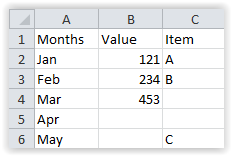
And you are counting missing value for Item(and not Value) field and they are missing at position for Months Mar and Apr. It is fine, I see.

 ashfaq_haseeb
- Mark as New
- Bookmark
- Subscribe
- Mute
- Subscribe to RSS Feed
- Permalink
- Report Inappropriate Content
Hi,
Remove group by clause
LOAD Months,
Value,
MissingCount(Item) as CountOfMissingItem
FROM
(ooxml, embedded labels, table is Sheet1) ;
Regards
ASHFAQ

 sushil353
- Mark as New
- Bookmark
- Subscribe
- Mute
- Subscribe to RSS Feed
- Permalink
- Report Inappropriate Content
Hi,
the no of field in load/select statement should included in group by clause.. so add Value in your Group by as
Group by Month, Value;
HTH
Sushil
tresB
- Mark as New
- Bookmark
- Subscribe
- Mute
- Subscribe to RSS Feed
- Permalink
- Report Inappropriate Content
You have to take all dimensions in the load (except for the one used in aggregation function) under group by clause like:
Group By Months, Value;
nikhilgarg
- Mark as New
- Bookmark
- Subscribe
- Mute
- Subscribe to RSS Feed
- Permalink
- Report Inappropriate Content
HEy,
Without GroupByClause , MissingCount will not work .
nikhilgarg
- Mark as New
- Bookmark
- Subscribe
- Mute
- Subscribe to RSS Feed
- Permalink
- Report Inappropriate Content
Hey,
IT works but i could not get what this MissingCount() function returns ??
I thought it will return numeric value(1 , 0) corresponding to other columns where values are missing.
Please explain.
ashfaq_haseeb
- Mark as New
- Bookmark
- Subscribe
- Mute
- Subscribe to RSS Feed
- Permalink
- Report Inappropriate Content
If it is function then add other fields to group by clause.
if not then
Try below
LOAD
Months,
only(Value) as Value,
MissingCount(Item) as CountOfMissingItem
FROM
(ooxml, embedded labels, table is Sheet1) Group By Months ;
Regards
ASHFAQ
nikhilgarg
- Mark as New
- Bookmark
- Subscribe
- Mute
- Subscribe to RSS Feed
- Permalink
- Report Inappropriate Content
Hey,
I just want to know that if we have 'n' no of dimensions then in GroupByClause we have to take 'n-1' dimensions ??
Is it so ??
ashfaq_haseeb
- Mark as New
- Bookmark
- Subscribe
- Mute
- Subscribe to RSS Feed
- Permalink
- Report Inappropriate Content
you can use only function as shown above to avoid adding dimension to groupby clause.
Regards
ASHFAQ
tresB
- Mark as New
- Bookmark
- Subscribe
- Mute
- Subscribe to RSS Feed
- Permalink
- Report Inappropriate Content
You are right, it returns numeric value. Issue could be somewhere else, like, an understanding-gap between your expectation and our understanding. Hence, try to share a sample data and explain the expected output.

- « Previous Replies
-
- 1
- 2
- Next Replies »