Unlock a world of possibilities! Login now and discover the exclusive benefits awaiting you.

- Qlik Community
- :
- All Forums
- :
- QlikView App Dev
- :
- Re: Field OnChange Trigger
- Subscribe to RSS Feed
- Mark Topic as New
- Mark Topic as Read
- Float this Topic for Current User
- Bookmark
- Subscribe
- Mute
- Printer Friendly Page

- Mark as New
- Bookmark
- Subscribe
- Mute
- Subscribe to RSS Feed
- Permalink
- Report Inappropriate Content
Field OnChange Trigger
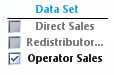
I'm probably just over-thinking this, but I can't seem to make this work. I have a ListBox for a field called "Data Set" that allows the user to limit the data (from a large concatenated fact table) displayed in chart objects. There are only three options. The users can select any one of the values or the first two values at the same time. BUT...the third option can only be selected by itself. So I'm trying to get this trigger to detect if that third option has been selected and, if so, unselect the first two options (if either have been selected). Conversely, if either or both of the first two options is selected, the third is unselected. I hope that makes sense.
- « Previous Replies
-
- 1
- 2
- Next Replies »
- Mark as New
- Bookmark
- Subscribe
- Mute
- Subscribe to RSS Feed
- Permalink
- Report Inappropriate Content
Jagan, the link to that document says I'm not authorized to view.
- Mark as New
- Bookmark
- Subscribe
- Mute
- Subscribe to RSS Feed
- Permalink
- Report Inappropriate Content
As an FYI, it still doesn't behave properly if you use "Windows Checkboxes" as the Selection Style. It does seems to work if you use the "Classic" or "LED" style.
- Mark as New
- Bookmark
- Subscribe
- Mute
- Subscribe to RSS Feed
- Permalink
- Report Inappropriate Content
yeah...Jagan's response helped figure out that we need double quotes and i figured out the * in front of the text in wildmatch is needed...so thanks Jagan 
- Mark as New
- Bookmark
- Subscribe
- Mute
- Subscribe to RSS Feed
- Permalink
- Report Inappropriate Content
yeah...i used classic style...the two checkbox styles (both windows and LED) behave slightly differently from the two styles without them...so i would use the ones that work
- Mark as New
- Bookmark
- Subscribe
- Mute
- Subscribe to RSS Feed
- Permalink
- Report Inappropriate Content
FYI
Using GetCurrentSelections proved to be problematic when other data selections were present so I changed the expression to the following, which seems to be working better.
=If(WildMatch(GetFieldSelections([Data Set]),'*Operator*'),('Operator Sales'),
replace('("' & GetFieldSelections([Data Set]) & '")',', ','"|"'))
- « Previous Replies
-
- 1
- 2
- Next Replies »