Unlock a world of possibilities! Login now and discover the exclusive benefits awaiting you.

- Qlik Community
- :
- All Forums
- :
- QlikView App Dev
- :
- Re: Filtering for specifics
- Subscribe to RSS Feed
- Mark Topic as New
- Mark Topic as Read
- Float this Topic for Current User
- Bookmark
- Subscribe
- Mute
- Printer Friendly Page

- Mark as New
- Bookmark
- Subscribe
- Mute
- Subscribe to RSS Feed
- Permalink
- Report Inappropriate Content
Filtering for specifics
Hello,
I am starting to get more familiar with Qlikview the more I use it but still am having trouble when it comes to creating expressions to help me filter. Right now I am trying to filter out specifically towards clients within a specific region selling a specific product. So say, Client ID number, Region, and Product.
A client ID # will remain the same within regions so it will just end up showing up several times if they are within multiple regions.
So if a client with ID 1 is in NY, NJ, MA. the number 1 will show up 3 times 1 - NY, 1 - NJ, 1 - MA. I am trying to filter out those clients working in only one region and selling a specific product with code 1.
Right now I am trying to write an if statement
If(sum([#_Client_ID]) = 1 AND Product = 1, Client_ID, 0)
Am I not allowed to use And in an if statement?
- Mark as New
- Bookmark
- Subscribe
- Mute
- Subscribe to RSS Feed
- Permalink
- Report Inappropriate Content
Hi,
Actually yes you can use And in an IF, but I'd like to know what kind of values #_Client_ID field has? text, numeric values, 0 and 1 (Boolean). However if you try to sum something for just Client_ID=1 and Product = 1, use something like this:
For this example use a straight table:
Dimension Client_ID (or Client_Name if you want)
Expression: Count({$<Product={1}>} Distinct [#_Client_ID])
or try
Dimension calculated : IF(Sum(aggr(Sum(#_Client_ID),Client_ID)) = 1 and Product = 1, Client_ID,0)
If you share (attach it) an example I can help you more.
Best regards.

 MarcoWedel
- Mark as New
- Bookmark
- Subscribe
- Mute
- Subscribe to RSS Feed
- Permalink
- Report Inappropriate Content
Hi,
maybe this helps also:
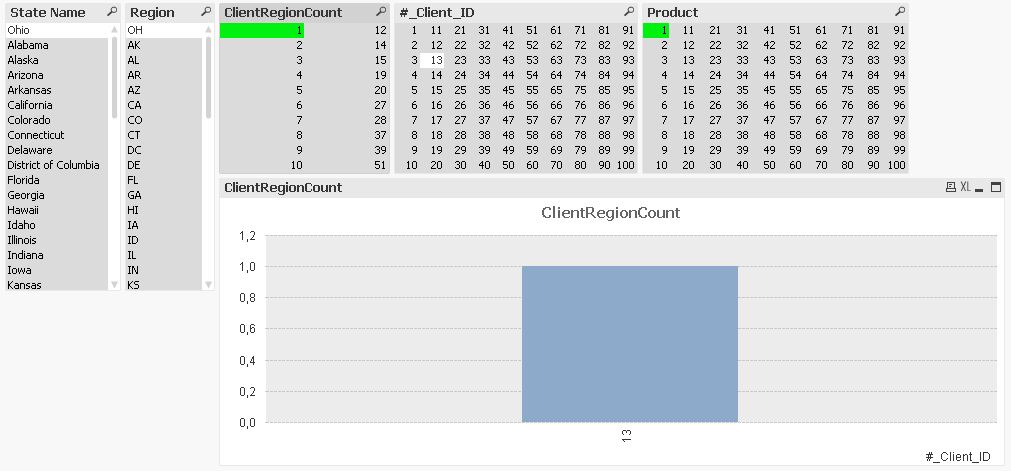
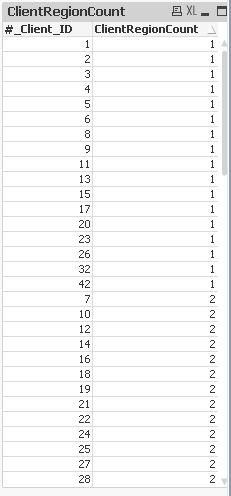
tabStates:
LOAD @1 as [State Name],
    @4 as Region
FROM [http://en.wikipedia.org/wiki/List_of_U.S._state_abbreviations]
(html, codepage is 1252, no labels, table is @1, filters(
Remove(Row, Pos(Top, 1)),Remove(Row, Pos(Top, 1)),Remove(Row, Pos(Top, 1)),Remove(Row, Pos(Top, 1)),Remove(Row, Pos(Top, 77)),
Remove(Row, Pos(Top, 76)),Remove(Row, Pos(Top, 75)),Remove(Row, Pos(Top, 74)),Remove(Row, Pos(Top, 73)),Remove(Row, Pos(Top, 72)),
Remove(Row, Pos(Top, 71)),Remove(Row, Pos(Top, 70)),Remove(Row, Pos(Top, 69)),Remove(Row, Pos(Top, 68)),Remove(Row, Pos(Top, 67)),
Remove(Row, Pos(Top, 66)),Remove(Row, Pos(Top, 65)),Remove(Row, Pos(Top, 64)),Remove(Row, Pos(Top, 63)),Remove(Row, Pos(Top, 62)),
Remove(Row, Pos(Top, 61)),Remove(Row, Pos(Top, 60)),Remove(Row, Pos(Top, 59)),Remove(Row, Pos(Top, 58)),Remove(Row, Pos(Top, 57)),
Remove(Row, Pos(Top, 56)),Remove(Row, Pos(Top, 55)),Remove(Row, Pos(Top, 54)),Remove(Row, Pos(Top, 53)),Remove(Row, Pos(Top, 52))));

mapStates:
Mapping LOAD
  RecNo(),
  Region
Resident tabStates;

tabSalesData:
LOAD ApplyMap('mapStates' ,Ceil(Rand()*51)) as Region,
    Ceil(Rand()*100) as Product,
    Ceil((1-pow(10, -(RowNo()-1)/300))*99)+1 as [#_Client_ID]
AutoGenerate 10000;

tabClientRegion:
LOAD [#_Client_ID],
    Count(DISTINCT Region) as ClientRegionCount
Resident tabSalesData
Group By [#_Client_ID];
regards
Marco
- Mark as New
- Bookmark
- Subscribe
- Mute
- Subscribe to RSS Feed
- Permalink
- Report Inappropriate Content
Hello!
Thank you for the responses.
Oswaldo,
So right now #_CLIENT_ID has numeric values, it is counting the number of the same CLIENT ID numbers that I have.
It is ranging from anywhere from 1 to like 15.
Product is listed as, for example, 1: Wood, 2: Toys, 3: Groceries. In that same exact format.
I want to make a filter that will take out the Clients who only sell 1 product.
For instance, a client who only sells Product 1: Wood.
I used my logic of: If(sum([#_Client_ID]) = 1 AND Product = 1: Wood, Client_ID, 0)
I thought that using sum([#_Client_ID]) = 1 would get me those clients only listed once. Then Product = 1: Wood would get those clients who only sell wood.
Which then the end product would filter out those clients listed once AND only selling wood.
- Mark as New
- Bookmark
- Subscribe
- Mute
- Subscribe to RSS Feed
- Permalink
- Report Inappropriate Content
Hi Richard,
Let me imagine your table structure like this:
Client_ID | Product | Sales | #_Client_ID
1 1 100 2
1 2 200 2
2 1 300 3
2 3 200 3
2 15 300 3
3 1 200 1
so with a simple set analysis you get Clients who sell product 1 and has #_Client_ID =1 use this expression:
IF(#_Client_ID = 1 and Product =1,Client) // return only Client 3
or if your structure is something like this:
Client_ID | Product | Sales | #_Client_ID
1 1 100 1
1 2 200 2
2 1 300 1
2 3 200 2
2 15 300 3
3 1 200 1
and you need sum #_Client_ID, you have to group by Client and sum this field:
MyTable:
Load
Client_ID,
FirstValue(#_Client_ID) as #_Client_ID,
from mydata.qvd
where Product = 1 Group By Client_ID, #_Client_ID;
then use:
IF(#_Client_ID = 1 and Product =1,Client) // return only Client 3
Best regards.