Unlock a world of possibilities! Login now and discover the exclusive benefits awaiting you.

- Qlik Community
- :
- All Forums
- :
- QlikView App Dev
- :
- Grouping values under same concept
- Subscribe to RSS Feed
- Mark Topic as New
- Mark Topic as Read
- Float this Topic for Current User
- Bookmark
- Subscribe
- Mute
- Printer Friendly Page

 absolutconsulti
- Mark as New
- Bookmark
- Subscribe
- Mute
- Subscribe to RSS Feed
- Permalink
- Report Inappropriate Content
Grouping values under same concept
Hi guys,
I have the following problem,
I would like to make a chart grouping some values under the same concept. the first possibility is to add a column to the excel file and group then and then load it, but i would like to do it in Qlikview
Example:
The table look like this
| A | B |
| 1 | 100 |
| 2 | 230 |
| 3 | 330 |
| 4 | 250 |
| 5 | 452 |
| 6 | 452 |
| 7 | 262 |
| 8 | 151 |
| 9 | 393 |
I want to make 3,4 and 9 together. Can someone help me?

 marksouzacosta
- Mark as New
- Bookmark
- Subscribe
- Mute
- Subscribe to RSS Feed
- Permalink
- Report Inappropriate Content
Hi,
I have added an extra column called Group during the Load Script that groups the values 3, 4 and 9 - this will have the same effect as you adding a column in the Excel so I don't know if this is what you are looking for:
[MappingGroups]:
MAPPING LOAD * INLINE [
  ID,GROUP
  3,3
  4,3
  9,3
];


[DataSource]:
LOAD
  A,
  ApplyMap('MappingGroups',A,A) AS Group,
  B
;
LOAD * INLINE [
  A,B
  1,100
  2,230
  3,330
  4,250
  5,452
  6,452
  7,262
  8,151
  9,393
];
This Load Script will generate the following table:
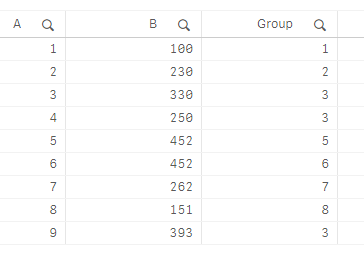
And you can create charts like those below - the Measure expressions are in the header of the charts:

I hope this is what you are looking for.
Regards,
Mark Costa
Read more at Data Voyagers - datavoyagers.net
Follow me on my LinkedIn | Know IPC Global at ipc-global.com
