Unlock a world of possibilities! Login now and discover the exclusive benefits awaiting you.

- Qlik Community
- :
- All Forums
- :
- QlikView App Dev
- :
- Re: How to Add More Values within same Calculated ...
- Subscribe to RSS Feed
- Mark Topic as New
- Mark Topic as Read
- Float this Topic for Current User
- Bookmark
- Subscribe
- Mute
- Printer Friendly Page

- Mark as New
- Bookmark
- Subscribe
- Mute
- Subscribe to RSS Feed
- Permalink
- Report Inappropriate Content
How to Add More Values within same Calculated Column
Hi All,
Below is a Sample Data i have:
| Names | Values | Values2 |
|---|---|---|
| jk8912 | 10 | 20 |
| Nami001 | - | 100 |
| mo024 | 2000 | 4000 |
| hon343 | - | 50 |
| brt110 | 2500 | 5000 |
Output that i want
| Names | Values |
|---|---|
| jk8912 | 12 |
| Nami001 | 50 |
| mo024 | 2000 |
| hon343 | 25 |
| brt110 | 2500 |
How to Calculate only Rows that are Null and Assign 50% of a number we get on (Values2 Column), and it must not affect existing Numbers under (Values column).
- « Previous Replies
-
- 1
- 2
- Next Replies »

 sunny_talwar
- Mark as New
- Bookmark
- Subscribe
- Mute
- Subscribe to RSS Feed
- Permalink
- Report Inappropriate Content
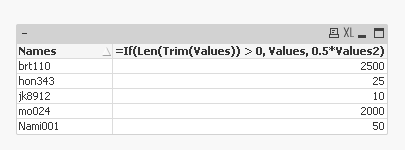
Front end solution:
- Mark as New
- Bookmark
- Subscribe
- Mute
- Subscribe to RSS Feed
- Permalink
- Report Inappropriate Content
Hi Avinash,
so the problem is now my Column is a Calculated one,
so how do i calculate for both
e.g: Sum(Values)
ur Solution:
if(len(values)<=0,Values2/2,values)
so how do i add the to methods in?
Thanks
 avinashelite
- Mark as New
- Bookmark
- Subscribe
- Mute
- Subscribe to RSS Feed
- Permalink
- Report Inappropriate Content
Hi,
try the in expression level or else , in the script create two separate columns like:
LOAD Names,
if(len(values)<=0,Values2/2,values) as Values_without_Null,
values,
value2
from table;
so if you don'e want to show null values then use Values_without_Null column , when you want to calculate the sum
then use values column sum(values) so that both the things are well separated
- Mark as New
- Bookmark
- Subscribe
- Mute
- Subscribe to RSS Feed
- Permalink
- Report Inappropriate Content
Hi,
this what i've applied:
if(len(values)<=0,value2/2,values)
and Hidden the Nor Summation Column and Activate this one to automatically assign Values.
this works.
Thanks.
avinashelite
- Mark as New
- Bookmark
- Subscribe
- Mute
- Subscribe to RSS Feed
- Permalink
- Report Inappropriate Content
cool, if you have got the answer can you please mark it as answered and close this thread 
- « Previous Replies
-
- 1
- 2
- Next Replies »