Unlock a world of possibilities! Login now and discover the exclusive benefits awaiting you.

- Qlik Community
- :
- All Forums
- :
- QlikView App Dev
- :
- How to show List box values conditional?
- Subscribe to RSS Feed
- Mark Topic as New
- Mark Topic as Read
- Float this Topic for Current User
- Bookmark
- Subscribe
- Mute
- Printer Friendly Page

 Suus
Suus
- Mark as New
- Bookmark
- Subscribe
- Mute
- Subscribe to RSS Feed
- Permalink
- Report Inappropriate Content
How to show List box values conditional?
Hi,
Hope someone can help with the following.
I have created a list box on a dimension Klantnaam in my app.
In this I show the expression value sum([Te Factureren Bedrag NC])+sum([Te Factureren Bedrag FP])
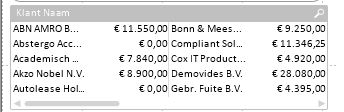
As you can see 'Abstergo' and 'Autolease' show a value of 0.
I would like them to turn 'grey', of exclude from the selection.
How do I achieve this?
Regards, Suzan
- « Previous Replies
-
- 1
- 2
- Next Replies »
Suus
- Mark as New
- Bookmark
- Subscribe
- Mute
- Subscribe to RSS Feed
- Permalink
- Report Inappropriate Content
Both options aren't available in a list box
Suus
- Mark as New
- Bookmark
- Subscribe
- Mute
- Subscribe to RSS Feed
- Permalink
- Report Inappropriate Content
Thanks, another new feature 😉
Unfortunately it gives a blank result.
I get a list box withiout values...
No worries... The Table workaround is good enough.
Unless you really want to pitbull through 😉

 rustyfishbones
- Mark as New
- Bookmark
- Subscribe
- Mute
- Subscribe to RSS Feed
- Permalink
- Report Inappropriate Content
Hi Suzan,
Please see the attached
Regards
Alan
Suus
- Mark as New
- Bookmark
- Subscribe
- Mute
- Subscribe to RSS Feed
- Permalink
- Report Inappropriate Content
Hi Jonathan,
I don't mind if they are no longer visible. Could you explain this option:
You could hide the elements containing 0 values by using a conditional expression in the list box - but this removes them so they are no longer visible.
Where and how do I make the conditional expression?
Regards, Suzan
Suus
- Mark as New
- Bookmark
- Subscribe
- Mute
- Subscribe to RSS Feed
- Permalink
- Report Inappropriate Content
Great! thanks. This works. Only small downside: It doesn't work with grey, but leaves out the dimension entirely.

- Mark as New
- Bookmark
- Subscribe
- Mute
- Subscribe to RSS Feed
- Permalink
- Report Inappropriate Content
Hi Alan,
I also ran across this requirement and thanks for the expression.
Downside to this approach is If we select the listbox with expression it will show only the selected values. My user wants to select multiple values and raises bug.
Can you pls let me know any alternative for this using list box.
P.S : I am a big fan of your Qlik tutorial channel in youtube . Thanks
Murali Krishna

 kstroupe
- Mark as New
- Bookmark
- Subscribe
- Mute
- Subscribe to RSS Feed
- Permalink
- Report Inappropriate Content
Thank you this worked for me exactly like I wanted it too.
- « Previous Replies
-
- 1
- 2
- Next Replies »