Unlock a world of possibilities! Login now and discover the exclusive benefits awaiting you.

- Qlik Community
- :
- All Forums
- :
- QlikView App Dev
- :
- Re: If Statement in Gauge chart - using traffic li...
- Subscribe to RSS Feed
- Mark Topic as New
- Mark Topic as Read
- Float this Topic for Current User
- Bookmark
- Subscribe
- Mute
- Printer Friendly Page

- Mark as New
- Bookmark
- Subscribe
- Mute
- Subscribe to RSS Feed
- Permalink
- Report Inappropriate Content
If Statement in Gauge chart - using traffic light style
Hi I am trying to create an if statement that calculates the percentage of performance based on two seperate factors
Date
Stand
Percentage - 85% or greater should have a green colour and anything below 85% should be red.
I have tried using the following statement:
=count(if({count([A-PAX])-count(if([CHKS]-[SCH]*24*60))/count([A-PAX])}>=85%,1,0))
I wasnt sure how to incorprate the stand or date into the equation should I do those calculations as variables then call the variable instead of tryign to calculate within the expression?
my field stand is defined as STND
I have attached the data I am working with but I am unable to load any changes made as I am using the personal version which only allows me to open documents I have created and modified. Could the code of any suggestions be copied and pasted thank you in advance
Accepted Solutions
- Mark as New
- Bookmark
- Subscribe
- Mute
- Subscribe to RSS Feed
- Permalink
- Report Inappropriate Content
With gague charts, there is no requirement for (and as far as I understand it no usage of) a dimension. In essence they are a dimensionless chart that equates to one number, such as in your instance a performance percentage.
Also, to do the greater than 85% as green you need to do some changes on the presentation properties, namely unselect the Autowidth segments, swap the green and red segments around and set the value of the second segment to 0.85.
However, before you do what would be quite a tedious task, not that a gauge chart isn't the only option as you can use text objects to display images.
As for the expression you could use such gauges or text object images, you can add STND into your expression as follows:
=(count({$<STND={'1'}>} [A-PAX])-count({$<STND={'1'}>} if((CHKS-SCH)*24*60>=15,1)))/count({$<STND={'1'}>} [A-PAX])
I'm not sure how dynamic you would be able to make the presentation of these traffic lights against your background, so for now have just included the STND number within the expression.
Jonathan
- Mark as New
- Bookmark
- Subscribe
- Mute
- Subscribe to RSS Feed
- Permalink
- Report Inappropriate Content
Ive just tried using:
=count({<STND={'1'}>[OnTime%])
where STND is declaring the stand and OnTime% has the calculation shown above, but for each section of the ontime calculation I put them in variables.
- Mark as New
- Bookmark
- Subscribe
- Mute
- Subscribe to RSS Feed
- Permalink
- Report Inappropriate Content
Ive Just tried writing the expression in long hand:
=({<count[A-PAX]>}-{<count(if(([CHKS]-[SCH])*24*60>=15,1))>}/{<count[A-PAX]>})
any guidance would be much appreciated
- Mark as New
- Bookmark
- Subscribe
- Mute
- Subscribe to RSS Feed
- Permalink
- Report Inappropriate Content
Hi I have managed to retrieve the correct answer but that is without the the additional pre condition STND
=(count([A-PAX])-count(if((CHKS-SCH)*24*60>=15,1)))/count([A-PAX])
Any help on how I could incorporate a predefined STND number would be appreciated.
- Mark as New
- Bookmark
- Subscribe
- Mute
- Subscribe to RSS Feed
- Permalink
- Report Inappropriate Content
With gague charts, there is no requirement for (and as far as I understand it no usage of) a dimension. In essence they are a dimensionless chart that equates to one number, such as in your instance a performance percentage.
Also, to do the greater than 85% as green you need to do some changes on the presentation properties, namely unselect the Autowidth segments, swap the green and red segments around and set the value of the second segment to 0.85.
However, before you do what would be quite a tedious task, not that a gauge chart isn't the only option as you can use text objects to display images.
As for the expression you could use such gauges or text object images, you can add STND into your expression as follows:
=(count({$<STND={'1'}>} [A-PAX])-count({$<STND={'1'}>} if((CHKS-SCH)*24*60>=15,1)))/count({$<STND={'1'}>} [A-PAX])
I'm not sure how dynamic you would be able to make the presentation of these traffic lights against your background, so for now have just included the STND number within the expression.
Jonathan
- Mark as New
- Bookmark
- Subscribe
- Mute
- Subscribe to RSS Feed
- Permalink
- Report Inappropriate Content
Hi Jonathan,
thanks so much it worked correctly is similar to the expression I was writing I only had one STND definition at the start of the expression instead of before each variable.
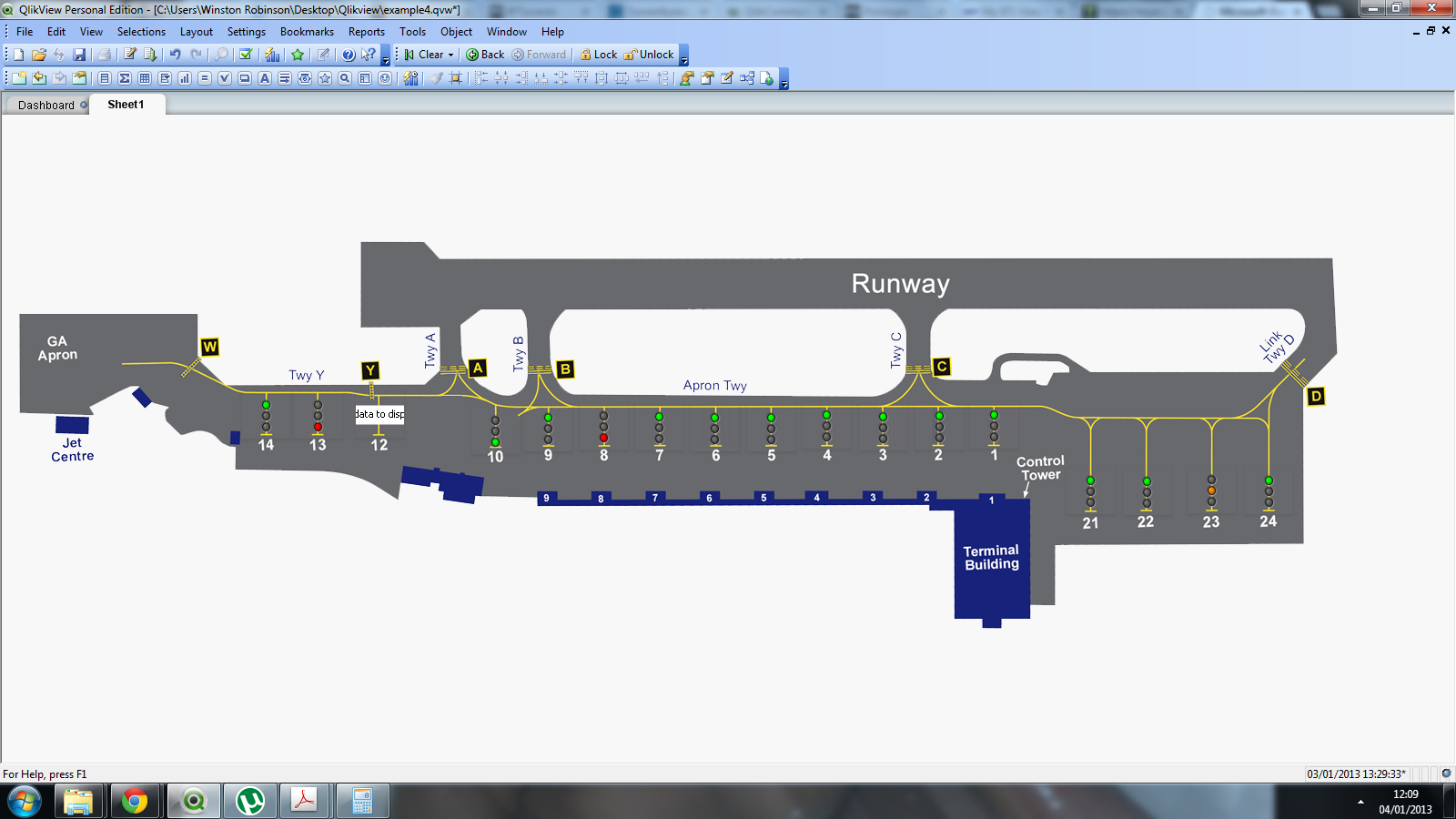
One question though is there a way for me to display red colour if no data is there to display. please see attached picture as you can see stand 12 has a text image in replace of the traffic light as no data is present.