Unlock a world of possibilities! Login now and discover the exclusive benefits awaiting you.

- Qlik Community
- :
- All Forums
- :
- QlikView App Dev
- :
- Line graphs, line types
- Subscribe to RSS Feed
- Mark Topic as New
- Mark Topic as Read
- Float this Topic for Current User
- Bookmark
- Subscribe
- Mute
- Printer Friendly Page

- Mark as New
- Bookmark
- Subscribe
- Mute
- Subscribe to RSS Feed
- Permalink
- Report Inappropriate Content
Line graphs, line types
Hello.
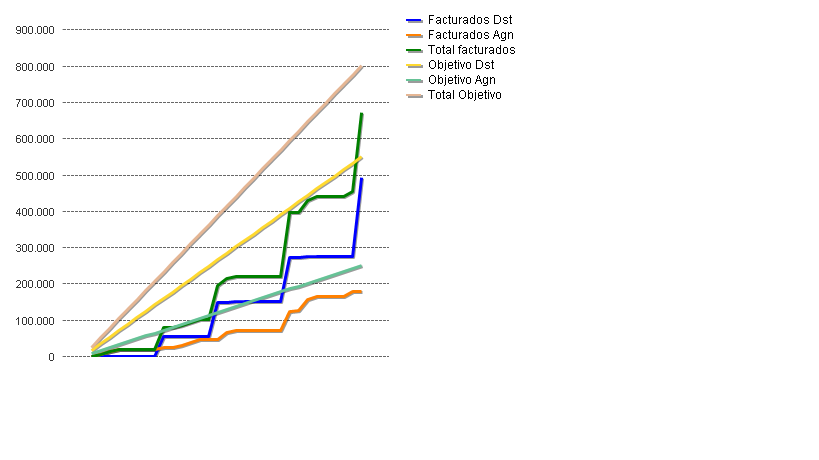
I have a line chart with 6 expressions (3 of sales and 3 of budget), and I want the budget lines are not continuous.
As I can do?
Regards
- Tags:
- new_to_qlikview
Accepted Solutions

 swuehl
- Mark as New
- Bookmark
- Subscribe
- Mute
- Subscribe to RSS Feed
- Permalink
- Report Inappropriate Content
Open the attributes of the budget expression By clicking the plus Sign next to the expression label, select line style and enter as attribute expression e.g.
'<S3>'
Hope this helps
Stefan
swuehl
- Mark as New
- Bookmark
- Subscribe
- Mute
- Subscribe to RSS Feed
- Permalink
- Report Inappropriate Content
Open the attributes of the budget expression By clicking the plus Sign next to the expression label, select line style and enter as attribute expression e.g.
'<S3>'
Hope this helps
Stefan
- Mark as New
- Bookmark
- Subscribe
- Mute
- Subscribe to RSS Feed
- Permalink
- Report Inappropriate Content
Thanks for the help Stefan, works as expected.
Other types of line there?
Thanks and regards
swuehl
- Mark as New
- Bookmark
- Subscribe
- Mute
- Subscribe to RSS Feed
- Permalink
- Report Inappropriate Content
Yes:
<S1> solid
<S2> dashed
<S3> dotted
<S4> combined
You can also set the line width using <Wn> n being 0.5 to 8
Try
'<W8><S4>'
😉
- Mark as New
- Bookmark
- Subscribe
- Mute
- Subscribe to RSS Feed
- Permalink
- Report Inappropriate Content
Thanks again, Stefan.
As always a great help 
Gabi