Unlock a world of possibilities! Login now and discover the exclusive benefits awaiting you.

Announcements
FLASH SALE: Save $500! Use code FLASH2026 at checkout until Feb 14th at 11:59PM ET. Register Now!
- Qlik Community
- :
- All Forums
- :
- QlikView App Dev
- :
- Link button and active selections
Options
- Subscribe to RSS Feed
- Mark Topic as New
- Mark Topic as Read
- Float this Topic for Current User
- Bookmark
- Subscribe
- Mute
- Printer Friendly Page
Turn on suggestions
Auto-suggest helps you quickly narrow down your search results by suggesting possible matches as you type.
Showing results for

 cksuperlatif
Contributor III
2015-11-19
03:21 AM
- Mark as New
- Bookmark
- Subscribe
- Mute
- Subscribe to RSS Feed
- Permalink
- Report Inappropriate Content
Link button and active selections
Hy,
That's what I want to get:
If I move active selections, I want that my close button move with it.
I dont know how to do it, need your help please.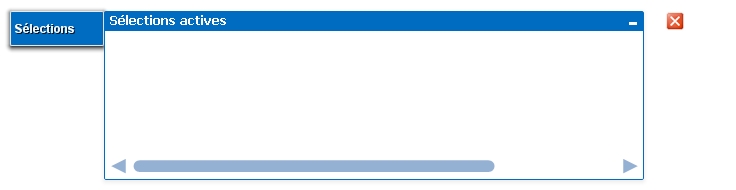
516 Views
2 Replies

 marcus_sommer
MVP
2015-11-19
10:04 AM
- Mark as New
- Bookmark
- Subscribe
- Mute
- Subscribe to RSS Feed
- Permalink
- Report Inappropriate Content
You need to select both objects - pressing shift-key and left-clicking on objects (without title it's difficult) or per lasso-selection with the mouse (circle around both objects).
- Marcus
398 Views
cksuperlatif
Contributor III
2015-11-23
04:28 AM
Author
- Mark as New
- Bookmark
- Subscribe
- Mute
- Subscribe to RSS Feed
- Permalink
- Report Inappropriate Content
Thank Marcus
but I want to link it realy to form only one object to apply an action to both
398 Views
