Unlock a world of possibilities! Login now and discover the exclusive benefits awaiting you.

- Qlik Community
- :
- All Forums
- :
- QlikView App Dev
- :
- Re: List Box
- Subscribe to RSS Feed
- Mark Topic as New
- Mark Topic as Read
- Float this Topic for Current User
- Bookmark
- Subscribe
- Mute
- Printer Friendly Page

 smilingjohn
- Mark as New
- Bookmark
- Subscribe
- Mute
- Subscribe to RSS Feed
- Permalink
- Report Inappropriate Content
List Box
Hi Guys,
As u can see i have atached a snap shot of the list box ,
My requirement is like if i clear it by defualt it should always get current year and current month selected .Can plz some one through some light on this ?
Detail:
now i have selcted 2014 year and month as jun
When i clear the dashboard it should select the current year and current month .
Thnaks
- Tags:
- new_to_qlikview


- « Previous Replies
-
- 1
- 2
- Next Replies »
smilingjohn
- Mark as New
- Bookmark
- Subscribe
- Mute
- Subscribe to RSS Feed
- Permalink
- Report Inappropriate Content
Hi Grean Baxter
My list box are populated from fields
iam not able to get this
iam attaching the error file plz find it
smilingjohn
- Mark as New
- Bookmark
- Subscribe
- Mute
- Subscribe to RSS Feed
- Permalink
- Report Inappropriate Content
No john it not working , and in my main post i have also attached the error message snap shot plz find it

- Mark as New
- Bookmark
- Subscribe
- Mute
- Subscribe to RSS Feed
- Permalink
- Report Inappropriate Content
Hi
Remove the '=' from the Field name and double quotes from search string.


 jagan
jagan
- Mark as New
- Bookmark
- Subscribe
- Mute
- Subscribe to RSS Feed
- Permalink
- Report Inappropriate Content
Hi,
Try like this
- Add-->Selection-->Clear All
- Add-->Selection-->Select in Field
Field: FiscalYear,
Search String : = Year(Today())
3) Add-->Selection-->Select in Field
Field: FiscalMonth,
Search string: = Text(Month(Today()))
Hope this helps you.
Regards,
Jagan.
- Mark as New
- Bookmark
- Subscribe
- Mute
- Subscribe to RSS Feed
- Permalink
- Report Inappropriate Content
1. Create a variable
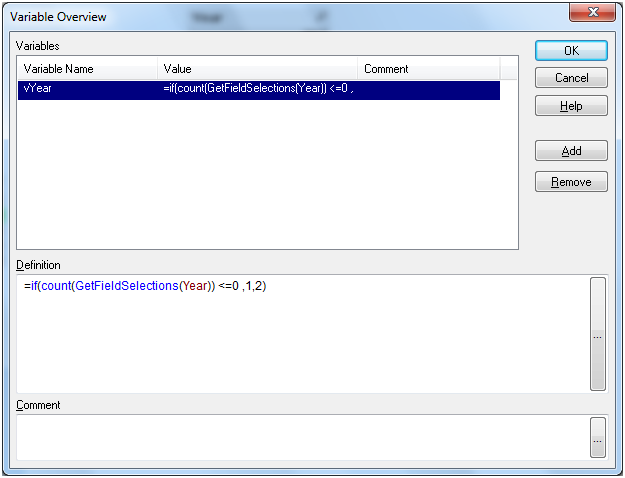
Go to Document properties - > Onchange -> Add Action
Get that variable in a text box
Get that variable in a text box
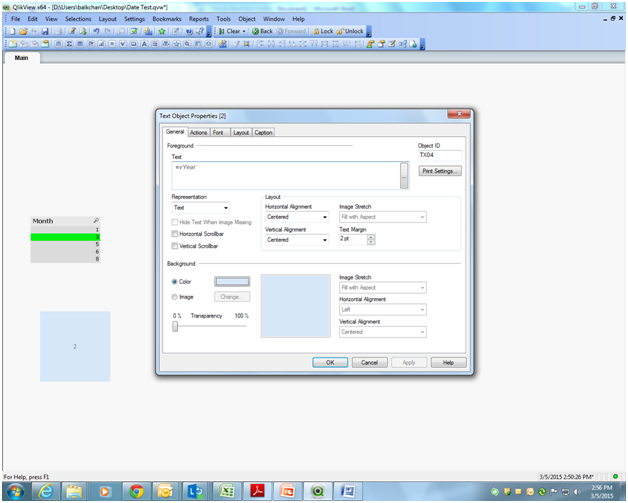
Note : Hide text object by Transparency and font color as white (without printing the variable it will not work ) but thats not the problem.
- Mark as New
- Bookmark
- Subscribe
- Mute
- Subscribe to RSS Feed
- Permalink
- Report Inappropriate Content
let me know if your requirement is something else
smilingjohn
- Mark as New
- Bookmark
- Subscribe
- Mute
- Subscribe to RSS Feed
- Permalink
- Report Inappropriate Content
HI balkumar ,
Iam attaching my QVW , if u look at the fiscal year and fiscal month u can select the vules depending on requirement ,
but when we clear it the selection should go back to current month and current year , as of not 2015 is current year and Apr is current month .
Can u please help me
thanks
jagan
- Mark as New
- Bookmark
- Subscribe
- Mute
- Subscribe to RSS Feed
- Permalink
- Report Inappropriate Content
Hi,
Please find attached file for solution
Regards,
Jagan.
smilingjohn
- Mark as New
- Bookmark
- Subscribe
- Mute
- Subscribe to RSS Feed
- Permalink
- Report Inappropriate Content
Thankuuu very muchhhhh Jagan
Can u please tell me what doese this do ?
Text(Month(YearStart(Today(), 0, 4)))
- « Previous Replies
-
- 1
- 2
- Next Replies »