Unlock a world of possibilities! Login now and discover the exclusive benefits awaiting you.

- Qlik Community
- :
- All Forums
- :
- QlikView App Dev
- :
- List Box
- Subscribe to RSS Feed
- Mark Topic as New
- Mark Topic as Read
- Float this Topic for Current User
- Bookmark
- Subscribe
- Mute
- Printer Friendly Page

 NavinReddy
- Mark as New
- Bookmark
- Subscribe
- Mute
- Subscribe to RSS Feed
- Permalink
- Report Inappropriate Content
List Box
Dear All,
I have a list box How can i apply filters
Region list box ,How can filter(US,UK,CHINA,INDIA,SINGAPORE)
if(Wildmatch([Region],'US','UK','CHINA','INDIA','SINGAPORE'),[Region])
Im using this but im getting Other Region Values also
Please help me Some one
Thanks In Advance
Niru
- « Previous Replies
-
- 1
- 2
- Next Replies »
Accepted Solutions

 MK_QSL
- Mark as New
- Bookmark
- Subscribe
- Mute
- Subscribe to RSS Feed
- Permalink
- Report Inappropriate Content
Create a pivot table
Calculated Dimension
IF(Match(Region,'US','UK','CHINA','INDIA','SINGAPORE'), Region)
Tick Suppress When Value is NULL
Expression
SUM(Sales)

 its_anandrjs
- Mark as New
- Bookmark
- Subscribe
- Mute
- Subscribe to RSS Feed
- Permalink
- Report Inappropriate Content
Use like take a list box and select Expression and type this code
if(Wildmatch([Region],'US','UK','CHINA','INDIA','SINGAPORE'),[Region])
Hope this helps
MK_QSL
- Mark as New
- Bookmark
- Subscribe
- Mute
- Subscribe to RSS Feed
- Permalink
- Report Inappropriate Content
IF(Match(Region,'US','UK','CHINA','INDIA','SINGAPORE'), Region)
its_anandrjs
- Mark as New
- Bookmark
- Subscribe
- Mute
- Subscribe to RSS Feed
- Permalink
- Report Inappropriate Content
You can create a field from this in load script also like
if(MixMatch([Region],'US','UK','CHINA','INDIA','SINGAPORE'),[Region]) as FilterRegion
Hope this helps
NavinReddy
- Mark as New
- Bookmark
- Subscribe
- Mute
- Subscribe to RSS Feed
- Permalink
- Report Inappropriate Content
But again im getting other values ' - '
like symbol
 maxgro
- Mark as New
- Bookmark
- Subscribe
- Mute
- Subscribe to RSS Feed
- Permalink
- Report Inappropriate Content
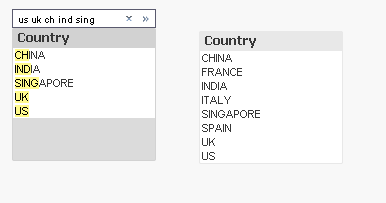
like this?
NavinReddy
- Mark as New
- Bookmark
- Subscribe
- Mute
- Subscribe to RSS Feed
- Permalink
- Report Inappropriate Content
Yes Like the way only,
when i apply filters But im getting
Other than Filter values also
NavinReddy
- Mark as New
- Bookmark
- Subscribe
- Mute
- Subscribe to RSS Feed
- Permalink
- Report Inappropriate Content
Im using this into Dimention limit in Pivot chart
there im getting other than filters also
MK_QSL
- Mark as New
- Bookmark
- Subscribe
- Mute
- Subscribe to RSS Feed
- Permalink
- Report Inappropriate Content
Create a pivot table
Calculated Dimension
IF(Match(Region,'US','UK','CHINA','INDIA','SINGAPORE'), Region)
Tick Suppress When Value is NULL
Expression
SUM(Sales)
its_anandrjs
- Mark as New
- Bookmark
- Subscribe
- Mute
- Subscribe to RSS Feed
- Permalink
- Report Inappropriate Content
Take a list box and type below code in expression
=if(MixMatch([Region],'US','UK','CHINA','INDIA','SINGAPORE'),[Region])
or you can add a field in load script like
if(MixMatch([Region],'US','UK','CHINA','INDIA','SINGAPORE'),[Region]) as FilterRegion
or you can use this in any chart also
Hope this helps

- « Previous Replies
-
- 1
- 2
- Next Replies »