Unlock a world of possibilities! Login now and discover the exclusive benefits awaiting you.

- Qlik Community
- :
- All Forums
- :
- QlikView App Dev
- :
- Re: Locating chart objects
- Subscribe to RSS Feed
- Mark Topic as New
- Mark Topic as Read
- Float this Topic for Current User
- Bookmark
- Subscribe
- Mute
- Printer Friendly Page

- Mark as New
- Bookmark
- Subscribe
- Mute
- Subscribe to RSS Feed
- Permalink
- Report Inappropriate Content
Locating chart objects
Hi,
I have a QVW file which contains about 70+ objects. Is there an easy to find the object and be able to locate
it directly? For example, say I have an object ID and it's CH50. I want to go this object directly but don't know which sheet
contains it. I could go through one by one and eventually I'll find it. Just looking for an efficient way.
Thanks
- Tags:
- new_to_qlikview
- « Previous Replies
-
- 1
- 2
- Next Replies »
- Mark as New
- Bookmark
- Subscribe
- Mute
- Subscribe to RSS Feed
- Permalink
- Report Inappropriate Content
Adam,
Yes, it looks like that's what I have to do. I wish there was a feature in the tool to do a "Find" and "Activate"
the object. Thanks for everyone's help.
- Mark as New
- Bookmark
- Subscribe
- Mute
- Subscribe to RSS Feed
- Permalink
- Report Inappropriate Content
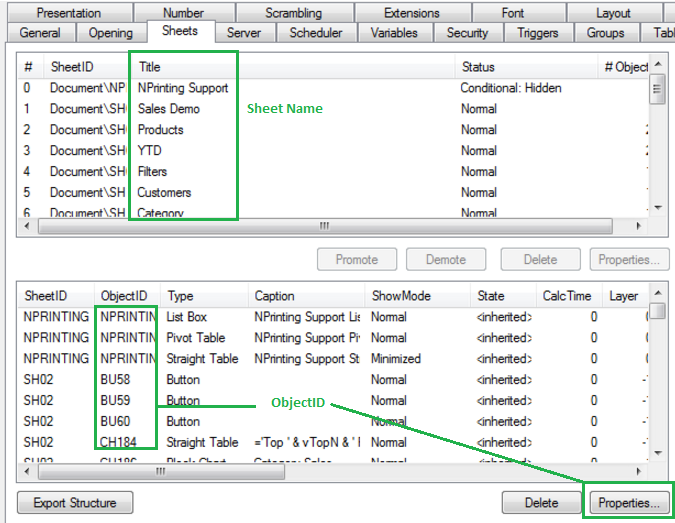
If you go to :
- Settings
- Document Properties
- Sheets
You see a list of all the Objects.
Find your Object and then you can the Sheet ID and Caption.
Still not perfect. but better than just looking blind.

 vcanale
- Mark as New
- Bookmark
- Subscribe
- Mute
- Subscribe to RSS Feed
- Permalink
- Report Inappropriate Content

 jyothish8807
- Mark as New
- Bookmark
- Subscribe
- Mute
- Subscribe to RSS Feed
- Permalink
- Report Inappropriate Content
Hi sidneylu,
As i mentioned above, it can only be achieved by creating some logic using macros. 
Regards
KC
KC
- Mark as New
- Bookmark
- Subscribe
- Mute
- Subscribe to RSS Feed
- Permalink
- Report Inappropriate Content
Would you know how to write this macro? I'm interested to see what the code looks like but I don't know how
to write it as I'm new to QV development. Thanks
- « Previous Replies
-
- 1
- 2
- Next Replies »