Unlock a world of possibilities! Login now and discover the exclusive benefits awaiting you.

- Qlik Community
- :
- All Forums
- :
- QlikView App Dev
- :
- Merge cells
- Subscribe to RSS Feed
- Mark Topic as New
- Mark Topic as Read
- Float this Topic for Current User
- Bookmark
- Subscribe
- Mute
- Printer Friendly Page

- Mark as New
- Bookmark
- Subscribe
- Mute
- Subscribe to RSS Feed
- Permalink
- Report Inappropriate Content
Merge cells
Hello everyone,
It seems that the topic of "Merging Cells" is a known issue to Qlikview users, and I am also having some trouble with this.
On the example I have attached there is a straight table. On this table, the column "Description" has repeated values, as well as the "Stat" column and the "aggr" column.
But I would like to merge the cells with the repeated values like on the attached image.
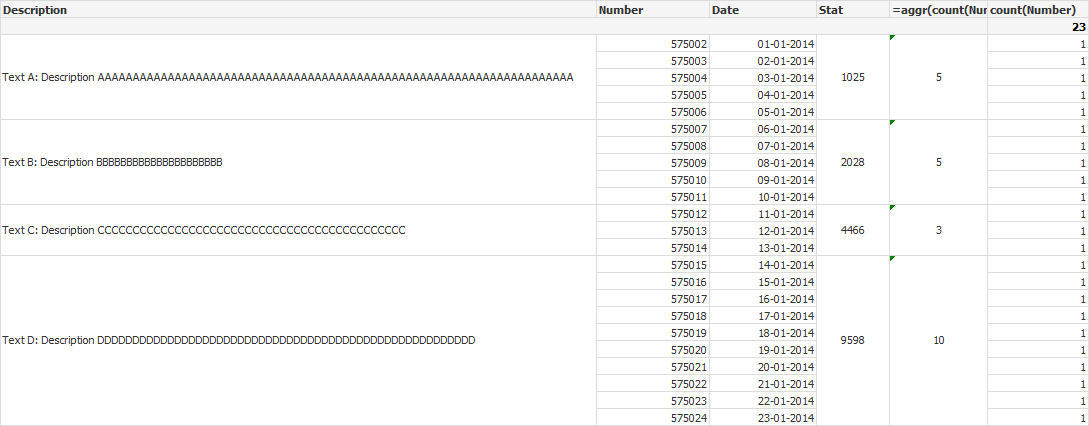
Is there a way to do this in Qlikview?
Thank you for the support!
Best regards
Accepted Solutions
- Mark as New
- Bookmark
- Subscribe
- Mute
- Subscribe to RSS Feed
- Permalink
- Report Inappropriate Content
Hi Ivo,
the straight table will always populate repeat each row like that yes, you will need to convert to a pivot table instead(like in your image) to result in one entry for each description.
Please note though, that even if you change to a pivot, if you then try to export this to excel, it will populate each row again in the output
hope that helps
thanks
Joe
- Mark as New
- Bookmark
- Subscribe
- Mute
- Subscribe to RSS Feed
- Permalink
- Report Inappropriate Content
Hi Ivo,
the straight table will always populate repeat each row like that yes, you will need to convert to a pivot table instead(like in your image) to result in one entry for each description.
Please note though, that even if you change to a pivot, if you then try to export this to excel, it will populate each row again in the output
hope that helps
thanks
Joe

 israrkhan
- Mark as New
- Bookmark
- Subscribe
- Mute
- Subscribe to RSS Feed
- Permalink
- Report Inappropriate Content
find the attachment, see om Sheet 2 as well.
Hope it help

 SunilChauhan
- Mark as New
- Bookmark
- Subscribe
- Mute
- Subscribe to RSS Feed
- Permalink
- Report Inappropriate Content
why not use Pivot table like attched
or
 VishalWaghole
- Mark as New
- Bookmark
- Subscribe
- Mute
- Subscribe to RSS Feed
- Permalink
- Report Inappropriate Content
Hi,
Only use pivot table instead of straight, your problem will be solve.
-- Regards,
Vishal Waghole
- Mark as New
- Bookmark
- Subscribe
- Mute
- Subscribe to RSS Feed
- Permalink
- Report Inappropriate Content
So, I was able to make the "merge cells" with the pivot table, but I have another problem.
I would like to remove the last column "count", because it does not make sense to be there, but this column is comes from a expression and if I delete it the table does not load the results...
In attachment is the current state. I only have the personal edition of QV so if you change something and save with the professional edition I will not be able to open it.
Thank you for the help!
- Mark as New
- Bookmark
- Subscribe
- Mute
- Subscribe to RSS Feed
- Permalink
- Report Inappropriate Content
Hi Ivo,
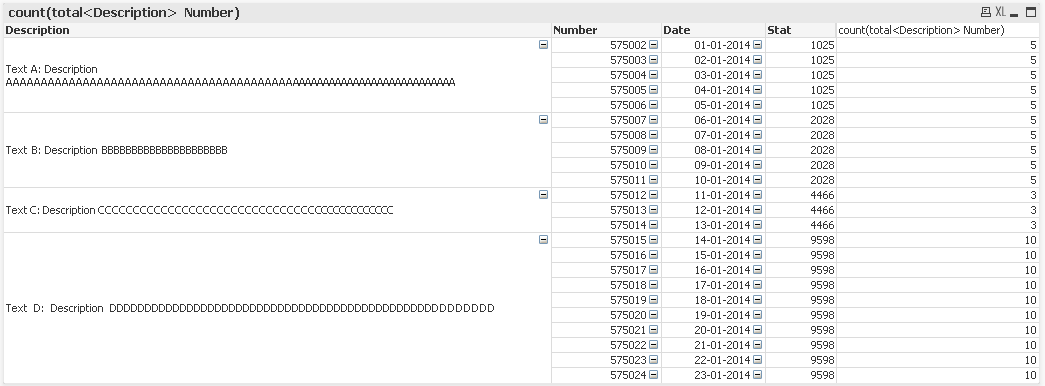
can't send you qvw I'm afraid but I think I know what you are after, all the rows but the overall total for each description?
If you remove your calculated dimension and count, then replace with new expression
count(total<Description> Number)
that should give you the answer.
Hope that helps
Joe
- Mark as New
- Bookmark
- Subscribe
- Mute
- Subscribe to RSS Feed
- Permalink
- Report Inappropriate Content
Yes this way it works properly 
Thank you everyone for the help!!
- Mark as New
- Bookmark
- Subscribe
- Mute
- Subscribe to RSS Feed
- Permalink
- Report Inappropriate Content
Hi, JoeSimmons,
in the above table if I want to show value 1025 & also count just once for Text A: Description.... How can I do that?
and in my case both 1025 and count is an expression.
Thanks