Unlock a world of possibilities! Login now and discover the exclusive benefits awaiting you.

- Qlik Community
- :
- All Forums
- :
- QlikView App Dev
- :
- Re: Number format pattern for accounting
- Subscribe to RSS Feed
- Mark Topic as New
- Mark Topic as Read
- Float this Topic for Current User
- Bookmark
- Subscribe
- Mute
- Printer Friendly Page

- Mark as New
- Bookmark
- Subscribe
- Mute
- Subscribe to RSS Feed
- Permalink
- Report Inappropriate Content
Number format pattern for accounting
Hello,
Is it possible to make a number format pattern to make my table in qlikview look like this?
I tried to do it with Tab and spaces but it will just look wrong
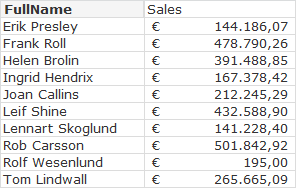
thanks for your help 
Accepted Solutions

 jonathandienst
- Mark as New
- Bookmark
- Subscribe
- Mute
- Subscribe to RSS Feed
- Permalink
- Report Inappropriate Content
Hi
I don't think that is possible. Aligning with spaces will only work with a monospaced font (like Courier New or one of the Console fonts).
What you could do is create an expression ='€' and a blank label to display the currency symbol in a column.
HTH
Jonathan

 tresB
tresB
- Mark as New
- Bookmark
- Subscribe
- Mute
- Subscribe to RSS Feed
- Permalink
- Report Inappropriate Content
In the number tab, take money format and put spaces like:

jonathandienst
- Mark as New
- Bookmark
- Subscribe
- Mute
- Subscribe to RSS Feed
- Permalink
- Report Inappropriate Content
Hi
I don't think that is possible. Aligning with spaces will only work with a monospaced font (like Courier New or one of the Console fonts).
What you could do is create an expression ='€' and a blank label to display the currency symbol in a column.
HTH
Jonathan
- Mark as New
- Bookmark
- Subscribe
- Mute
- Subscribe to RSS Feed
- Permalink
- Report Inappropriate Content
Hi treseco,
i tried that first but it will not be alligned nicely.
The report needs to look clean. not jumping currency signs
- Mark as New
- Bookmark
- Subscribe
- Mute
- Subscribe to RSS Feed
- Permalink
- Report Inappropriate Content
Hi,
Just contacted my Qlik Trainer, needed answer fairly quick.
Indeed as Jonathan mentions it is not possible. the best solution is to create expression with currency symbol.
thanks for your reply

 marcus_sommer
- Mark as New
- Bookmark
- Subscribe
- Mute
- Subscribe to RSS Feed
- Permalink
- Report Inappropriate Content
I would prefer a solution like jonathan dienst suggested - it's clear and wasted not space. But if you really want such format you could use a format-function like: num(144186.07, '€ #.##0,00') with a monospaced font or with more effort count the len from your numbers and create with repeat your needed count of space-chars. But you won't reach a pixel-perfect look if you don't used a monospace font - it's only nearby ...
- Marcus
- Mark as New
- Bookmark
- Subscribe
- Mute
- Subscribe to RSS Feed
- Permalink
- Report Inappropriate Content
Yes, this is the solution i used in the end and the client was happy with the result so thank you all for the help.