Unlock a world of possibilities! Login now and discover the exclusive benefits awaiting you.

- Qlik Community
- :
- All Forums
- :
- QlikView App Dev
- :
- Pick/Match and Current Selections
- Subscribe to RSS Feed
- Mark Topic as New
- Mark Topic as Read
- Float this Topic for Current User
- Bookmark
- Subscribe
- Mute
- Printer Friendly Page

- Mark as New
- Bookmark
- Subscribe
- Mute
- Subscribe to RSS Feed
- Permalink
- Report Inappropriate Content
Pick/Match and Current Selections
Hello-
I'm using pick/match for a few fields. My object shows the new value. However, when these fields are selected, the current selections box shows the original value. Is there a way I can fix this? I'm not opposed to using a text box and creating a new current selections box. Can this be done? Thanks in advance!
-Tina
- « Previous Replies
-
- 1
- 2
- Next Replies »
- Mark as New
- Bookmark
- Subscribe
- Mute
- Subscribe to RSS Feed
- Permalink
- Report Inappropriate Content
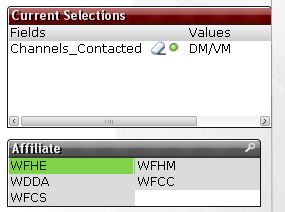
I think my original question got sidetracked.  I used a pick/match statement to create a new values for a particular field. When I click on these new values my current selection box shows the old values not the new values. In the pictures below is an example. I would like the current selections to read Fields = Affiliate and Values = WFHE. Is there a fix for this outside of the load script?
.png "Miguel_Angel_Baeyens")
 Miguel_Angel_Ba
- Mark as New
- Bookmark
- Subscribe
- Mute
- Subscribe to RSS Feed
- Permalink
- Report Inappropriate Content
Tina,
The current selections object always shows (and only) the actual field names and values. If you want to show something different you can create two fields in the script, as JasleenP_SR suggested above, one with the actual value, the other one with the value you want to show, and use the latter for selections. Actually is quite usual, for example, Item No and Item Description. (Use the numeric code in set analysis and expressions, but show the user the more familiar Description).
Hope that helps.
BI Consultant
- Mark as New
- Bookmark
- Subscribe
- Mute
- Subscribe to RSS Feed
- Permalink
- Report Inappropriate Content
I'm attaching the qvw for your ref. tina....
- Mark as New
- Bookmark
- Subscribe
- Mute
- Subscribe to RSS Feed
- Permalink
- Report Inappropriate Content
Thanks!
- « Previous Replies
-
- 1
- 2
- Next Replies »