Unlock a world of possibilities! Login now and discover the exclusive benefits awaiting you.

- Qlik Community
- :
- All Forums
- :
- QlikView App Dev
- :
- Re: Pivot table
- Subscribe to RSS Feed
- Mark Topic as New
- Mark Topic as Read
- Float this Topic for Current User
- Bookmark
- Subscribe
- Mute
- Printer Friendly Page

 upaliwije
- Mark as New
- Bookmark
- Subscribe
- Mute
- Subscribe to RSS Feed
- Permalink
- Report Inappropriate Content
Pivot table
Hi Friends
I have attached document with two pivot tables. The both tables are working fine as they are. But when I select month other than 1 (jan)
last column of the 2nd pivot table shows no value. If i select month 2 last two columns of the 2nd pivot table become zero. Pls help me to solve this problem by modifying the set expression
Accepted Solutions

 Gysbert_Wassena
- Mark as New
- Bookmark
- Subscribe
- Mute
- Subscribe to RSS Feed
- Permalink
- Report Inappropriate Content
The problem is that you take the max of the MonthId and add 11. For months larger than 1 you end up with values of 13 and higher, which don't exist in your data.
MonthId: 2 => MONTH={$(=Max(MonthId)+11)} => MONTH={$(=2+11)} => MONTH={13} => no data, sum = 0.
Try adding a mod in the expression:
sum({<Year={$(=Max(YEAR))},MONTH={$(=mod(Max(MonthId)+11,12)+1)}>}$(=Upper(Month(AddMonths(MakeDate($(=Max(YEAR)), $(=max(MonthId))),11)))&'_NRP'))
talk is cheap, supply exceeds demand
.png "bbi_mba_76") bbi_mba_76
bbi_mba_76
- Mark as New
- Bookmark
- Subscribe
- Mute
- Subscribe to RSS Feed
- Permalink
- Report Inappropriate Content
Hi,
if you delete the label expression you can see the expression in the header
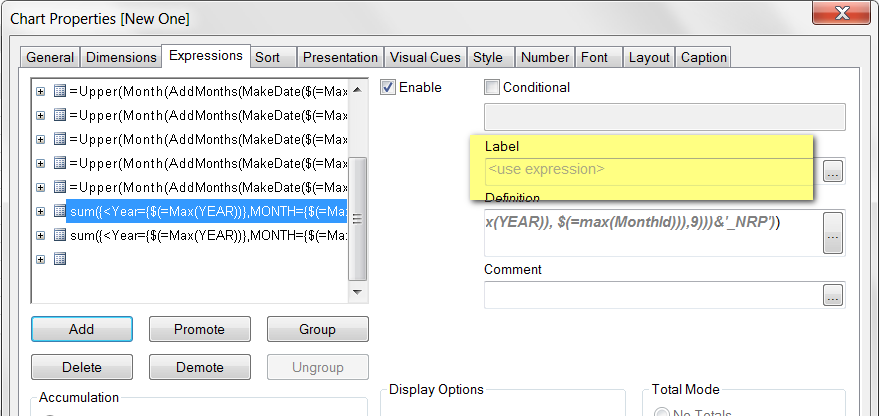
And you can see that your set analysis is searching for month 13, when I selected 4


 SunilChauhan
- Mark as New
- Bookmark
- Subscribe
- Mute
- Subscribe to RSS Feed
- Permalink
- Report Inappropriate Content
Months are not connected hence the problem
in first table add one more column
MONTH as MonthId
reload and check
hope this work for you
upaliwije
- Mark as New
- Bookmark
- Subscribe
- Mute
- Subscribe to RSS Feed
- Permalink
- Report Inappropriate Content
Hi BBI
Instead of searching 13 when you select month 4 I want to modify the set analysis to search Next month. That is Jan .
Pls correct my Set expression to obtain the desired results
Gysbert_Wassena- Mark as New
- Bookmark
- Subscribe
- Mute
- Subscribe to RSS Feed
- Permalink
- Report Inappropriate Content
The problem is that you take the max of the MonthId and add 11. For months larger than 1 you end up with values of 13 and higher, which don't exist in your data.
MonthId: 2 => MONTH={$(=Max(MonthId)+11)} => MONTH={$(=2+11)} => MONTH={13} => no data, sum = 0.
Try adding a mod in the expression:
sum({<Year={$(=Max(YEAR))},MONTH={$(=mod(Max(MonthId)+11,12)+1)}>}$(=Upper(Month(AddMonths(MakeDate($(=Max(YEAR)), $(=max(MonthId))),11)))&'_NRP'))
talk is cheap, supply exceeds demand
bbi_mba_76
- Mark as New
- Bookmark
- Subscribe
- Mute
- Subscribe to RSS Feed
- Permalink
- Report Inappropriate Content
I think you have to use autonumber on the period (YYYY*100+MM) in the script.
This way if I select a period (generated ID 14) you can add 11 and retrieve the 11th period consecutive(generated ID 25)
upaliwije
- Mark as New
- Bookmark
- Subscribe
- Mute
- Subscribe to RSS Feed
- Permalink
- Report Inappropriate Content
So can you please modify my expression to avoid month 13 and return month 1 when month exceeds 12
upaliwije
- Mark as New
- Bookmark
- Subscribe
- Mute
- Subscribe to RSS Feed
- Permalink
- Report Inappropriate Content
Thanks It is working fine
