Unlock a world of possibilities! Login now and discover the exclusive benefits awaiting you.

- Qlik Community
- :
- All Forums
- :
- QlikView App Dev
- :
- Running count in percentage of
- Subscribe to RSS Feed
- Mark Topic as New
- Mark Topic as Read
- Float this Topic for Current User
- Bookmark
- Subscribe
- Mute
- Printer Friendly Page

 curiousfellow
- Mark as New
- Bookmark
- Subscribe
- Mute
- Subscribe to RSS Feed
- Permalink
- Report Inappropriate Content
Running count in percentage of
i would like to calculate a cumulating count as percentage of total value
For example
sortvalue count cum percentage (of 100)
-10 3 3
-8 4 7
-5 1 8
-1 6 14
0 2 16
3 4 20
5 1 21
8 1 22
All of the presented values are calculated (including) set analysis
I have a line chart with the running total for the absolute cumulating count, but I cannot figure out how to get a running percentage

 sunny_talwar
- Mark as New
- Bookmark
- Subscribe
- Mute
- Subscribe to RSS Feed
- Permalink
- Report Inappropriate Content
Do you have QV12.1 or higher? If yes, then you can try this approach Recipe for a Pareto Analysis – Revisited. If not, then I am afraid you are going to have a very hard time doing this
 Sergey_Shuklin
- Mark as New
- Bookmark
- Subscribe
- Mute
- Subscribe to RSS Feed
- Permalink
- Report Inappropriate Content
Hi, Johan!
Is this not what you want?
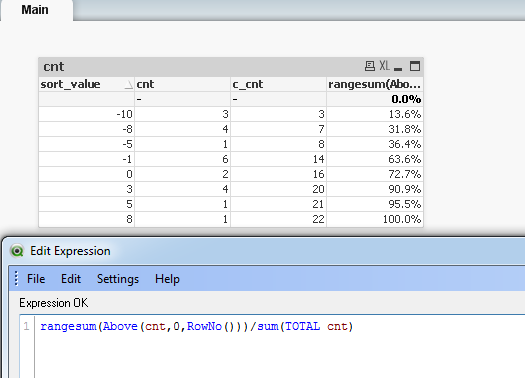
curiousfellow
- Mark as New
- Bookmark
- Subscribe
- Mute
- Subscribe to RSS Feed
- Permalink
- Report Inappropriate Content
I'll try this one 
curiousfellow
- Mark as New
- Bookmark
- Subscribe
- Mute
- Subscribe to RSS Feed
- Permalink
- Report Inappropriate Content
Unfortunately the last part (sum(total cnt) does not give any results.
Perhaps because another value is counted (from another table)
cnt gives a result sum(Total cnt) does not
To be more specific :
dimension 1 = yyyyqq
dimension 2 = (datereceived-datesend)
expression 1 = count(forms_received)
expression 2 = count(forms_send)
so in your example the expression should be
rangesum(above(count(expression1),0,rowno()) /sum(Total expression2)
Is it possible that this does not work because there is no dimension2 for expression2 ?
Sergey_Shuklin
- Mark as New
- Bookmark
- Subscribe
- Mute
- Subscribe to RSS Feed
- Permalink
- Report Inappropriate Content
HI, Johan!
You can also try to set "sum(total expression2)" into a variable (sometimes it helps). If you'll gain no effect, please, post a piece of source table(s)!
