Unlock a world of possibilities! Login now and discover the exclusive benefits awaiting you.

- Qlik Community
- :
- All Forums
- :
- QlikView App Dev
- :
- Show data on last date of the month
- Subscribe to RSS Feed
- Mark Topic as New
- Mark Topic as Read
- Float this Topic for Current User
- Bookmark
- Subscribe
- Mute
- Printer Friendly Page

 tracycrown
- Mark as New
- Bookmark
- Subscribe
- Mute
- Subscribe to RSS Feed
- Permalink
- Report Inappropriate Content
Show data on last date of the month
Dear all
Kindly advise how to plot cumulative sales data only on last date of the month ?.
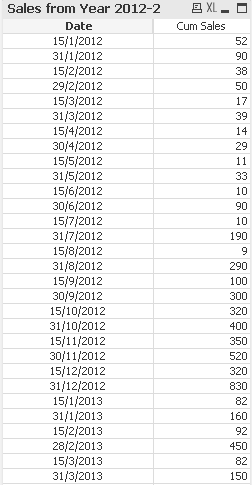
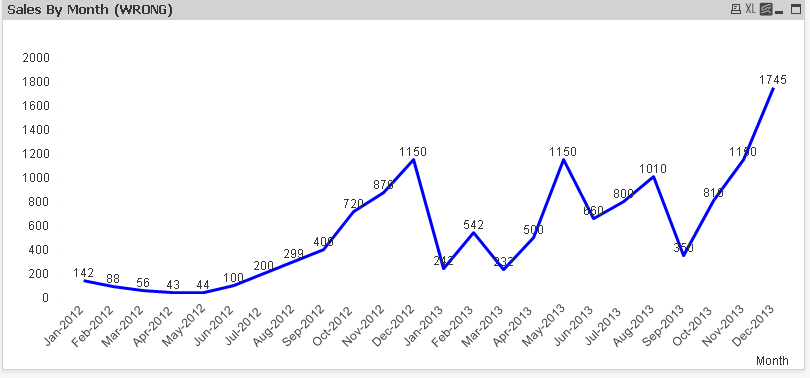
Thank you
Tracy
Accepted Solutions

 Gysbert_Wassena
- Mark as New
- Bookmark
- Subscribe
- Mute
- Subscribe to RSS Feed
- Permalink
- Report Inappropriate Content
Ah, yes. Silly me. MonthEnd returns a value that also has a time part. Try this instead:
if(Date = Floor(MonthEnd(Date)), 1, 0) as IsLastDayOfMonth
talk is cheap, supply exceeds demand

 tresesco
- Mark as New
- Bookmark
- Subscribe
- Mute
- Subscribe to RSS Feed
- Permalink
- Report Inappropriate Content
Try: FirstSortedValue([Cum Sales],-Date)
 Chanty4u
- Mark as New
- Bookmark
- Subscribe
- Mute
- Subscribe to RSS Feed
- Permalink
- Report Inappropriate Content
may be
= FirstSortedValue([Cum Sales],Date)
Gysbert_Wassena- Mark as New
- Bookmark
- Subscribe
- Mute
- Subscribe to RSS Feed
- Permalink
- Report Inappropriate Content
Create a new flag field in the script:
LOAD
Date,
if(Date = MonthEnd(Date), 1, 0) as IsLastDayOfMonth,
[Cum Sales]
FROM
...
;
You can then use that new flag field in your expression:
sum([Cum Sales]) changes to sum({<IsLastDayOfMonth={1}>}[Cum Sales])
talk is cheap, supply exceeds demand
tracycrown
- Mark as New
- Bookmark
- Subscribe
- Mute
- Subscribe to RSS Feed
- Permalink
- Report Inappropriate Content
Dear gysbert wassenaar
I tried your method but no data shown on the chart, please check and advise.
Thank You
Tracy
tracycrown
- Mark as New
- Bookmark
- Subscribe
- Mute
- Subscribe to RSS Feed
- Permalink
- Report Inappropriate Content
Dear tresesco
Please advise what is the meaning of FirstSortedValue ?
Thank You
Tracy
Gysbert_Wassena- Mark as New
- Bookmark
- Subscribe
- Mute
- Subscribe to RSS Feed
- Permalink
- Report Inappropriate Content
Ah, yes. Silly me. MonthEnd returns a value that also has a time part. Try this instead:
if(Date = Floor(MonthEnd(Date)), 1, 0) as IsLastDayOfMonth
talk is cheap, supply exceeds demand
