Unlock a world of possibilities! Login now and discover the exclusive benefits awaiting you.

Announcements
FLASH SALE: Save $500! Use code FLASH2026 at checkout until Feb 14th at 11:59PM ET. Register Now!
- Qlik Community
- :
- All Forums
- :
- QlikView App Dev
- :
- Re: Straight Table.
Options
- Subscribe to RSS Feed
- Mark Topic as New
- Mark Topic as Read
- Float this Topic for Current User
- Bookmark
- Subscribe
- Mute
- Printer Friendly Page
Turn on suggestions
Auto-suggest helps you quickly narrow down your search results by suggesting possible matches as you type.
Showing results for

Not applicable
2016-09-02
04:54 AM
- Mark as New
- Bookmark
- Subscribe
- Mute
- Subscribe to RSS Feed
- Permalink
- Report Inappropriate Content
Straight Table.
How to change the colour of data in Straight Table.
Regard,
Qliker
723 Views
1 Solution
Accepted Solutions

 MK9885
Master II
2016-09-02
10:31 AM
- Mark as New
- Bookmark
- Subscribe
- Mute
- Subscribe to RSS Feed
- Permalink
- Report Inappropriate Content
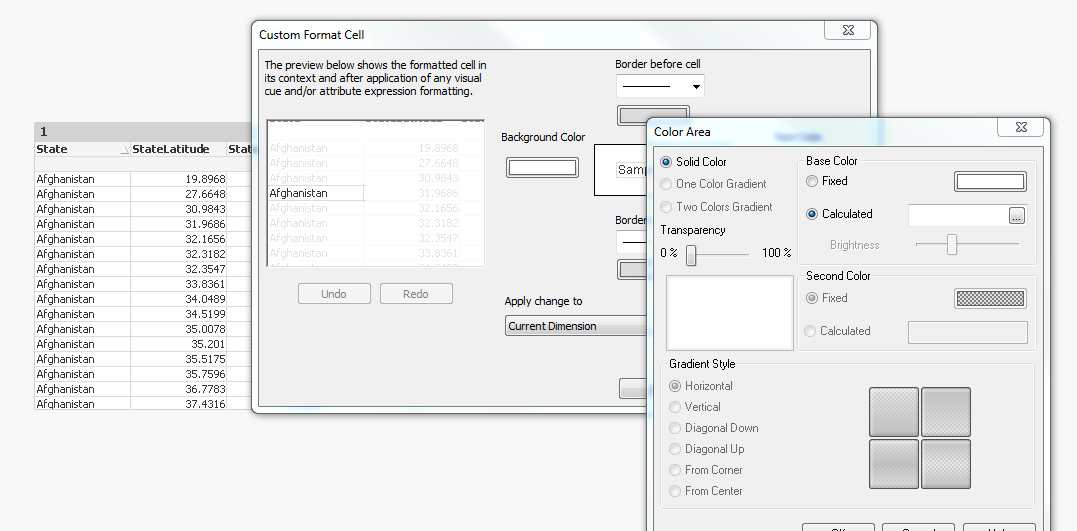
Find the attachment.
Right click on the Straight Table for Custom Format cell and click on what you wanna change, like background or text color and it will be column wise.
Thanks.
596 Views
2 Replies
MK9885
Master II
2016-09-02
10:31 AM
- Mark as New
- Bookmark
- Subscribe
- Mute
- Subscribe to RSS Feed
- Permalink
- Report Inappropriate Content
Find the attachment.
Right click on the Straight Table for Custom Format cell and click on what you wanna change, like background or text color and it will be column wise.
Thanks.
597 Views

 hirenjadiya
Partner - Contributor III
2016-09-02
03:34 PM
- Mark as New
- Bookmark
- Subscribe
- Mute
- Subscribe to RSS Feed
- Permalink
- Report Inappropriate Content
596 Views