Unlock a world of possibilities! Login now and discover the exclusive benefits awaiting you.

- Qlik Community
- :
- All Forums
- :
- QlikView App Dev
- :
- Struggling with HR solution
- Subscribe to RSS Feed
- Mark Topic as New
- Mark Topic as Read
- Float this Topic for Current User
- Bookmark
- Subscribe
- Mute
- Printer Friendly Page

- Mark as New
- Bookmark
- Subscribe
- Mute
- Subscribe to RSS Feed
- Permalink
- Report Inappropriate Content
Struggling with HR solution
Hello all,
I'm struggling with an HR solution for some time now. I hope you guys can help me. Or clear things up for me about the (company) history of an employee.
Maybe I'm thinking the wrong way....
In a company we have employees. These employees have startdate and an enddate (which is a date in the future). This is in the table; Employee. Along with their name, birthdate etc.
There's also a table containing history about the employees position; an employee can work in different units whitin the company over time. In this table we also have a startdate and enddate, and a unitcode. Corresponding to the organisationtable which contains the unitcodes.
Example of a row:
EmplID Startdate Enddate UnitCode
1 1-4-2004 31-5-2005 TEST
1 1-6-2005 - BI1
2 1-2-2005 - BI2
I'v managed to come so far: I've got an overview of the employees and their positions today. Which is nice, but I want to make a comparison with historic data.
So my question: how do I do it?
This is what I got so far:
- Employee-table
- Employee_position-table
- Organisation_unitcodes-table
- Mastercalendar
I already searched this forum for some solutions, but I cannot find any. Maybe I'm searching with the wrong searchphrases.
I was planning to make a demo.qvw so you guys can exactly see what I mean, and what my document looks like (picture says more than 1000 words...). But so far, no demo yet.
So I hope you understand my struggle  and come up with any solution.
Thanks so far, for reading my question.
Kind regards,
Koos from The Netherlands
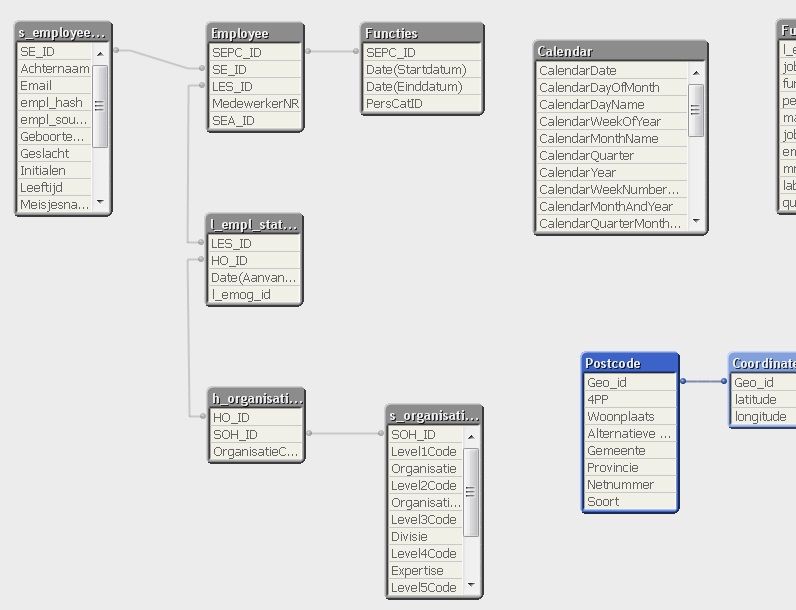
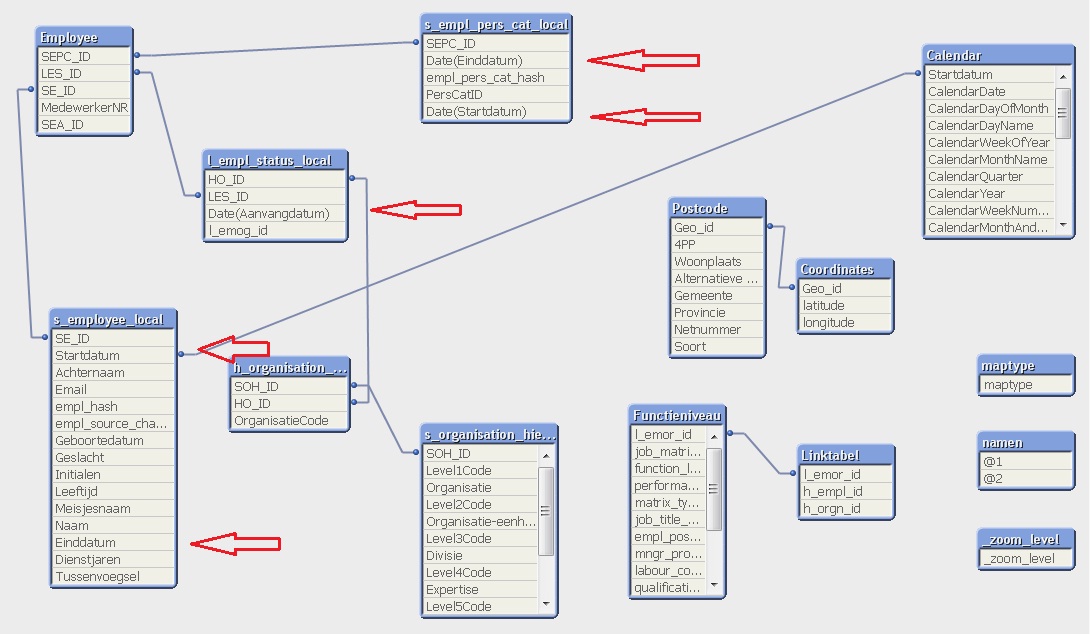
My tablestructure:

 swuehl
- Mark as New
- Bookmark
- Subscribe
- Mute
- Subscribe to RSS Feed
- Permalink
- Report Inappropriate Content
Your historic data looks like a slowly changing dimension. So one possible approach would be to use an interval match between your historic table and a calendar to be able to analize the position of an employee at any given date.
Please check out INTERVAL MATCH load prefix in the manuel / Help file.
You currently have your master calendar linked to the start date of an employee. Depending on your requirements and data, you could replace that link by the link created by the interval match and the calendar. Or you might need to rework your data model a bit. Take care that you don't create circular loops in your model.
Hope this helps,
Stefan

 nstefaniuk
- Mark as New
- Bookmark
- Subscribe
- Mute
- Subscribe to RSS Feed
- Permalink
- Report Inappropriate Content
Hello.
Standard issue, but not so easy to solve indeed.
In fact you have to manage intervals (start date to end date) and for each interval to link the fact line with the other tables. So you have to merge the intervals.
For example:
Bob has started the 1 and is still there.
Bob has worked in U1 from 1 to now
Bob has worked in U2 from 5 to 15
Bob has worked in U3 from 10 to 20
So you have to merge all the intervals like that.
1) what are the events?
- Start at 1
- Enter U1 at 1
- Enter U2 at 5
- Enter U3 at 10
- Go out of U2 at 15
- Go out of U3 at 20
2) from the distinct event dates, what are the intervals?
- 1 to 5
- 5 to 10
- 10 to 15
- 15 to 20
- 20 to now
3) for these intervals, what are the facts?
- 1 to 5 : in company, in U1
- 5 to 10: in company, in U1 and U2
- 10 to 15: in company, in U1 and U2 and U3
- 15 to 20: in company, in U1 and U3
- 20 to now: in company, in U1
4) for each interval of each user (Bob in our case), create a fact line.
FACT
- Line 1 : 1 to 5
- Line 2 :5 to 10
- Line 3 :10 to 15
- Line 4 :15 to 20
- Line 5 :20 to now
5) for each fact line, create lines in an other fact table
FACT_COMPANY_STATUS
- Line 1 : IN COMPANY
- Line 2 : IN COMPANY
- Line 3 : IN COMPANY
- Line 4 : IN COMPANY
- Line 5 : IN COMPANY
FACT_CODE_UNIT
- Line 1 : U1
- Line 2 : U1
- Line 2 : U2
- Line 3 : U1
- Line 3 : U2
- Line 3 : U3
- Line 4 : U1
- Line 4 : U3
- Line 5 : U1
You can notice that you have more than 1 line in FACT_CODE_UNIT for 1 line of FACT. For FACT_COMPANY_STATUS you should have a 1-1 relation and so this pivot table is not really useful.
And so, at EACH date of the year, you can say:
- if the employee was in company or not
- if the employee was in a code unit or not
- how many code unit the employee was belong to
Just take care that in step 5 you need IntervalMatch to match the fact intervals and the events, and you need that the intervals have 1 opened bound, and not 2 closed bound. Else the event that occurs on 10 will belong to both intervals 5 to 10 and 10 to 15.
- Mark as New
- Bookmark
- Subscribe
- Mute
- Subscribe to RSS Feed
- Permalink
- Report Inappropriate Content
Thanks swuehl!
I read the intervalmatch chapter from the Reference manual. But it seems I'm missing something, thinking-wise.
Do I need to link my mastercalendar to my dates-table?
What am I doing wrong?
Thanks in advance!