Unlock a world of possibilities! Login now and discover the exclusive benefits awaiting you.

- Qlik Community
- :
- All Forums
- :
- QlikView App Dev
- :
- Technique to reset a Pivot Table to it's original ...
- Subscribe to RSS Feed
- Mark Topic as New
- Mark Topic as Read
- Float this Topic for Current User
- Bookmark
- Subscribe
- Mute
- Printer Friendly Page

 jblomqvist
- Mark as New
- Bookmark
- Subscribe
- Mute
- Subscribe to RSS Feed
- Permalink
- Report Inappropriate Content
Technique to reset a Pivot Table to it's original layout easily for business users?
Hi all,
Is there a way to reset a Pivot Table to it's original layout easily for business users?
For example I have a table like this:
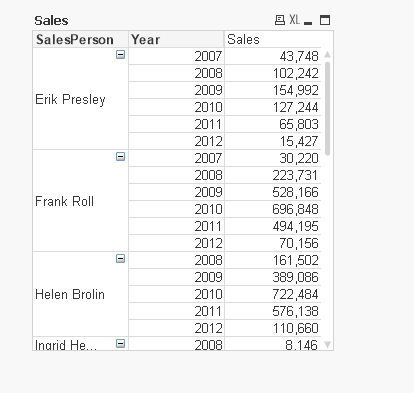
A user can pivot it in various ways like this:
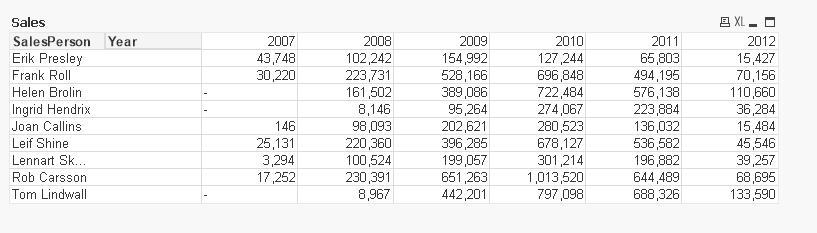
I would like a button that resets the Pivot Table to the original state.
The reason why is the pivot table has multiple dimensions and measures so can get potentially quite tricky for a business user to drag it all back to the original state.
Is there a way to reset the Pivot Table like this or any techniques that could be user friendly?
Thanks 

 avinashelite
- Mark as New
- Bookmark
- Subscribe
- Mute
- Subscribe to RSS Feed
- Permalink
- Report Inappropriate Content
As per I know this is not possible

 trdandamudi
- Mark as New
- Bookmark
- Subscribe
- Mute
- Subscribe to RSS Feed
- Permalink
- Report Inappropriate Content
I don't think it is possible but instead you can try different method and hope you will like it:
1) Create two pivot charts one with the default view (Original Layout)
2) Create second chart the way the business users want it.
Now create a button and toggle between first and second chart. This will work perfect....
 antoniotiman
- Mark as New
- Bookmark
- Subscribe
- Mute
- Subscribe to RSS Feed
- Permalink
- Report Inappropriate Content
Hi John,
in QV Desktop User should not save document after changing it
in QV Server uncheck 'Session Recovery' in QMC
Regards,
Antonio
 settu_periasamy
- Mark as New
- Bookmark
- Subscribe
- Mute
- Subscribe to RSS Feed
- Permalink
- Report Inappropriate Content
Hi John,
We can do it via macro.. Try this
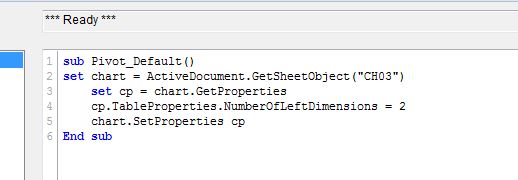
Sample attached

- Mark as New
- Bookmark
- Subscribe
- Mute
- Subscribe to RSS Feed
- Permalink
- Report Inappropriate Content
Settu, I think it should work from one to Two. But, user require from Two to One might be the Macro is won't work. Correct me if i am Wrong.
And, How about this?
If we create two charts. Then create Show and hide for those two graphs and Any Button if required
settu_periasamy
- Mark as New
- Bookmark
- Subscribe
- Mute
- Subscribe to RSS Feed
- Permalink
- Report Inappropriate Content
Hi Anil,
Anil babu wrote:
Settu, I think it should work from one to Two. But, user require from Two to One might be the Macro is won't work. Correct me if i am Wrong.
It will work whatever the dimension limit. if we have the 5 dimension, we can just put "NumberofLeftDimensions=5"
If we create two charts. Then create Show and hide for those two graphs and Any Button if required
Yes, this is another option
