Unlock a world of possibilities! Login now and discover the exclusive benefits awaiting you.

- Qlik Community
- :
- All Forums
- :
- QlikView App Dev
- :
- Re: Timestamp conversion
- Subscribe to RSS Feed
- Mark Topic as New
- Mark Topic as Read
- Float this Topic for Current User
- Bookmark
- Subscribe
- Mute
- Printer Friendly Page

- Mark as New
- Bookmark
- Subscribe
- Mute
- Subscribe to RSS Feed
- Permalink
- Report Inappropriate Content
Timestamp conversion
Hi Folks,
I am loading a excel file , this have the time stamp data as 'DD/MM/YYYY HH:MM:SS AM' .
I am not able to convert this into date and extract month,year ..
the expression which i am uisng is as follows
Date(floor([Completed Time]))
Thanks in Advance...
Regards
Abdul
- Tags:
- new_to_qlikview
- « Previous Replies
-
- 1
- 2
- Next Replies »
Accepted Solutions

 anbu1984
- Mark as New
- Bookmark
- Subscribe
- Mute
- Subscribe to RSS Feed
- Permalink
- Report Inappropriate Content
Load Year([Created Time]),Month([Created Time]),Date(Floor([Created Time]),'M/D/YYYY');
LOAD Group,
[Request ID],
Department,
Category,
Subcategory,
Item,
Urgency,
Impact,
[Request Type],
[Approval Status],
[Request Closure Code],
[Request Closure Comments],
Priority,
[Request Status],
[Pending Status],
[Created Time] As [Created Time1],
Timestamp#([Created Time],'DD/MM/YYYY hh:mm') As [Created Time],
[Responded Date],
[DueBy Time],
[Completed Time],
[Time Elapsed],
[Overdue Status]
FROM
[Tickets.csv]
(txt, codepage is 1252, embedded labels, delimiter is ',', msq, header is 1 lines);
anbu1984
- Mark as New
- Bookmark
- Subscribe
- Mute
- Subscribe to RSS Feed
- Permalink
- Report Inappropriate Content
Load Date(TS,'DD/MM/YYYY') As Dt,Year(TS) As Yr,Month(TS) As Mth;
Load Timestamp#(TS,'DD/MM/YYYY hh:mm:ss TT') As TS Inline [
TS
01/01/2015 01:00:00 AM
01/02/2015 01:00:00 AM ];

 Colin-Albert
- Mark as New
- Bookmark
- Subscribe
- Mute
- Subscribe to RSS Feed
- Permalink
- Report Inappropriate Content
Your expression needs to include Date#() to convert the text data to a date.
Date(floor(Date#([completed Time], 'DD/MM/YYYY hh.mm.ss tt')))
- Mark as New
- Bookmark
- Subscribe
- Mute
- Subscribe to RSS Feed
- Permalink
- Report Inappropriate Content
Hi Abdul,
first check data format in your excel if it is datetime format or general format .
If it is general format convert it to datetime format and then try.
if it is in datetime format (in excel) then Anbu solution should work for you .
- Mark as New
- Bookmark
- Subscribe
- Mute
- Subscribe to RSS Feed
- Permalink
- Report Inappropriate Content
Thanks for the reply .
I am still not able get the date and month , i have placed the above load statement in the script .
it gives me a blank column - no data in it,
Thanks in Advance..

 MarcoWedel
- Mark as New
- Bookmark
- Subscribe
- Mute
- Subscribe to RSS Feed
- Permalink
- Report Inappropriate Content
Hi,
try
LOAD *,
          DayName([Completed Time]) as Date,
          Month([Completed Time]) as Month,
          Year([Completed Time]) as Year;
LOAD Timestamp#([Completed Time], ''DD/MM/YYYY hh:mm:ss TT'') as [Completed Time]
FROM yourSource;
hope this helps
regards
Marco
anbu1984
- Mark as New
- Bookmark
- Subscribe
- Mute
- Subscribe to RSS Feed
- Permalink
- Report Inappropriate Content
Can you post sample data
- Mark as New
- Bookmark
- Subscribe
- Mute
- Subscribe to RSS Feed
- Permalink
- Report Inappropriate Content
Please find the sample data file.
Thanks in Advance...
- Mark as New
- Bookmark
- Subscribe
- Mute
- Subscribe to RSS Feed
- Permalink
- Report Inappropriate Content
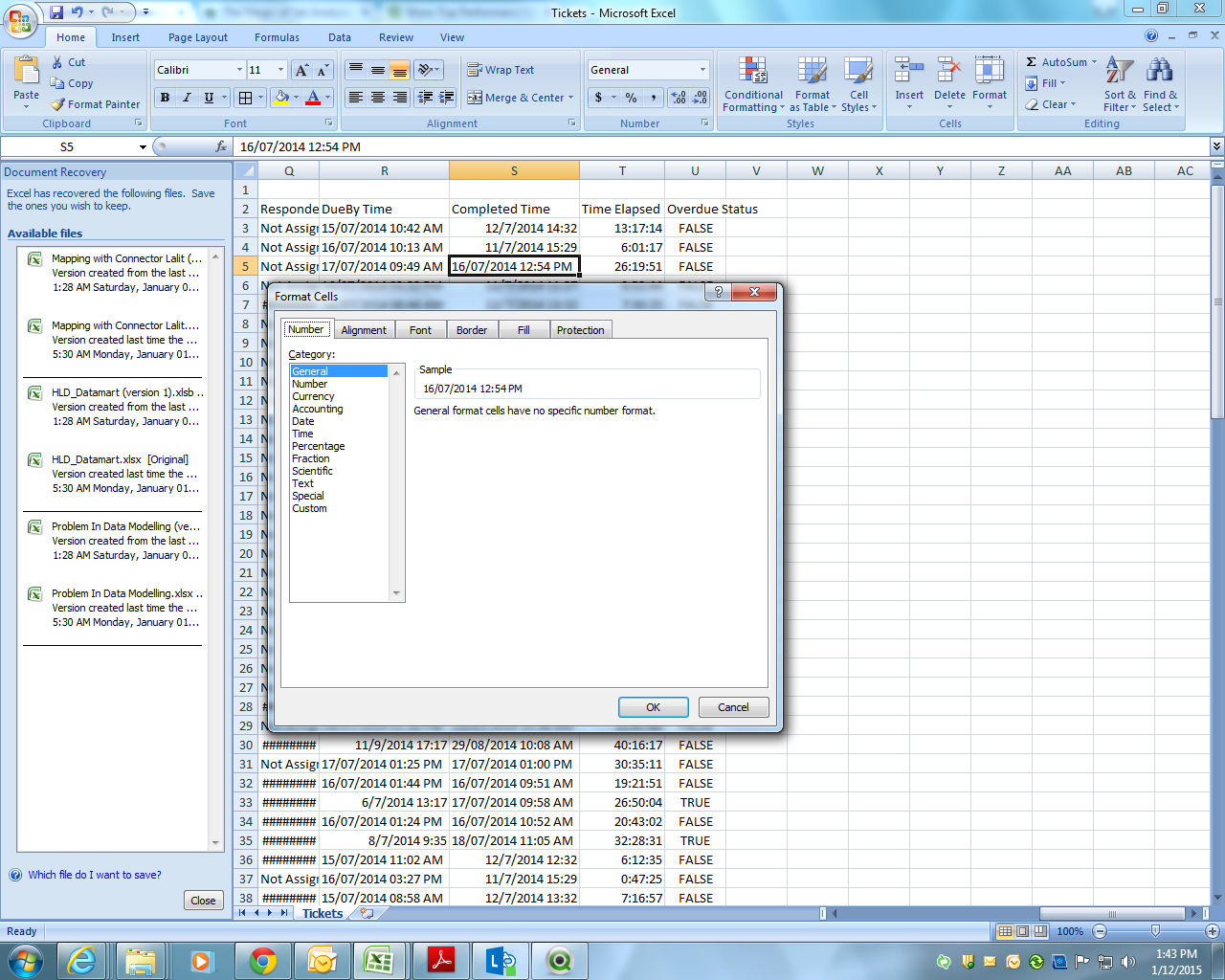
see your data is not in proper datetime format in CSV.
anbu1984
- Mark as New
- Bookmark
- Subscribe
- Mute
- Subscribe to RSS Feed
- Permalink
- Report Inappropriate Content
Load Year([Created Time]),Month([Created Time]),Date(Floor([Created Time]),'M/D/YYYY');
LOAD Group,
[Request ID],
Department,
Category,
Subcategory,
Item,
Urgency,
Impact,
[Request Type],
[Approval Status],
[Request Closure Code],
[Request Closure Comments],
Priority,
[Request Status],
[Pending Status],
[Created Time] As [Created Time1],
Timestamp#([Created Time],'DD/MM/YYYY hh:mm') As [Created Time],
[Responded Date],
[DueBy Time],
[Completed Time],
[Time Elapsed],
[Overdue Status]
FROM
[Tickets.csv]
(txt, codepage is 1252, embedded labels, delimiter is ',', msq, header is 1 lines);
- « Previous Replies
-
- 1
- 2
- Next Replies »