Unlock a world of possibilities! Login now and discover the exclusive benefits awaiting you.

- Qlik Community
- :
- All Forums
- :
- QlikView App Dev
- :
- Re: Timestamp conversion
- Subscribe to RSS Feed
- Mark Topic as New
- Mark Topic as Read
- Float this Topic for Current User
- Bookmark
- Subscribe
- Mute
- Printer Friendly Page

- Mark as New
- Bookmark
- Subscribe
- Mute
- Subscribe to RSS Feed
- Permalink
- Report Inappropriate Content
Timestamp conversion
Hi Folks,
I am loading a excel file , this have the time stamp data as 'DD/MM/YYYY HH:MM:SS AM' .
I am not able to convert this into date and extract month,year ..
the expression which i am uisng is as follows
Date(floor([Completed Time]))
Thanks in Advance...
Regards
Abdul
- Tags:
- new_to_qlikview
- « Previous Replies
-
- 1
- 2
- Next Replies »

 kiranmanoharrod
- Mark as New
- Bookmark
- Subscribe
- Mute
- Subscribe to RSS Feed
- Permalink
- Report Inappropriate Content
Hi Abdul,
just use below script, I think it will solve the issue.
Date(floor(Num([Completed Time])))
Regards,
Kiran

 its_anandrjs
- Mark as New
- Bookmark
- Subscribe
- Mute
- Subscribe to RSS Feed
- Permalink
- Report Inappropriate Content
Hi,
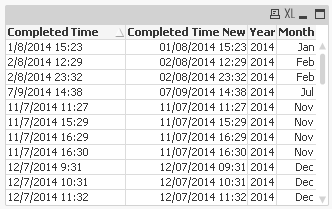
Use Alt function it because you have different date formats in the field and also it in not in the timestamp format try below load script for the solution and convert Year and Month also same.
Source:
LOAD *,Year([Completed Time New]) as Year, Month([Completed Time New]) as Month;
LOAD
[Completed Time],
Alt(Timestamp(Timestamp#([Completed Time],'MM/DD/YYYY hh:mm'),'MM/DD/YYYY hh:mm'),
Timestamp(Timestamp#([Completed Time],'DD/MM/YYYY hh:mm TT'),'DD/MM/YYYY hh:mm TT'),
Timestamp(Timestamp#([Completed Time],'MM/DD/YYYY hh:mm TT'),'MM/DD/YYYY hh:mm TT'),
Timestamp(Timestamp#([Completed Time],'M/D/YYYY hh:mm TT'),'M/D/YYYY hh:mm TT'),'MM/DD/YYYY hh:mm') as [Completed Time New]
FROM
Tickets.csv
(txt, codepageis 1252, embeddedlabels, delimiteris ',', msq, headeris 1 lines);
And fields that you get
Regards
Anand
- Mark as New
- Bookmark
- Subscribe
- Mute
- Subscribe to RSS Feed
- Permalink
- Report Inappropriate Content
Thanks Anbu .. its working fine now.
- Mark as New
- Bookmark
- Subscribe
- Mute
- Subscribe to RSS Feed
- Permalink
- Report Inappropriate Content
Thanks Anand. it helped me to resolve in case of multiple formats in the same column..
- « Previous Replies
-
- 1
- 2
- Next Replies »