Unlock a world of possibilities! Login now and discover the exclusive benefits awaiting you.

- Qlik Community
- :
- All Forums
- :
- QlikView App Dev
- :
- Re: Unable to select calculated dimension in pivot...
- Subscribe to RSS Feed
- Mark Topic as New
- Mark Topic as Read
- Float this Topic for Current User
- Bookmark
- Subscribe
- Mute
- Printer Friendly Page

- Mark as New
- Bookmark
- Subscribe
- Mute
- Subscribe to RSS Feed
- Permalink
- Report Inappropriate Content
Unable to select calculated dimension in pivot chart
Hi All,
I used calculated dimension to remove such row where both the dimensions have null value but now i have a new issue.
Here's my calculated dimension, the first dimension (please note that the field Table2.Name and Table3.Name is being used as second and third dimension.)
=IF(ISNULL(Table2.Name) AND ISNULL(Table3.Name),NULL(),Table1.Name)
After selecting "Suppress When Value is Null" for the first dimension, it removes all the rows where both the fields Table2.Name and Table3.Name is null.
However, the problem is now I am unable to select the Table1.Name in the Pivot Chart.
If I use AGGR as following the rows where Table2.Name and Table3.Name are null reappears which is what I don't need either.
Aggr(IF(ISNULL(Table2.Name) AND ISNULL(table3.Name),NULL(),Table1.Name),Table1.Name)
Is there a workaround for this?
- « Previous Replies
-
- 1
- 2
- Next Replies »

.png "Former Employee") JonnyPoole
JonnyPoole
- Mark as New
- Bookmark
- Subscribe
- Mute
- Subscribe to RSS Feed
- Permalink
- Report Inappropriate Content
i wasn't able to follow the explanation after this statement:
"However, the problem is now I am unable to select the Table1.Name in the Pivot Chart."
if it removes only the rows where table2.name and table3.name are null , why can't you still select table1.name ? was every row suppressed ?
screenshots or qvw would help my understanding.
- Mark as New
- Bookmark
- Subscribe
- Mute
- Subscribe to RSS Feed
- Permalink
- Report Inappropriate Content
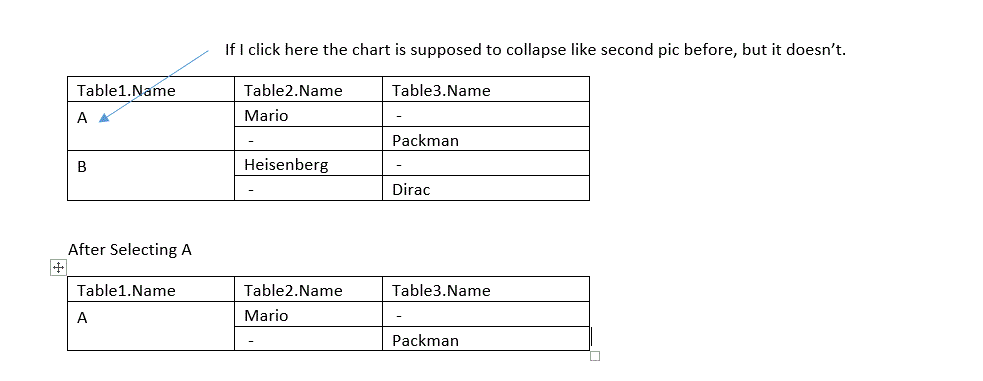
Thanks for looking into it Jonathan. Unfortunately, I can't share the QVW. But here's an example. When I click on A, the pivot chart is supposed to collapse and show results only for A.
But it is not happening for the use case and set up I have described above.
Where the dimensions are selected in the order Table1.Name, Table2.Name, Table3.Name and Table1.Name is the calculated dimension as in =IF(ISNULL(Table2.Name) AND ISNULL(Table3.Name),NULL(),Table1.Name).
- Mark as New
- Bookmark
- Subscribe
- Mute
- Subscribe to RSS Feed
- Permalink
- Report Inappropriate Content
Hi Raish,
I think I follow your explanation but I have a question. The table1.name field in the second row is empty, so why do you expect QlikView to show you that row when you select 'A' (as shown in your second screenshot)? If the first two rows (i.e. Mario and Packman) relate to the same person then this is sounding more like a data modelling problem. I suspect that you'd like the name 'Mario' and 'Packman' on the same row, with 'A' as their table1.name.
Does this sound about right?
Yours,
William
- Mark as New
- Bookmark
- Subscribe
- Mute
- Subscribe to RSS Feed
- Permalink
- Report Inappropriate Content
Hi William - Thanks for looking into the post. I just updated the screenshot. Sorry about the confusion. It is a pivot chart I was working on. Currently working on the (1) selection issue and (2) an attempt to combine Table2.Name and Table3.Name so that I can get something like this. Any pointers will be greatly appreciated. Thanks a lot!!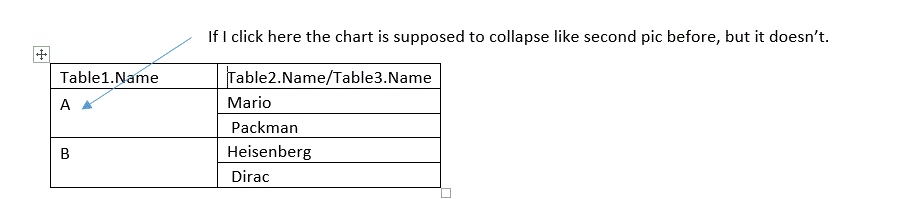
- Mark as New
- Bookmark
- Subscribe
- Mute
- Subscribe to RSS Feed
- Permalink
- Report Inappropriate Content
Hi Raish,
Well, combining table2.name and table3.name should be accomplished with something like this (as a calculated dimension):
=if(isNull(table2.name), table3.name, table2.name)
However, I'm a little surprised with your inability to select a particular value in a dimension. What does the data model look like? Can you post a screenshot of what the data looks like if put in a table box with all columns added?
Yours,
William
- Mark as New
- Bookmark
- Subscribe
- Mute
- Subscribe to RSS Feed
- Permalink
- Report Inappropriate Content
Hey William - I used this expression to tie up all three dimension:
=if(isNull(TableA.Name) AND len(trim(TableB.Name))=0,TableC.Name,if(isNull(TableA.Name) AND isNull(tableC.Name),Group.Name,if(isNull(TableB.Name) AND isNull(tableC.Name),tableA.Name)))
- Mark as New
- Bookmark
- Subscribe
- Mute
- Subscribe to RSS Feed
- Permalink
- Report Inappropriate Content
Hi Raish,
It seems you found an expression that works for combining all these fields in one dimension. However, are you still having difficulty selecting one value from the calculated dimension in the pivot table?
- Mark as New
- Bookmark
- Subscribe
- Mute
- Subscribe to RSS Feed
- Permalink
- Report Inappropriate Content
Hi Raish,
Any updates on your original problem of selecting the dimension in the pivot table? If you've solved your problem or found your answer in one of the above responses, please help us keep the community organised by closing the thread and/or marking the right response as correct.
If you're still facing problems, please let us know so that we can help you further.
Yours,
William
- Mark as New
- Bookmark
- Subscribe
- Mute
- Subscribe to RSS Feed
- Permalink
- Report Inappropriate Content
Hi @William Dib - Thanks a lot for checking back! Please let me know if you have further insights . The original issue of not being able to select the calculated dimension still persists. Here's how the table box looks:
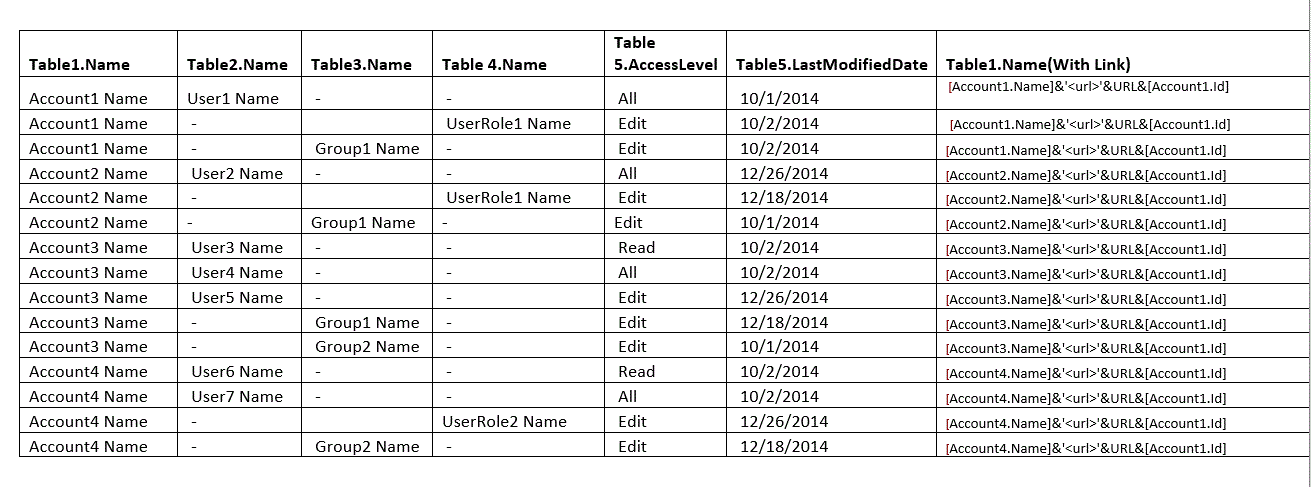
And following's the data model:
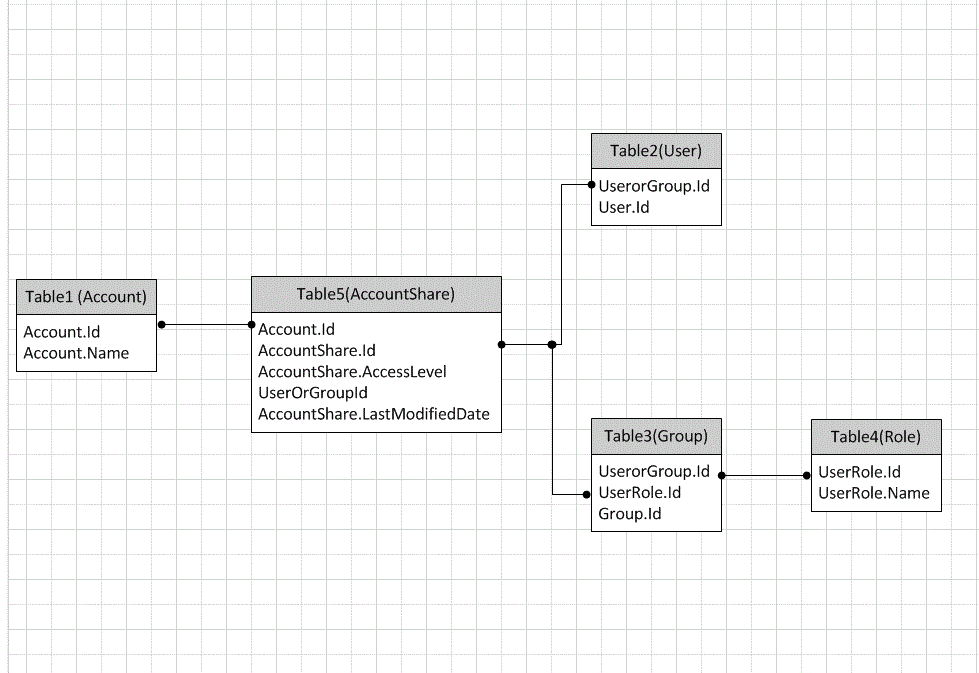
Regards,
Rk
- « Previous Replies
-
- 1
- 2
- Next Replies »