Unlock a world of possibilities! Login now and discover the exclusive benefits awaiting you.

- Qlik Community
- :
- All Forums
- :
- QlikView App Dev
- :
- Re: User can't export to QVD with macro
- Subscribe to RSS Feed
- Mark Topic as New
- Mark Topic as Read
- Float this Topic for Current User
- Bookmark
- Subscribe
- Mute
- Printer Friendly Page

- Mark as New
- Bookmark
- Subscribe
- Mute
- Subscribe to RSS Feed
- Permalink
- Report Inappropriate Content
User can't export to QVD with macro
Hi!
I've created a simple macro which gives the user a possibility to export a table to a QVD using a macro. It looks like this:
sub ExportObject()
set v=ActiveDocument.getVariable("vChosenWeek")
set u=ActiveDocument.getVariable("vChosenYear")
path="E:\QlikView\SourceDocuments\QVD\History\"
Filename="Week "&v.getContent.string & " " &u.getContent.string & ".qvd"
call test("CH173",path&Filename)
end Sub
sub test(objectID,FilePath)
set v=ActiveDocument.getVariable("vChosenWeek")
set u=ActiveDocument.getVariable("vChosenYear")
set o = ActiveDocument.GetSheetObject(objectID)
o.Exportbiff FilePath
set o=nothing
msgbox("Week"&v.getContent.string &" år " &u.getContent.string &" exportet." )
end sub
This works for my administrator-user. But it doesnt work for other users, allthough I did give them access to the folder where the QVD is created.
Any suggestions on how to solve this?
- « Previous Replies
-
- 1
- 2
- Next Replies »
Accepted Solutions

 marcus_sommer
- Mark as New
- Bookmark
- Subscribe
- Mute
- Subscribe to RSS Feed
- Permalink
- Report Inappropriate Content
I have also none entries about security in settings.ini. I think those entries will only set if anything became forbidden. For test you could remove this file (after backup) - the settings.ini will new create. I think other settings/access rights are wrong, possibly the path is wrong for the user and E: is here another source.

 jonathan_dau
- Mark as New
- Bookmark
- Subscribe
- Mute
- Subscribe to RSS Feed
- Permalink
- Report Inappropriate Content
Hi,
Did you try to check 'Macro Override Security' in Properties --> Security -->
Hope that helps
Regards
Jonathan
- Mark as New
- Bookmark
- Subscribe
- Mute
- Subscribe to RSS Feed
- Permalink
- Report Inappropriate Content
Hi!
I already checked that box, doesn't help I'm afraid.
Any other suggestions? 

 Sokkorn
- Mark as New
- Bookmark
- Subscribe
- Mute
- Subscribe to RSS Feed
- Permalink
- Report Inappropriate Content
Hi,
Make sure you use System Access
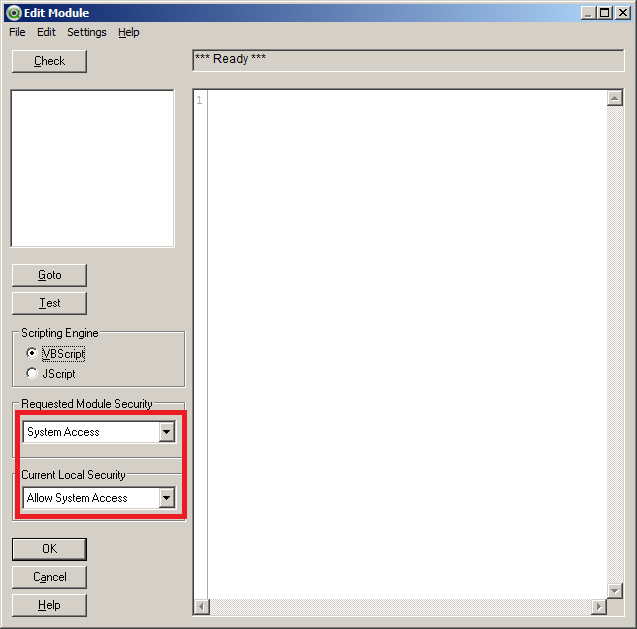
Regards,
Sokkorn
- Mark as New
- Bookmark
- Subscribe
- Mute
- Subscribe to RSS Feed
- Permalink
- Report Inappropriate Content
Sorry for the late reply. I tried that, didn't help I'm afraid.
marcus_sommer
- Mark as New
- Bookmark
- Subscribe
- Mute
- Subscribe to RSS Feed
- Permalink
- Report Inappropriate Content
Check the settings in user- and document-properties in tab security and the settings.ini from the users:
C:\Users\USER\AppData\Roaming\QlikTech\QlikView\settings.ini (macro execution could be forbidden)
- Marcus
- Mark as New
- Bookmark
- Subscribe
- Mute
- Subscribe to RSS Feed
- Permalink
- Report Inappropriate Content
Try this from API Guide:
set obj = ActiveDocument.GetSheetObject("CH01")
obj.ExportEx "C:\test.qvd", 4 '4 = qvd
- Mark as New
- Bookmark
- Subscribe
- Mute
- Subscribe to RSS Feed
- Permalink
- Report Inappropriate Content
Didn't work either I'm afraid 😕
marcus_sommer
- Mark as New
- Bookmark
- Subscribe
- Mute
- Subscribe to RSS Feed
- Permalink
- Report Inappropriate Content
Work other simple macros like msgbox? Receives the user a security message about macro execution?
- Mark as New
- Bookmark
- Subscribe
- Mute
- Subscribe to RSS Feed
- Permalink
- Report Inappropriate Content
Yes the user gets the msgbox so I guess the macro is being executed, but the file isn't created for some reason.
- « Previous Replies
-
- 1
- 2
- Next Replies »