Unlock a world of possibilities! Login now and discover the exclusive benefits awaiting you.

- Qlik Community
- :
- All Forums
- :
- QlikView App Dev
- :
- Using If and getselectedcount
- Subscribe to RSS Feed
- Mark Topic as New
- Mark Topic as Read
- Float this Topic for Current User
- Bookmark
- Subscribe
- Mute
- Printer Friendly Page

- Mark as New
- Bookmark
- Subscribe
- Mute
- Subscribe to RSS Feed
- Permalink
- Report Inappropriate Content
Using If and getselectedcount
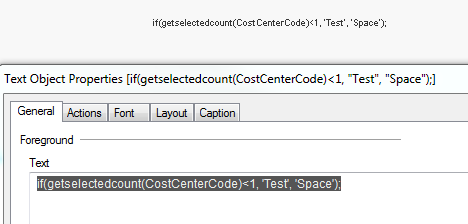
I have a text object that I would like to display "Test" if there are selections made for the CostCenterCode with
getselectedcount(CostCenterCode). Otherwise, display "Space." I created the expression below and put it into the Text area of the Text Object. I am not getting just the Test or Display. I get a text with the code that I wrote. I have researched but have not found anything to resolve this issue. I hope you can help.
if(getselectedcount(CostCenterCode)<1, 'Test', 'Space');
Accepted Solutions

 trdandamudi
- Mark as New
- Bookmark
- Subscribe
- Mute
- Subscribe to RSS Feed
- Permalink
- Report Inappropriate Content
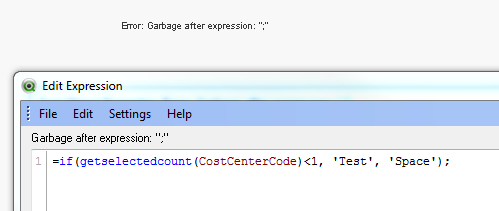
You need to remove the semi colon at the end:
=if(getselectedcount(CostCenterCode)<1, 'Test', 'Space')
trdandamudi
- Mark as New
- Bookmark
- Subscribe
- Mute
- Subscribe to RSS Feed
- Permalink
- Report Inappropriate Content
Try putting a equal (=) in the front:
=if(getselectedcount(CostCenterCode)<1, 'Test', 'Space')
Note: Also remove the colon at the end.
- Mark as New
- Bookmark
- Subscribe
- Mute
- Subscribe to RSS Feed
- Permalink
- Report Inappropriate Content
I got an error message if I do that,
trdandamudi
- Mark as New
- Bookmark
- Subscribe
- Mute
- Subscribe to RSS Feed
- Permalink
- Report Inappropriate Content
You need to remove the semi colon at the end:
=if(getselectedcount(CostCenterCode)<1, 'Test', 'Space')
- Mark as New
- Bookmark
- Subscribe
- Mute
- Subscribe to RSS Feed
- Permalink
- Report Inappropriate Content

- Mark as New
- Bookmark
- Subscribe
- Mute
- Subscribe to RSS Feed
- Permalink
- Report Inappropriate Content
Then you want
=if(getselectedcount(CostCenterCode)>0,'Test','Space')
The way you have it written now is less than 1.
- Mark as New
- Bookmark
- Subscribe
- Mute
- Subscribe to RSS Feed
- Permalink
- Report Inappropriate Content
trdandamudi
- Mark as New
- Bookmark
- Subscribe
- Mute
- Subscribe to RSS Feed
- Permalink
- Report Inappropriate Content
Then you need to re-write the code as below:
=if(getselectedcount(CostCenterCode) > 0, 'Test', 'Space')
- Mark as New
- Bookmark
- Subscribe
- Mute
- Subscribe to RSS Feed
- Permalink
- Report Inappropriate Content
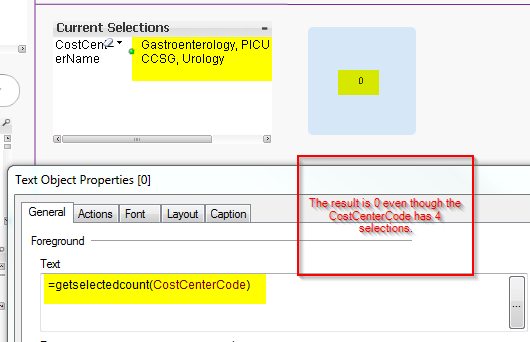
It's because CostCenterCode and CostCenterName are 2 difference fields. If you want to check both you could do something like
=if(getselectedcount(CostCenterName)+getselectedcount(CostCenterCode)>0,'Test','Space')