Unlock a world of possibilities! Login now and discover the exclusive benefits awaiting you.

- Qlik Community
- :
- All Forums
- :
- QlikView App Dev
- :
- Visual Alert using Text object
- Subscribe to RSS Feed
- Mark Topic as New
- Mark Topic as Read
- Float this Topic for Current User
- Bookmark
- Subscribe
- Mute
- Printer Friendly Page

- Mark as New
- Bookmark
- Subscribe
- Mute
- Subscribe to RSS Feed
- Permalink
- Report Inappropriate Content
Visual Alert using Text object
Hi All,
We are calculating the conversion ratio in a text object, now the requirement is that
1. if the percentage is below or equal to 50, the text object should pop up red color.
2. If the percentage is greater than 50 but less than 70, the text object should pop up yellow color
3. If the percentage is greater than 70, the text object should pop up Green color.
We are using the following query in the the General -> text column of the Text object
=num((count(if(Conversion='Yes',Conversion)) / Count([Patient Code]) * 1),'##0 %;(##0)')
Thanks in Advance.

 tresB
tresB
- Mark as New
- Bookmark
- Subscribe
- Mute
- Subscribe to RSS Feed
- Permalink
- Report Inappropriate Content
Use calculated color for font.
- Mark as New
- Bookmark
- Subscribe
- Mute
- Subscribe to RSS Feed
- Permalink
- Report Inappropriate Content
Hi Tres,
I am new to QV
Could you please let me know, which location or under which option will I get the calculated Color tab.
tresB
- Mark as New
- Bookmark
- Subscribe
- Mute
- Subscribe to RSS Feed
- Permalink
- Report Inappropriate Content
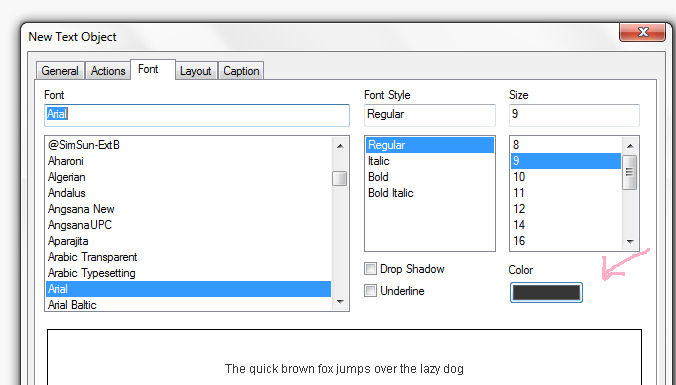
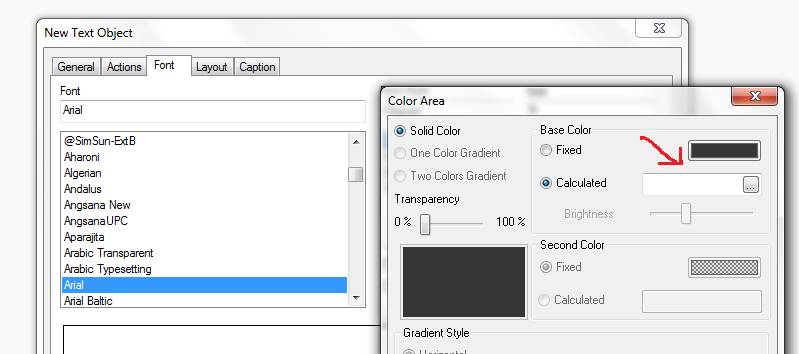
Is this what you need?