Unlock a world of possibilities! Login now and discover the exclusive benefits awaiting you.

- Qlik Community
- :
- All Forums
- :
- QlikView App Dev
- :
- Re: YearQtr unable to display from left to right
- Subscribe to RSS Feed
- Mark Topic as New
- Mark Topic as Read
- Float this Topic for Current User
- Bookmark
- Subscribe
- Mute
- Printer Friendly Page

 paulyeo11
- Mark as New
- Bookmark
- Subscribe
- Mute
- Subscribe to RSS Feed
- Permalink
- Report Inappropriate Content
YearQtr unable to display from left to right
Hi All
I have a script that generate Yr Qtr , it work fine :-
Right(year(date),2) & '-Q' & ceil(Month(date)/3) as [YearQtr],
But today i want my chart latest date start from left side , and i notice that it is not able sort from Hi to Lo.
Hope some one can share with me how to change the above script ?
PAul
- « Previous Replies
-
- 1
- 2
- Next Replies »
paulyeo11
- Mark as New
- Bookmark
- Subscribe
- Mute
- Subscribe to RSS Feed
- Permalink
- Report Inappropriate Content
My QV Doc
 suniljain
- Mark as New
- Bookmark
- Subscribe
- Mute
- Subscribe to RSS Feed
- Permalink
- Report Inappropriate Content
I tried solution in your application and it is working fine.
please write date field in expresion of sort tab and set descending order. it is working fine.
paulyeo11
- Mark as New
- Bookmark
- Subscribe
- Mute
- Subscribe to RSS Feed
- Permalink
- Report Inappropriate Content
Hi Sunil
I try to set the way you said , but it still not work.
Paul
paulyeo11
- Mark as New
- Bookmark
- Subscribe
- Mute
- Subscribe to RSS Feed
- Permalink
- Report Inappropriate Content
Hi Sunil
Can you attach the QV doc for me to see ? As i still struggle with this.
PAul
 Sokkorn
- Mark as New
- Bookmark
- Subscribe
- Mute
- Subscribe to RSS Feed
- Permalink
- Report Inappropriate Content
Hi Paul,
It sound you tried to sort decending. Ok, now let try in "Sort" by expression =(Left($(ColumnDim_p),2) * 10) + Right($(ColumnDim_p),1)
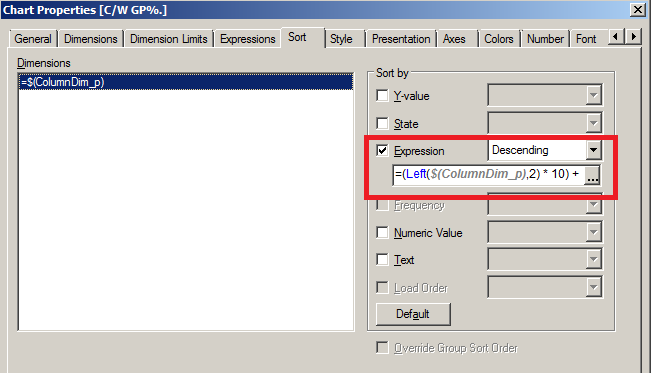
Let me know, if this one is what you looking for.
Regards,
Sokkorn
paulyeo11
- Mark as New
- Bookmark
- Subscribe
- Mute
- Subscribe to RSS Feed
- Permalink
- Report Inappropriate Content
Hi Sokkom
Thank you for your proposal . I try your approach , work on Qtr Yr but now year have problem.
Paul
Sokkorn
- Mark as New
- Bookmark
- Subscribe
- Mute
- Subscribe to RSS Feed
- Permalink
- Report Inappropriate Content
Hi Paul,
I try SubField in "Sort" tab then work for me.
=(SubField($(ColumnDim_p),'-',1) * 10) + Right($(ColumnDim_p),1)

Let apply to your app whether it work at your environment or not.
Regards,
Sokkorn
paulyeo11
- Mark as New
- Bookmark
- Subscribe
- Mute
- Subscribe to RSS Feed
- Permalink
- Report Inappropriate Content
Hi Sokkom
Kindly attach your QV Doc , as i am still not able to make it work.
PAul
Sokkorn
- Mark as New
- Bookmark
- Subscribe
- Mute
- Subscribe to RSS Feed
- Permalink
- Report Inappropriate Content
Hi Paul,
Please check my attached file.
Regards,
Sokkorn

- « Previous Replies
-
- 1
- 2
- Next Replies »