Unlock a world of possibilities! Login now and discover the exclusive benefits awaiting you.

- Qlik Community
- :
- All Forums
- :
- QlikView App Dev
- :
- Re: Re: % calculation in a straight table
- Subscribe to RSS Feed
- Mark Topic as New
- Mark Topic as Read
- Float this Topic for Current User
- Bookmark
- Subscribe
- Mute
- Printer Friendly Page

- Mark as New
- Bookmark
- Subscribe
- Mute
- Subscribe to RSS Feed
- Permalink
- Report Inappropriate Content
% calculation in a straight table
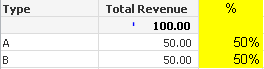
Hi, I am trying to calculate the % breakout per the yellow highlight in the screenshot below in a straight table. Can anyone help please?
Thanks.
- Tags:
- new_to_qlikview
- « Previous Replies
-
- 1
- 2
- Next Replies »

.png "Former Employee") JonnyPoole
JonnyPoole
- Mark as New
- Bookmark
- Subscribe
- Mute
- Subscribe to RSS Feed
- Permalink
- Report Inappropriate Content
i do not see it. if you believe its too big try the following:
1. File -> SaveAs (new file name)
2. Open the load script, hit 'debug', on the left change to 'limited load' and select 10000 or 1000
3. hit run to run the script
4. once complete save the new file and upload
- Mark as New
- Bookmark
- Subscribe
- Mute
- Subscribe to RSS Feed
- Permalink
- Report Inappropriate Content
Great, here you go...
Thanks!
JonnyPoole
- Mark as New
- Bookmark
- Subscribe
- Mute
- Subscribe to RSS Feed
- Permalink
- Report Inappropriate Content
Got it. The [Total Revenue] expression is a calculated expression so you need to put that in the numerator/denominator like this:
=sum(if(Dataset='Recent',Revenue))/ sum( TOTAL <Segment_Classification> if(Dataset='Recent',Revenue) )
- Mark as New
- Bookmark
- Subscribe
- Mute
- Subscribe to RSS Feed
- Permalink
- Report Inappropriate Content
oh.. I did that but I used Total Revenue instead of Revenue... let me try it now.
Thanks!
- Mark as New
- Bookmark
- Subscribe
- Mute
- Subscribe to RSS Feed
- Permalink
- Report Inappropriate Content
it works! Thanks, I have another question, if I want to do the same but by seg class by BU. Would that work? Say total % by BU should 100% for each of the BU.
Thanks
JonnyPoole
- Mark as New
- Bookmark
- Subscribe
- Mute
- Subscribe to RSS Feed
- Permalink
- Report Inappropriate Content
it should, just change the field after the TOTAL clause in the denominator to the field that represents the subtotal.
change:
=sum(if(Dataset='Recent',Revenue))/ sum( TOTAL <Segment_Classification> if(Dataset='Recent',Revenue) )
to:
=sum(if(Dataset='Recent',Revenue))/ sum( TOTAL <BU> if(Dataset='Recent',Revenue) )
- Mark as New
- Bookmark
- Subscribe
- Mute
- Subscribe to RSS Feed
- Permalink
- Report Inappropriate Content
Thank you!
- Mark as New
- Bookmark
- Subscribe
- Mute
- Subscribe to RSS Feed
- Permalink
- Report Inappropriate Content
Sorry.. one more question - the BU column is also a cyclic group that toggles between BU and segment. If i use that script, I can only get to BU calc, what about the segment calc?
Thank you so much for your help!
JonnyPoole
- Mark as New
- Bookmark
- Subscribe
- Mute
- Subscribe to RSS Feed
- Permalink
- Report Inappropriate Content
You can do that. I'm not in front of my computer so I can't remember what your cyclic group name was but here is what it may look like:
if ( Getcurrentfield([groupname)] = 'BU' , sum(if(Dataset='Recent',Revenue))/ sum( TOTAL <BU>if(Dataset='Recent',Revenue) ) , If ( getcurrentfield([groupname]) = 'Segment_Classification' , sum(if(Dataset='Recent',Revenue))/ sum( TOTAL <Segment_Classification> if(Dataset='Recent',Revenue) )))
Where groupname is the name of your cycle group.
- Mark as New
- Bookmark
- Subscribe
- Mute
- Subscribe to RSS Feed
- Permalink
- Report Inappropriate Content
Great! It works, thanks!
- « Previous Replies
-
- 1
- 2
- Next Replies »