Unlock a world of possibilities! Login now and discover the exclusive benefits awaiting you.

- Qlik Community
- :
- All Forums
- :
- QlikView App Dev
- :
- Re: display contents of table box based on selecti...
- Subscribe to RSS Feed
- Mark Topic as New
- Mark Topic as Read
- Float this Topic for Current User
- Bookmark
- Subscribe
- Mute
- Printer Friendly Page

- Mark as New
- Bookmark
- Subscribe
- Mute
- Subscribe to RSS Feed
- Permalink
- Report Inappropriate Content
display contents of table box based on selections made in list box
Hi,
I would like to display contents of table box based on selections made in listbox, example I would like to display contents of a table box if I select two division ids (ex.division id =1 AND division id=2) at a time, I tried to use the Calculation condition for this but it didn't work, it worked for OR(division id=1 OR division id=2) though. Please help me out I am a beginner.
Thanks in advance! !
- « Previous Replies
-
- 1
- 2
- Next Replies »
- Mark as New
- Bookmark
- Subscribe
- Mute
- Subscribe to RSS Feed
- Permalink
- Report Inappropriate Content
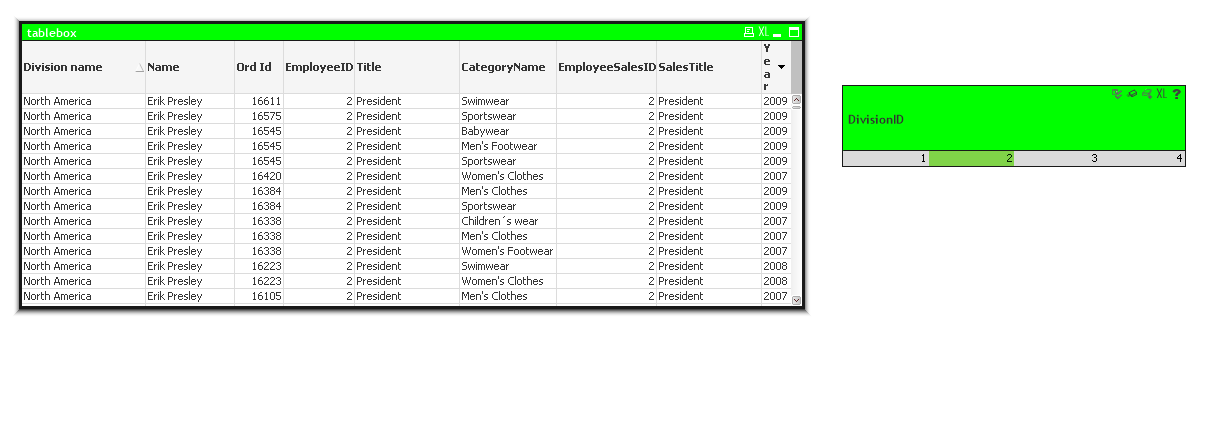
So, when I select two division ids at a time (ex Division id 1 and 2) the contents of the table box must be displayed.
- Mark as New
- Bookmark
- Subscribe
- Mute
- Subscribe to RSS Feed
- Permalink
- Report Inappropriate Content
Hello Sunny T ,
Great! it worked, after searching for a long time, this solution provided me the exact requirement. Thank you, but I didn't understand why the condition is written in that manner, is there any syntax kind of thing to write conditions, could you explain why it's written like that.
- Mark as New
- Bookmark
- Subscribe
- Mute
- Subscribe to RSS Feed
- Permalink
- Report Inappropriate Content
Hi Madhuri madhumohan19,
That is an Set analysis.
Set analysis: Is a Query language used in Qlik used to write expressions.
Thanks
Venkat

 sunny_talwar
- Mark as New
- Bookmark
- Subscribe
- Mute
- Subscribe to RSS Feed
- Permalink
- Report Inappropriate Content
Let break one of this expression into parts and understand what is going on...
SubStringCount('|' & GetFieldSelections(Division_ID, '|', 100) & '|', '|1|') = 1
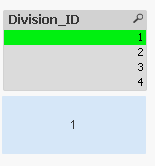
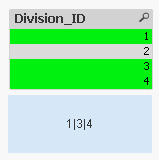
1st Part -> GetFieldSelections(Division_ID, '|', 100)
This checks what have you selected in Division_ID field. Where second parameter ('|') is the value separate between selections and finally 100 is just the amount of selections it will show before QlikView start showing something like this for example 101 out of 1000 selected. You might not need 100 but depending on how many selections are possible you
can adjust this number upward or downward.
When only 1 selection is made
When more than 1 selection is made
Also, just for demonstration how it would look if you have a very low 3rd parameter. Replacing 100 with 2 here GetFieldSelections(Division_ID, '|', 2)
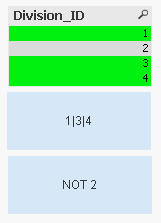
We don't want this to happen because this won't work with the SubStringCount.
2nd Part -> SubStringCount('|' & GetFieldSelections(Division_ID, '|', 100) & '|', '|1|')
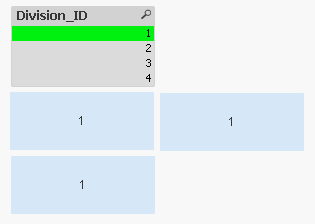
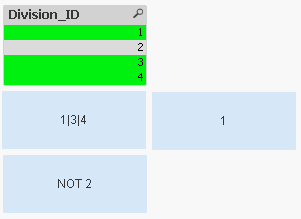
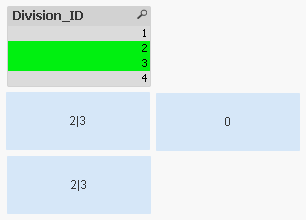
This count the number of times your last parameter repeats in the list ('|1|'). Since GetFieldSelections always display a distinct list of values that are selected, the above expression will give 1 when 1 is selected else it will give 0.
When only 1 is selected
When 1 is selected with other selections
When 1 is not selected
So this combined with the other expression SubStringCount('|' & GetFieldSelections(Division_ID, '|', 100) & '|', '|2|')
will allow your table to be visible when both 1 and 2 are selected. If any of the two expression is 0 the table box won't show up.
I hope this clarify the logic here.
HTH
Best,
Sunny
- Mark as New
- Bookmark
- Subscribe
- Mute
- Subscribe to RSS Feed
- Permalink
- Report Inappropriate Content
Thank you for such detailed explanation.
sunny_talwar
- Mark as New
- Bookmark
- Subscribe
- Mute
- Subscribe to RSS Feed
- Permalink
- Report Inappropriate Content
No problem at all 
- « Previous Replies
-
- 1
- 2
- Next Replies »