Unlock a world of possibilities! Login now and discover the exclusive benefits awaiting you.

- Qlik Community
- :
- All Forums
- :
- QlikView App Dev
- :
- Re: drill down - table
- Subscribe to RSS Feed
- Mark Topic as New
- Mark Topic as Read
- Float this Topic for Current User
- Bookmark
- Subscribe
- Mute
- Printer Friendly Page

- Mark as New
- Bookmark
- Subscribe
- Mute
- Subscribe to RSS Feed
- Permalink
- Report Inappropriate Content
drill down - table
Hey everyone, how is it going?
I have an issue, let me show you: My data base is something like that:
| Product | Date | RM 1 | RM 2 | RM 3 | RM Total |
|---|---|---|---|---|---|
| A | 01/01/2016 | 10 | 5 | 60 | 75 |
| B | 01/01/2016 | 15 | 10 | 55 | 80 |
| C | 01/01/2016 | 20 | 15 | 55 | 90 |
| D | 01/01/2016 | 25 | 20 | 60 | 105 |
| A | 02/01/2016 | 30 | 25 | 85 | 140 |
| B | 02/01/2016 | 35 | 30 | 115 | 180 |
| C | 02/01/2016 | 40 | 35 | 150 | 225 |
| D | 02/01/2016 | 45 | 40 | 190 | 275 |
| A | 03/01/2016 | 50 | 45 | 235 | 330 |
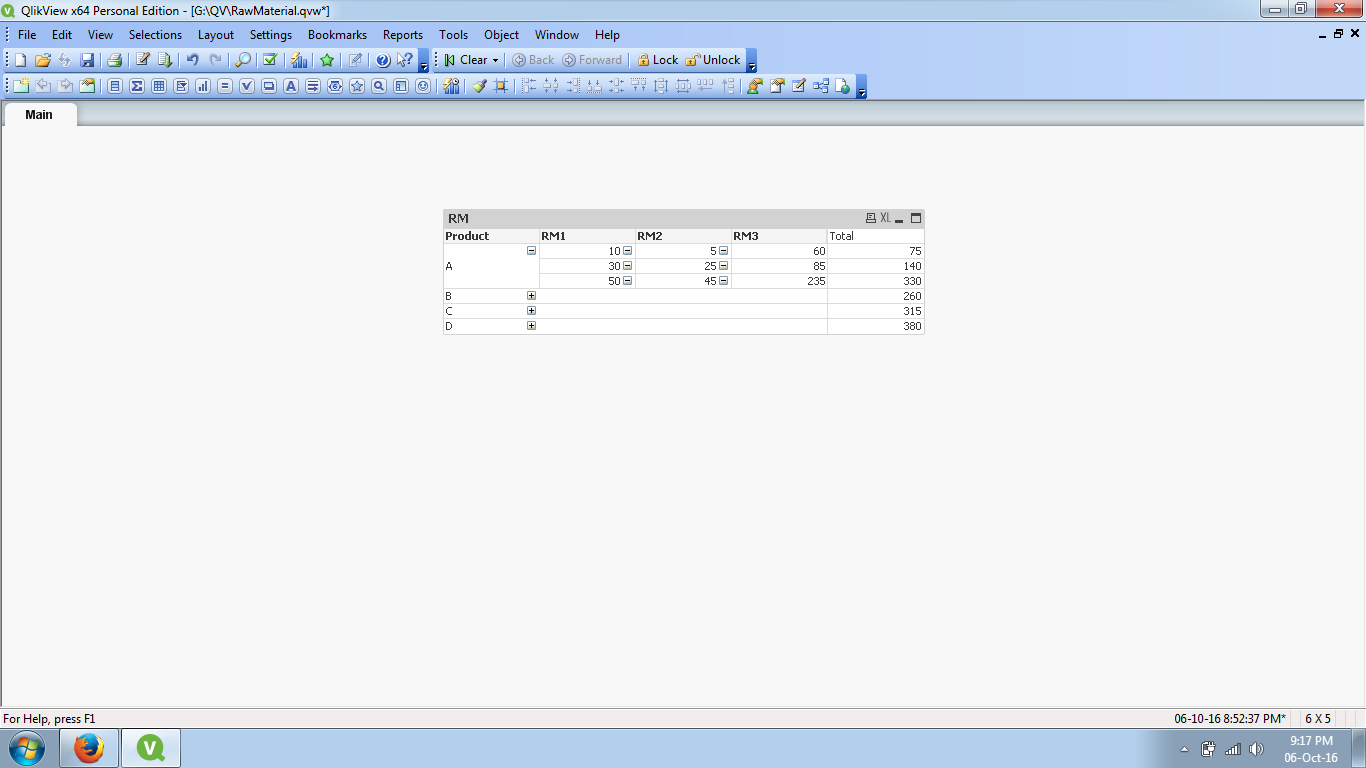
I want to make a pivot table, where I can show by product, how much was spent of raw material and if the users wants, they can open by kind of RM (RM 1, RM2 and RM3) .
I already appreciate the attention.
Kind regards, Luiz Bisco
- « Previous Replies
-
- 1
- 2
- Next Replies »

 vinieme12
- Mark as New
- Bookmark
- Subscribe
- Mute
- Subscribe to RSS Feed
- Permalink
- Report Inappropriate Content
See my app I am able to expand and collapse the dimension , you should be able to view the + and - signs too!
also uncheck Suppress Expansion icons
If a post helps to resolve your issue, please accept it as a Solution.
- Mark as New
- Bookmark
- Subscribe
- Mute
- Subscribe to RSS Feed
- Permalink
- Report Inappropriate Content
I appreciate your colaboration, Vineeth! thank you very much!!
I did that. but it won't show me the subtotal when its closed. It only show me '-' (null or 0 character).
Sincerely, Bisco
vinieme12
- Mark as New
- Bookmark
- Subscribe
- Mute
- Subscribe to RSS Feed
- Permalink
- Report Inappropriate Content
Use the below expression
and check partial sums for the first two dimensions
=if(Dimensionality()=2,Pick(MATCH(Process,'Process 1','Process 2','Process 3','Process 4','Process 5','Process 6','Process 7','Process 8'),
sum([Process 1])
,sum([Process 2])
,sum([Process 3])
,sum([Process 4])
,sum([Process 5])
,sum([Process 6])
,sum([Process 7])
,sum([Process 8])
)
,if(Dimensionality()=1,
sum([Process 1])+sum([Process 2])+sum([Process 3])+sum([Process 4])+sum([Process 5])+sum([Process 6])+sum([Process 7])+sum([Process 8])
, if(Dimensionality()=0,sum(TOTAL [Process 1])+sum(TOTAL [Process 2])+sum(TOTAL [Process 3])+sum(TOTAL [Process 4])+sum(TOTAL [Process 5])+sum(TOTAL [Process 6])+sum(TOTAL [Process 7])+sum(TOTAL [Process 8]))
)
)
If a post helps to resolve your issue, please accept it as a Solution.

 dineshm030
- Mark as New
- Bookmark
- Subscribe
- Mute
- Subscribe to RSS Feed
- Permalink
- Report Inappropriate Content
Hi Luiz,
Like This??
- Mark as New
- Bookmark
- Subscribe
- Mute
- Subscribe to RSS Feed
- Permalink
- Report Inappropriate Content
Kind of, Kumar, but with subtotals. But I had already done, thank you for the help! 
- « Previous Replies
-
- 1
- 2
- Next Replies »