Unlock a world of possibilities! Login now and discover the exclusive benefits awaiting you.

- Qlik Community
- :
- All Forums
- :
- QlikView App Dev
- :
- Re: how to convert date format Jan 14" to "1/1/201...
Options
- Subscribe to RSS Feed
- Mark Topic as New
- Mark Topic as Read
- Float this Topic for Current User
- Bookmark
- Subscribe
- Mute
- Printer Friendly Page
Turn on suggestions
Auto-suggest helps you quickly narrow down your search results by suggesting possible matches as you type.
Showing results for

 balasundaram
Creator II
2014-09-07
06:42 AM
- Mark as New
- Bookmark
- Subscribe
- Mute
- Subscribe to RSS Feed
- Permalink
- Report Inappropriate Content
how to convert date format Jan 14" to "1/1/2014"
tell me how to covert date format Jan 14" into "1/1/2014"
1,041 Views
3 Replies

 MarcoWedel
MVP
2014-09-07
07:19 AM
- Mark as New
- Bookmark
- Subscribe
- Mute
- Subscribe to RSS Feed
- Permalink
- Report Inappropriate Content
Hi,
one solution:
=Date(Date#('Jan 14', 'MMM YY'), 'M/D/YYYY')

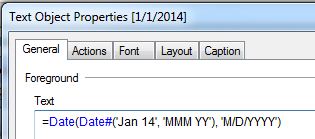
hope this helps
regards
Marco
499 Views
 PrashantSangle
MVP
2014-09-07
07:22 AM
- Mark as New
- Bookmark
- Subscribe
- Mute
- Subscribe to RSS Feed
- Permalink
- Report Inappropriate Content
Hi,
If it is in Date Format then try
Date(Date#(dateField,'MMM YY'),'D/M/YYYY') as newField
Or You can use MakeDate()
like
MakeDate(Year(Date#(dateField,'MMM YY')),Month(Date#(dateField,'MMM YY')),'1') as NewDateField
Regards
Great dreamer's dreams never fulfilled, they are always transcended.
Please appreciate our Qlik community members by giving Kudos for sharing their time for your query. If your query is answered, please mark the topic as resolved 🙂
Please appreciate our Qlik community members by giving Kudos for sharing their time for your query. If your query is answered, please mark the topic as resolved 🙂
499 Views

 ashfaq_haseeb
Champion III
2014-09-07
07:34 AM
- Mark as New
- Bookmark
- Subscribe
- Mute
- Subscribe to RSS Feed
- Permalink
- Report Inappropriate Content
Hi,
Assuming that you have proper date field.
Try this
Date(date#([DateField],'MMM YY'),'M/D/YYYY') as NewDate
Regards
ASHFAQ
499 Views
