Unlock a world of possibilities! Login now and discover the exclusive benefits awaiting you.

- Qlik Community
- :
- All Forums
- :
- QlikView App Dev
- :
- Re: how to show data for ytd and current month
- Subscribe to RSS Feed
- Mark Topic as New
- Mark Topic as Read
- Float this Topic for Current User
- Bookmark
- Subscribe
- Mute
- Printer Friendly Page

- Mark as New
- Bookmark
- Subscribe
- Mute
- Subscribe to RSS Feed
- Permalink
- Report Inappropriate Content
how to show data for ytd and current month
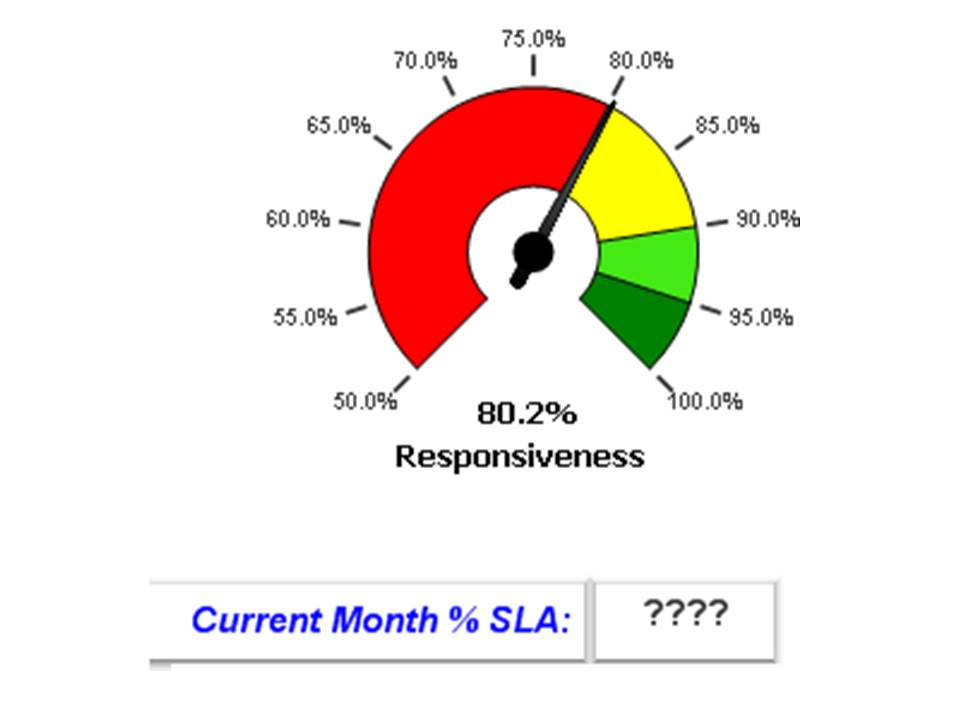
I have a gauge chart that shows my %SLA for the current time period, in this case from 1/1/2013 to present day. I'd like to create a text field down below this chart that shows the %SLA for the current month to date. Has any one done this?
- « Previous Replies
- Next Replies »
- Mark as New
- Bookmark
- Subscribe
- Mute
- Subscribe to RSS Feed
- Permalink
- Report Inappropriate Content
yes! this provides the correct answer for June.
So if I want to make it for whichever the current month might be in the future, I would replace the ({<CRCaseYear={"2016"}, CRCaseMonth={"Jun"}>} with the variable vLatestMonth=max({<Year={$(vLatestYear)}>} Month(Date))?

 krishnacbe
- Mark as New
- Bookmark
- Subscribe
- Mute
- Subscribe to RSS Feed
- Permalink
- Report Inappropriate Content
Yes you need to change the month to current month.
But there is a way to automate it by using below expression. whenever you find time implement below variable in your expression to avoid hard coding's.
vCurrMonth=Month(Today()) -- will give the Current month as per today
or
vLatestYear=Max(CRCaseYear)
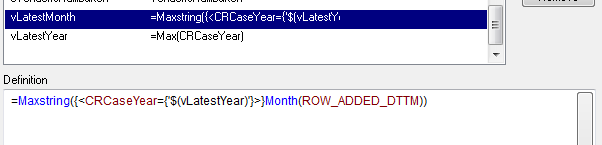
vLatestMonth=Max({<CRCaseYear={"$(vLatestYear)"}>}ROW_ADDED_DTTM)
Please mark the answer the right one as correct and close the thread.
- Mark as New
- Bookmark
- Subscribe
- Mute
- Subscribe to RSS Feed
- Permalink
- Report Inappropriate Content
sorry, but I am unable to get this to work trying to automate the expression. could you please show me the correct expression using the variables?
I very much appreciate your help!
krishnacbe
- Mark as New
- Bookmark
- Subscribe
- Mute
- Subscribe to RSS Feed
- Permalink
- Report Inappropriate Content
Please find the attached qvw with requested details.
two variables and modified expression
=num((sum({<CRCaseYear={'$(vLatestYear)'}, CRCaseMonth={'$(vLatestMonth)'}>}count_LIVESLO_2)+sum({<CRCaseYear={'$(vLatestYear)'}, CRCaseMonth={'$(vLatestMonth)'}>}count_ELECSLO_2))
/(sum({<CRCaseYear={'$(vLatestYear)'}, CRCaseMonth={'$(vLatestMonth)'}>}count_LIVE2)+sum({<CRCaseYear={'$(vLatestYear)'}, CRCaseMonth={'$(vLatestMonth)'}>}count_ELEC2))
,'#,##0.0%')
- Mark as New
- Bookmark
- Subscribe
- Mute
- Subscribe to RSS Feed
- Permalink
- Report Inappropriate Content
Last question;
When I identically copy these variables and the expressions to my main QVW, they do not work. Is there something I am missing or something else I need to do?
krishnacbe
- Mark as New
- Bookmark
- Subscribe
- Mute
- Subscribe to RSS Feed
- Permalink
- Report Inappropriate Content
Did you create two variables in below location?
Settings -> Variables Overview -> Add and define the expression.
Variables creation I have done and uploaded same dashboard in my last post.
if you have created the variables and still you are getting error? share me the error message.
- Mark as New
- Bookmark
- Subscribe
- Mute
- Subscribe to RSS Feed
- Permalink
- Report Inappropriate Content
I copied everything verbatim except the = sign beginning the LatestMonth variable definition! Problem solved!! thanks, again...
krishnacbe
- Mark as New
- Bookmark
- Subscribe
- Mute
- Subscribe to RSS Feed
- Permalink
- Report Inappropriate Content
You are welcome!!
- « Previous Replies
- Next Replies »