Unlock a world of possibilities! Login now and discover the exclusive benefits awaiting you.

- Qlik Community
- :
- All Forums
- :
- QlikView App Dev
- :
- interview question
- Subscribe to RSS Feed
- Mark Topic as New
- Mark Topic as Read
- Float this Topic for Current User
- Bookmark
- Subscribe
- Mute
- Printer Friendly Page

 prabhas277
- Mark as New
- Bookmark
- Subscribe
- Mute
- Subscribe to RSS Feed
- Permalink
- Report Inappropriate Content
interview question
Hi Experts,
I have 1 cro records data in table box when I exported to xl how many records will be there and what about remaining records?
How to drop the variables?
I want group the 2 dimension which function u use?
I have2 list boxes and current selection box if click on list box 1 selection should appear in current selection box and when I I click on listbox2 selection should not appear?
Thanks In advance.
- Tags:
- new_to_qlikview

 tamilarasu
- Mark as New
- Bookmark
- Subscribe
- Mute
- Subscribe to RSS Feed
- Permalink
- Report Inappropriate Content
Hi,
1. Excel 2003 - 65,536 rows ( If you have more than 65536 rows, it will be splitted and stored in next sheets). But you can use CSV file format for large data set. (I have never tried to export 1 crore rows  )
)
2. You can drop variables like below
VariableName = ; or VariableName = null();
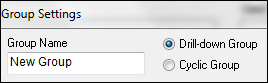
3. I don't understand this question. I guess, you are asking about Cyclic Group and Drill-Down Group. You can use this option to group dimensions.
4. You can use HidePrefix syntax in your load script. Search in community for clear example.
Ex: Set HidePrefix = '~';
Hope this helps.

 ramasaisaksoft
- Mark as New
- Bookmark
- Subscribe
- Mute
- Subscribe to RSS Feed
- Permalink
- Report Inappropriate Content
Hi Prabhas,
As per MS Office your records will export to excel file.Excel 2003 is having a max limit 65 thousands something like that 2010 and 2013 having some limit and remaining records are not Export to excel may be it fallows First records i am not sure.
2) Drop variables you can drop/Remove variables from
Settings->Variables->select the variable name->click on Remove button.
3) If u want to group 2 dimensions into one dim then u need to use concatenate
LastName &' ' &FirstName as FullName (Here LN & FN are 2 dimensions)
4)I Don't Know this
