Unlock a world of possibilities! Login now and discover the exclusive benefits awaiting you.

- Qlik Community
- :
- All Forums
- :
- QlikView App Dev
- :
- Re: need help regarding the dimension
- Subscribe to RSS Feed
- Mark Topic as New
- Mark Topic as Read
- Float this Topic for Current User
- Bookmark
- Subscribe
- Mute
- Printer Friendly Page

 agni_gold
- Mark as New
- Bookmark
- Subscribe
- Mute
- Subscribe to RSS Feed
- Permalink
- Report Inappropriate Content
need help regarding the dimension
I have a situation that , i have created the year_Month field but some of the data is not coming for some month , suppose for Nov-2014 , there is no data in my source , and no month selected when that iD is selected in the listbox ,
Now if i want to show the month in dimension , how can i do it .

 kaushiknsolanki
- Mark as New
- Bookmark
- Subscribe
- Mute
- Subscribe to RSS Feed
- Permalink
- Report Inappropriate Content
Hi,
Create a master calendar and link that with your data.
Regards,
Kaushik Solanki
agni_gold
- Mark as New
- Bookmark
- Subscribe
- Mute
- Subscribe to RSS Feed
- Permalink
- Report Inappropriate Content
I have created and linked , but for NOV-2014 there is no source data , therefore NOV-2014 is not showing in dimension . But I just want to show the 0 value for these type of records . Don't want to miss the months in dimension.
kaushiknsolanki
- Mark as New
- Bookmark
- Subscribe
- Mute
- Subscribe to RSS Feed
- Permalink
- Report Inappropriate Content
Dear Kumar,
Do not create master calendar using the same field.
Create a master calendar using the min and max date and then link that to your data.
Sample Master Cal script is:
Let vMin = num(makedate(2015,01,01));
Let vMax = num(today());
Temp:
Load Date($(vMin) + rowno() -1) as Date
Autogenerate 1
While Date($(vMin) + rowno() -1) < Date($(vMax));
MatserCal:
Load Date,
Month(Date) as Month,
Year(Date) as Year
Resident Temp;
Drop table Temp;
Regards,
Kaushik Solanki

 MarcoWedel
- Mark as New
- Bookmark
- Subscribe
- Mute
- Subscribe to RSS Feed
- Permalink
- Report Inappropriate Content
Hi,
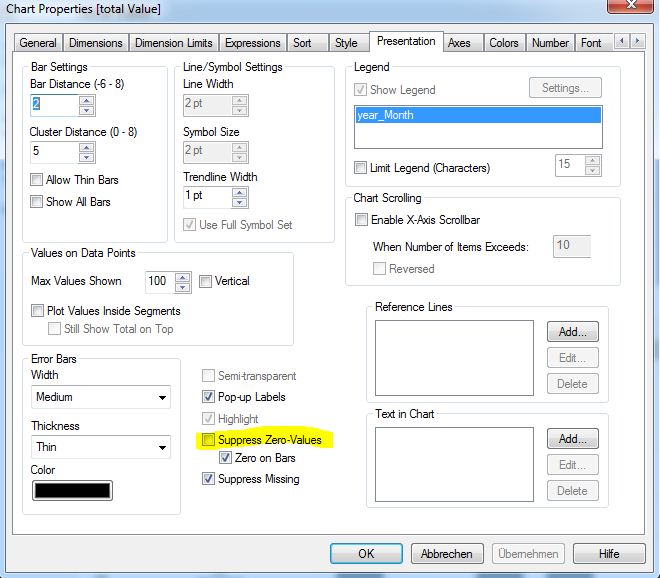
try to uncheck "suppress zero-values" and/or "suppress missing" on the presentation tab of the chart properties.
hope this helps
regards
Marco
agni_gold
- Mark as New
- Bookmark
- Subscribe
- Mute
- Subscribe to RSS Feed
- Permalink
- Report Inappropriate Content
no it is not working
MarcoWedel
- Mark as New
- Bookmark
- Subscribe
- Mute
- Subscribe to RSS Feed
- Permalink
- Report Inappropriate Content
please post a sample application.
regards
Marco
MarcoWedel
- Mark as New
- Bookmark
- Subscribe
- Mute
- Subscribe to RSS Feed
- Permalink
- Report Inappropriate Content
Hi,
one example:
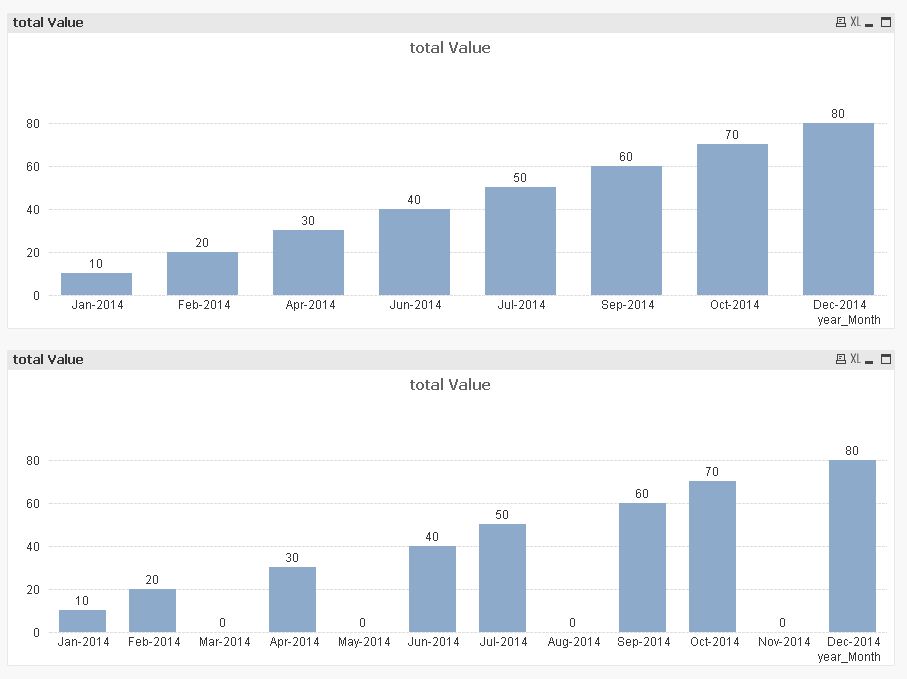
tabData:
LOAD Date#(year_Month,'MMM-YYYY') as year_Month,
    Value
INLINE [
    year_Month, Value
    Jan-2014, 10
    Feb-2014, 20
    Apr-2014, 30
    Jun-2014, 40
    Jul-2014, 50
    Sep-2014, 60
    Oct-2014, 70
    Dec-2014, 80
];

tabMonthCalendar:
LOAD Date(AddMonths(MakeDate(2014),RecNo()-1),'MMM-YYYY') as year_Month
AutoGenerate 12;
hope this helps
regards
Marco
agni_gold
- Mark as New
- Bookmark
- Subscribe
- Mute
- Subscribe to RSS Feed
- Permalink
- Report Inappropriate Content
i tried that also, but it is also not working for me.
